
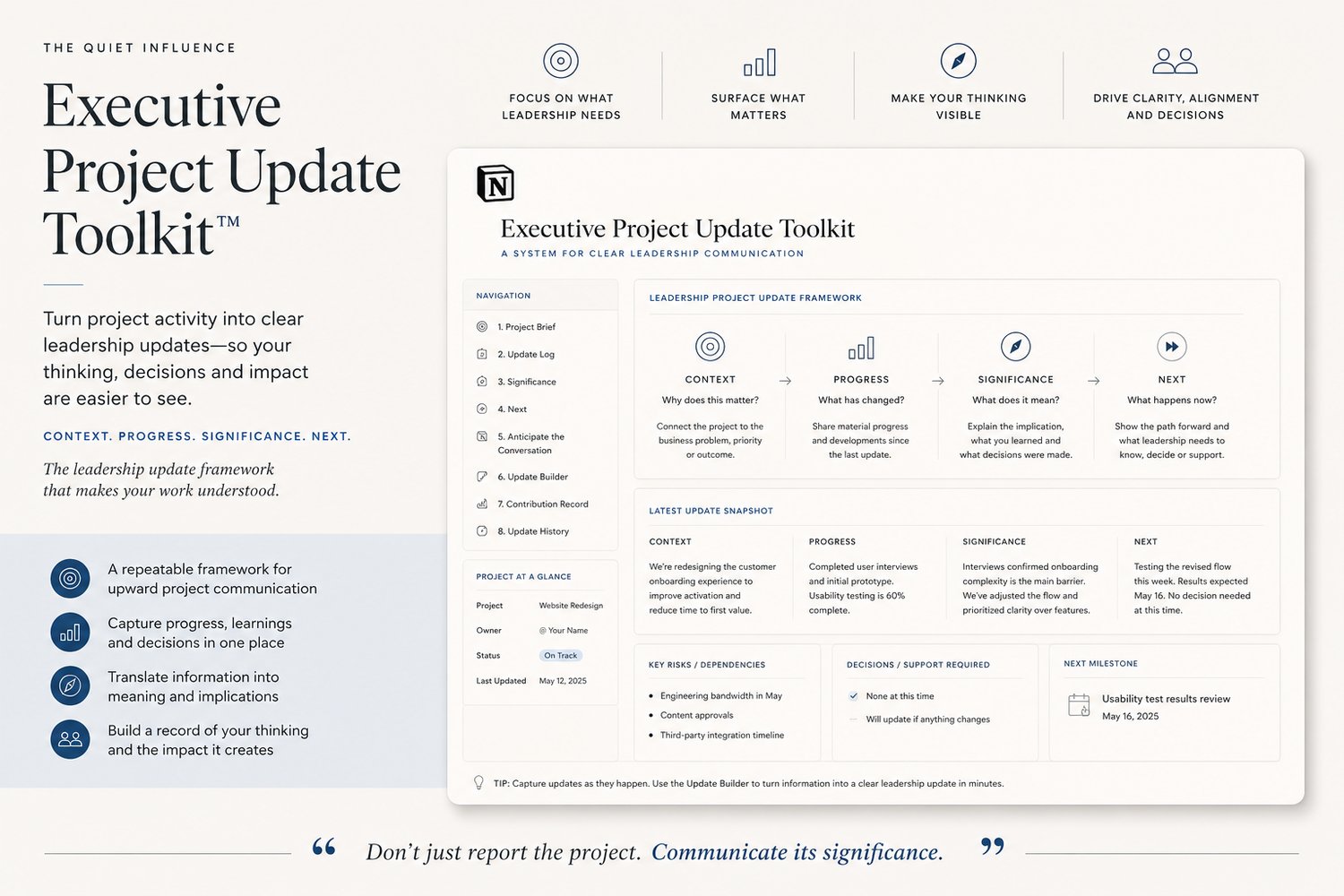
Executive Project Update Toolkit
Executive Project Update Toolkit™
Turn project activity into clear leadership communication.
Make it easier for leadership to see what changed, why it matters, what you decided—and what happens next.
Built for Quiet Professionals who want their work to be understood without overexplaining it.
Your project is moving. But does leadership understand what it means?
You can be making real progress on an important project and still find yourself struggling to explain it to leadership.
You have the milestones.
The meetings.
The research.
The decisions.
The risks.
The work happening behind the scenes.
But when it is time to give an update, it can be difficult to know:
- What does leadership actually need to know?
- Which progress is meaningful enough to mention?
- How much detail is too much?
- What does this development actually mean?
- What decision or support is needed?
- How do I show the thinking behind the work without turning the update into a long explanation?
The Executive Project Update Toolkit™ gives you a repeatable way to answer those questions.
Don't just report the project. Communicate its significance.
A better way to communicate project progress
Most project updates answer:
“What have we done?”
A leadership update needs to answer something more useful:
“What has changed—and why does it matter?”
The Toolkit is built around a simple four-part framework:
CONTEXT
Why does this matter?
Connect the project to the business problem, priority or outcome leadership cares about.
↓
PROGRESS
What has materially changed?
Focus on meaningful progress, evidence, milestones and developments—not a chronology of activities.
↓
SIGNIFICANCE
What does that change mean?
Make your interpretation, conclusions, decisions, trade-offs and implications visible.
↓
NEXT
What happens now?
Show the path forward and clarify whether leadership needs to know, decide or support anything.
What you get
The Executive Project Update Toolkit™ is designed as a repeatable project communication system, not another project-management dashboard.
01 — Project Brief
Establish the foundation of the project once.
Capture:
- What you're doing
- Why it matters
- What success looks like
- Key stakeholders
- Scope
- Milestones
- Risks and dependencies
So you don't have to reconstruct the context every time you prepare an update.
02 — Project Update Log
Capture meaningful changes as the project develops.
Record:
- What changed
- What was achieved
- What you learned
- What changed in your approach
- What remains unresolved
The goal isn't to document everything.
It's to preserve the changes that matter.
03 — Significance
Move from information to interpretation.
Use this section to work through:
- What the change means
- Its implications
- What you concluded
- What decision was made
- What trade-off you're making
- What you're still watching
This is where the thinking behind the work becomes easier to see.
04 — Next
Make the path forward clear.
Identify:
- The next milestone
- What you're watching
- Decisions required
- Leadership support required
- What leadership simply needs to know
No more ending an update with a list of activities and leaving the reader to work out what happens next.
05 — Anticipate the Conversation
Prepare for what comes after the update.
Think through:
- Likely leadership questions
- Evidence supporting your position
- Assumptions that could be challenged
- Alternative approaches
- Potential concerns
- What could change your recommendation
Because a good update often creates a better conversation.
06 — Leadership Update Builder
Turn your project information into a concise leadership update using:
CONTEXT → PROGRESS → SIGNIFICANCE → NEXT
Instead of starting with a blank page, you work from the thinking you've already captured.
07 — Contribution Record
Preserve the moments where your work involved meaningful judgment.
Capture:
What we observed → What we concluded → What we decided → What changed
Over time, this becomes a record of the thinking and decisions behind your project work.
08 — Update History
Keep a simple record of how the project evolved.
See:
- What changed
- Why it mattered
- What happened next
- What leadership decided or supported
Your project history becomes more than a collection of status reports.
It becomes a record of how the work developed.
From project activity to leadership understanding
Without a system
Activity
“We completed the customer interviews and are now moving into usability testing.”
The work is clear.
But the significance isn't.
With the Executive Project Update Toolkit™
Progress
“We completed the customer interviews and found that onboarding complexity is the primary barrier to activation.”
Significance
“This suggests the original feature-prioritisation approach may not address the main constraint, so we've shifted the next sprint toward simplifying the onboarding flow.”
Next
“We're testing the revised flow this week. No decision is required yet; we'll return with the results next Friday.”
The difference isn't more information.
It's better interpretation.
Why this matters for Quiet Professionals
Your work is not always visible in the final output.
Leadership may see:
The milestone.
But not necessarily:
The observation that changed the direction.
They may see:
The recommendation.
But not necessarily:
The evidence and judgment behind it.
They may see:
The completed project.
But not necessarily:
The decisions you helped shape along the way.
That creates a familiar problem for Quiet Professionals:
Your contribution can be greater than people's understanding of your contribution.
The Executive Project Update Toolkit™ helps close that gap—not by making you talk more, but by making the thinking behind your work easier to understand.
Built for the projects that matter
This toolkit is particularly useful when you are:
- Leading or contributing to a cross-functional project
- Giving regular updates to senior management
- Working on a strategic initiative
- Managing a project with significant stakeholders
- Preparing for a project review
- Communicating progress upward
- Navigating changing priorities or assumptions
- Trying to make your strategic thinking more visible
It works especially well for projects where the work involves judgment, uncertainty and decisions—not simply execution.
How to use it
1. Set up your project
Complete the Project Brief once.
Give yourself a clear foundation for the work.
2. Capture meaningful changes
Return to the Update Log whenever something important changes.
Don't wait until the day before your leadership update.
3. Interpret the progress
Use Significance to ask:
What does this change actually mean?
Capture the conclusion, decision, implication or trade-off.
4. Define what's next
Clarify what happens next and whether leadership needs to know, decide or support anything.
5. Build your update
Use the Leadership Update Builder to turn your thinking into a concise communication.
6. Preserve the record
Use Contribution Record and Update History to retain the thinking and decisions behind the project.
Then repeat.
The value of the Toolkit isn't in completing it once.
It's in having a reliable way to communicate important projects again and again.
What makes this different from a project management template?
You probably don't need another place to track tasks.
You probably don't need another Gantt chart.
And you probably don't need another template that asks you to list everything that happened this week.
The Executive Project Update Toolkit™ is designed around a different question:
What does leadership need to understand about this project now?
It helps you move from:
Activity → Progress
Progress → Significance
Significance → Decision
Decision → Next
The result is a project communication system built around understanding, not documentation.
The outcome
With the Toolkit, you can:
Communicate with greater clarity
Know what belongs in the update—and what doesn't.
Reduce unnecessary explanation
Give leadership the context and interpretation they need without overwhelming them with operational detail.
Make your thinking visible
Show the observations, conclusions and decisions behind the work.
Surface what matters
Bring forward risks, implications, trade-offs and meaningful changes.
Make leadership conversations more productive
Help stakeholders understand what needs attention, what has already been decided and where their involvement matters.
Build a record of your contribution
Preserve evidence of the judgment and decisions that shaped your work over time.
One project. One repeatable system.
Instead of rebuilding your project update from scratch every time, keep the thinking in one place.
Project Brief
↓
Update Log
↓
Significance
↓
Next
↓
Leadership Update
↓
Contribution Record
↓
Update History
Then use the system again for the next important project.
What you'll receive
The Executive Project Update Toolkit™ — Notion Template
A ready-to-duplicate Notion workspace containing:
✓ Project Brief
✓ Project Update Log
✓ Significance Framework
✓ Next-Step Planner
✓ Anticipate the Conversation
✓ Leadership Update Builder
✓ Contribution Record
✓ Update History
✓ Built-in guidance and prompts
✓ Executive Project Update Framework:
Use it immediately in your existing Notion workspace.
Who this is for
Quiet Professionals who:
- Do meaningful work but don't want to constantly explain themselves
- Work on projects where leadership visibility matters
- Want to communicate upward with more clarity
- Want their judgment and strategic thinking to be easier to see
- Prefer substance over self-promotion
- Want a repeatable system rather than another piece of generic career advice
This is not for you if...
You are looking for:
- A task-management system
- A full project-management operating system
- A team collaboration workspace
- A complex Gantt or resource-planning tool
- A generic weekly status-report template
This Toolkit has a narrower purpose:
Helping you communicate important project work to leadership with clarity and substance.
Frequently Asked Questions
Do I need to be a project manager?
No.
The Toolkit is designed for anyone who leads or contributes to projects where communicating progress to stakeholders or leadership matters.
Is this a project-management template?
Not in the traditional sense.
It is primarily a project communication and leadership-update system.
You can use your existing project-management tools for tasks, timelines and execution while using this Toolkit to structure the thinking and communication around important updates.
Do I need to know Notion?
No.
The Toolkit is designed to be duplicated into your Notion workspace and used immediately. Basic familiarity with Notion is helpful, but you don't need advanced Notion skills.
How often should I use it?
Use the Project Brief when you start a project.
Then return to the Update Log whenever something materially changes.
Use the Leadership Update Builder whenever you need to communicate that progress to leadership or important stakeholders.
Can I use it for multiple projects?
Yes.
The intended workflow is simple:
Duplicate → Create a project → Update as the work evolves → Build your leadership updates → Preserve the record.
Is this only for updates to senior leadership?
No.
The framework works for any stakeholder who needs to understand the significance of project progress.
It is particularly useful when the audience has limited time and needs to understand the implications, decisions and next steps quickly.
Will this help me become more strategic?
The Toolkit won't make your work strategic.
What it can do is help you make the strategic thinking already present in your work easier to see.
That distinction matters.
Your work is already happening.
The question is whether the thinking behind it is visible.
You don't need to give leadership more information.
You need to make it easier for them to understand:
What changed.
Why it matters.
What you concluded.
What happens next.
Don't just report the project. Communicate its significance.
For Quiet Professionals who want their work to be understood without becoming louder.