


Slate — 37 Line Icons with a Built-In Accent (SVG + PNG, Commercial Licence)
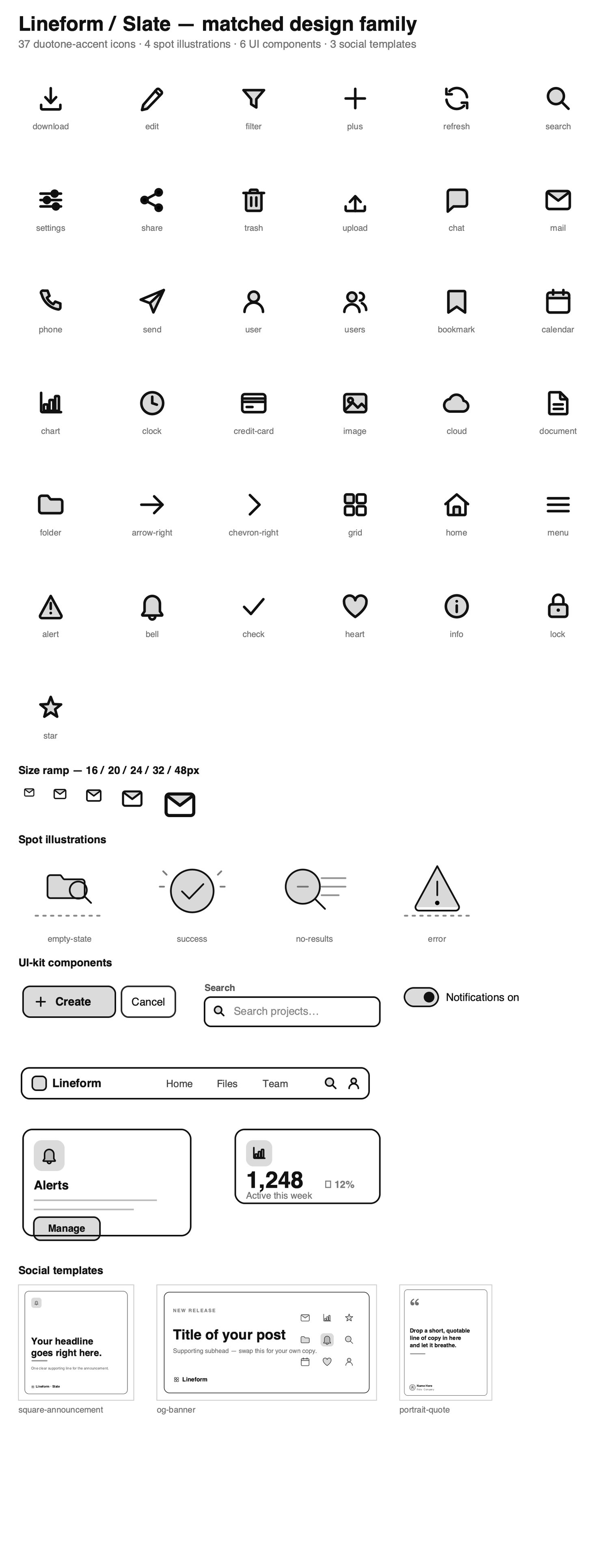
Most line-icon packs give you one colour and call it done. Slate icons carry a second layer — a soft accent wash on each icon's focal point, driven by the exact same colour value as the outline — so the set doesn't just recolour, it re-shades itself. 37 icons, one 24×24 grid, one 2px rounded stroke, built to look like a set instead of a pile of downloads from three different packs.
Slate is a line-icon set for SaaS and productivity interfaces, built for people who are tired of icon packs that don't actually match each other once you drop them into a real product.
Why the accent matters. Every icon with a focal region — the envelope's flap, the folder's body, the bell's shell — carries one soft wash on that subject, at reduced opacity, in the same colour as the stroke. Both layers are currentColor, so changing one CSS value (or one Figma fill) restyles the whole set at once: light mode, dark mode, a brand-colour swap — no per-icon editing, no separate "dark" export to maintain. That's the specific thing free monoline sets and most paid packs don't ship: an accent that travels with your colour instead of sitting hardcoded on top of it.
What's in the set:
• 37 icons across 6 categories — navigation, action, status, communication, content, and file
• One 24×24 grid, one 2px rounded stroke, verified legible from 16px to 48px
• Single currentColor on both stroke and accent — themeable, accessible, host-controlled contrast
• Clean editor-agnostic SVG (no cruft, one viewBox) plus PNG renders
• README with HTML, React, and Figma import steps, and a plain-language licence
• Hand-authored vector geometry — nothing traced, nothing AI-rastered
Questions before you buy:
How is this different from a free icon pack? Free monoline sets give you one flat colour and stop there. Slate's accent is a second currentColor layer tied to the same value as the stroke — so the set still recolours from one value, but it doesn't go flat when it does. That's a deliberate design decision, not a missing feature in a cheaper pack.
Will these actually look right in dark mode? Yes — that's the point of currentColor on both layers. Set the icon's colour the same way you'd set any inherited text colour, and both the outline and the accent follow.
Is this AI-generated or traced from somewhere? No. Every icon is hand-authored vector geometry from one shared geometry file — nothing traced from another pack, nothing AI-rastered and cleaned up after the fact.
What license do I actually get? Personal ($7) covers your own non-commercial projects, single user, no resale. Commercial ($15) adds use in one commercial end product with unlimited end-users of that product. Full text is below and ships as LICENSE.txt in the download.
What files do I get, exactly? Clean SVG and PNG for all 37 icons, a README.md with HTML/React/Figma import steps, and LICENSE.txt. No placeholder files, no "coming soon" folders.