
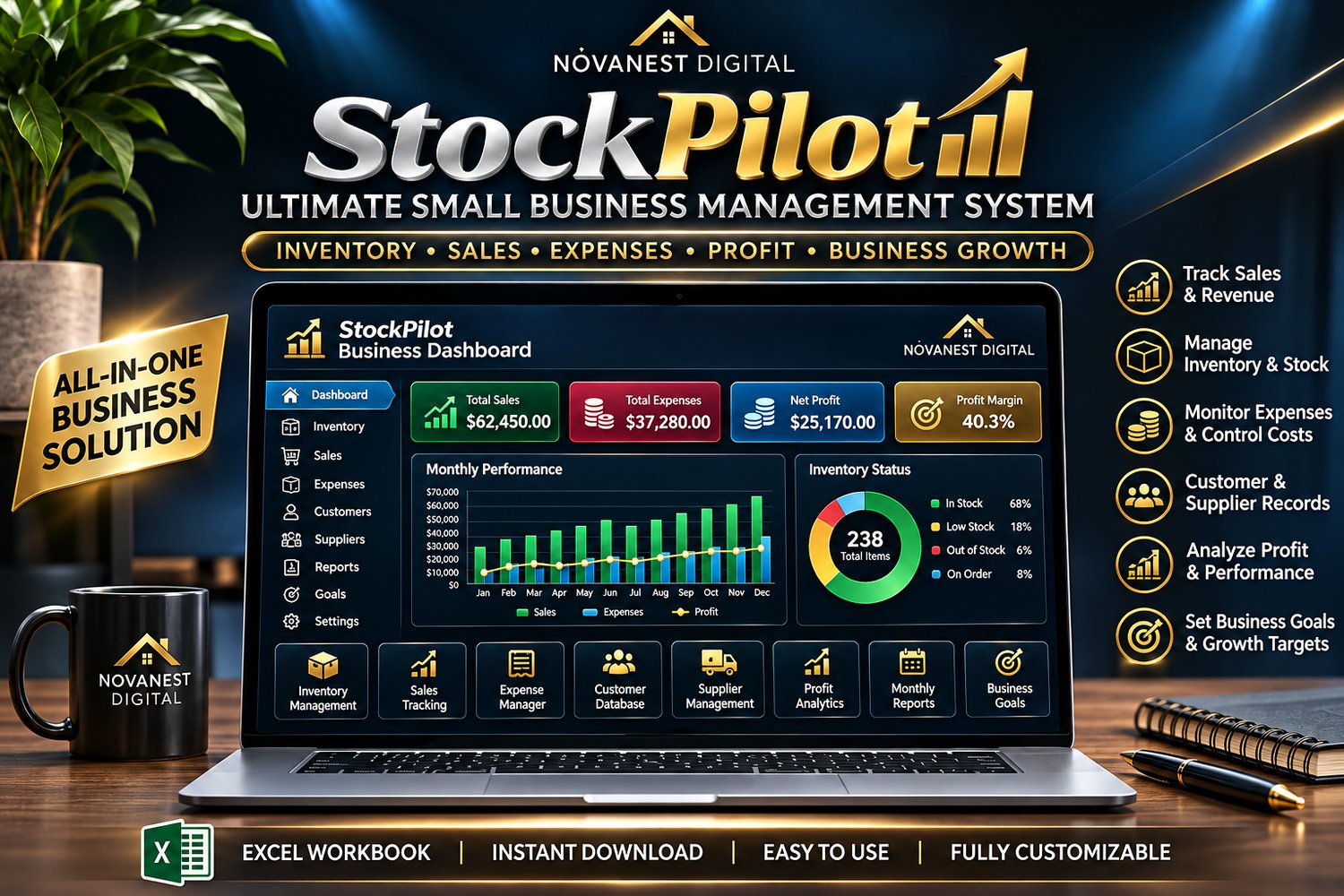
StockPilot
📦 StockPilot – Ultimate Small Business Management System
Run Your Business Smarter. Stay Organized. Grow With Confidence.
Managing a business shouldn't mean juggling endless spreadsheets, losing track of inventory, or wondering where your profits are going.
Introducing StockPilot, an all-in-one Excel business management system designed to help small business owners organize their operations, monitor financial performance, and make more informed decisions.
From inventory and sales to expenses, customers, suppliers, and profitability, StockPilot brings essential business information together in one convenient workbook.
One Business. One Powerful Management System.
🚀 EVERYTHING YOU NEED TO MANAGE YOUR BUSINESS
📊 1. Business Performance Dashboard
Get a clear overview of your business.
✔ Total sales and revenue
✔ Business expenses
✔ Gross and net profit
✔ Profit margins
✔ Monthly performance summaries
✔ Inventory status
📦 2. Smart Inventory Management
Know what's happening with your stock.
✔ Track products and quantities
✔ Record product costs and selling prices
✔ Calculate inventory value
✔ Monitor stock availability
✔ Identify products running low
✔ Organize product information
💰 3. Sales & Revenue Tracker
Keep your sales records organized.
✔ Record customer purchases
✔ Track products sold
✔ Calculate sales revenue
✔ Monitor sales performance
✔ Analyze product profitability
🧾 4. Business Expense Manager
Understand where your money goes.
✔ Record operating expenses
✔ Categorize business costs
✔ Track monthly spending
✔ Monitor expense trends
✔ Improve cost visibility
👥 5. Customer Management
Keep important customer information in one place.
✔ Customer contact details
✔ Purchase records
✔ Customer references
✔ Organized customer database
🚚 6. Supplier Directory
Manage your supplier relationships.
✔ Supplier names and contact information
✔ Product sourcing information
✔ Supplier references
✔ Purchasing details
📈 7. Profit & Performance Analysis
Understand how your business is performing.
✔ Revenue calculations
✔ Cost tracking
✔ Gross profit estimates
✔ Net profit estimates
✔ Profit margin calculations
✔ Monthly financial summaries
📅 8. Monthly Business Reports
Review your business performance over time.
✔ Monthly sales summaries
✔ Expense comparisons
✔ Profit tracking
✔ Business performance trends
🎯 9. Business Goals & Targets
Turn business ambitions into measurable goals.
✔ Set revenue targets
✔ Monitor progress
✔ Track important business milestones
✔ Review business performance against goals
⚙️ 10. Customizable Business Settings
Adapt StockPilot to your business.
✔ Business information
✔ Currency display settings
✔ Tax configuration
✔ Customizable categories
✔ Flexible product records
💎 WHY CHOOSE STOCKPILOT?
✨ All-in-One Organization — Manage essential business records in one Excel workbook.
✨ Automatic Calculations — Built-in formulas help calculate revenue, expenses, inventory values, and profits.
✨ Professional Dashboard — View important business metrics in an organized format.
✨ Inventory Visibility — Track stock levels and identify low-stock products.
✨ Customizable — Adapt the workbook to suit your products and business needs.
✨ No Monthly Subscription — Make one purchase and keep your digital files.
✨ Reusable — Continue updating your records as your business grows.
✨ Instant Digital Download — Start setting up your business records after purchase.
👨💼 WHO IS STOCKPILOT FOR?
StockPilot is designed for:
✔ Small business owners
✔ Online store owners
✔ Retail entrepreneurs
✔ Independent sellers
✔ Home-based businesses
✔ Side hustlers
✔ Product-based startups
✔ Entrepreneurs wanting better financial organization
Whether you're launching your first business or improving how you manage an existing one, StockPilot is designed to help you stay organized.
💻 HOW DOES IT WORK?
STEP 1: Purchase StockPilot.
STEP 2: Download your Excel business management workbook.
STEP 3: Open the file in Microsoft Excel.
STEP 4: Enter your business details, products, customers, and suppliers.
STEP 5: Record your sales, expenses, and inventory activity.
STEP 6: Review your dashboard and reports to monitor business performance.
🎁 WHAT YOU RECEIVE
📦 StockPilot Ultimate Small Business Management System (.xlsx)
📊 Business dashboard and reporting worksheets
💰 Sales, expense, and profit tracking tools
📋 Inventory and stock management worksheets
👥 Customer and supplier organization tools
🎯 Business goals and performance tracking
📖 Getting-started instructions
🌟 TAKE CONTROL OF YOUR BUSINESS OPERATIONS
Imagine opening one organized dashboard and seeing your sales, expenses, inventory, and profits without searching through multiple files.
That's what StockPilot is designed to help you achieve.
Spend less time organizing spreadsheets and more time focusing on your business.
💰 GET STOCKPILOT FOR JUST $29.99
✅ One-time purchase
✅ Instant digital download
✅ No monthly subscription
✅ Customizable Excel workbook
✅ Designed for small business owners
StockPilot — Organize Better. Manage Smarter. Grow Stronger.
Created by NovaNest Digital.
📌 IMPORTANT PRODUCT INFORMATION
Digital Product: No physical product will be shipped.
File Format: Microsoft Excel (.xlsx). Microsoft Excel is recommended for the best experience.
Manual Data Entry: StockPilot requires users to enter and maintain their own business records.
No Automatic Integrations: StockPilot does not automatically connect to bank accounts, online stores, payment processors, or accounting platforms.
Financial Disclaimer: StockPilot is a business organization and recordkeeping tool. It is not a replacement for professional accounting, tax, financial, or legal advice.
Compatibility: Some features or formatting may differ when opened in spreadsheet applications other than Microsoft Excel.
Delivery: Digital files are provided after successful purchase.