
Smart Personal Budget Planner – Excel Template
📊 Smart Personal Budget Planner – Excel Template
Take Control of Your Money. Plan Better. Spend Smarter. Save More.
Managing money becomes easier when you know exactly how much you earn, spend, invest, and save. The Smart Personal Budget Planner is a comprehensive, easy-to-use Excel template designed to help you organize your personal finances, control unnecessary spending, plan monthly budgets, track savings goals, and review your financial progress throughout the year.
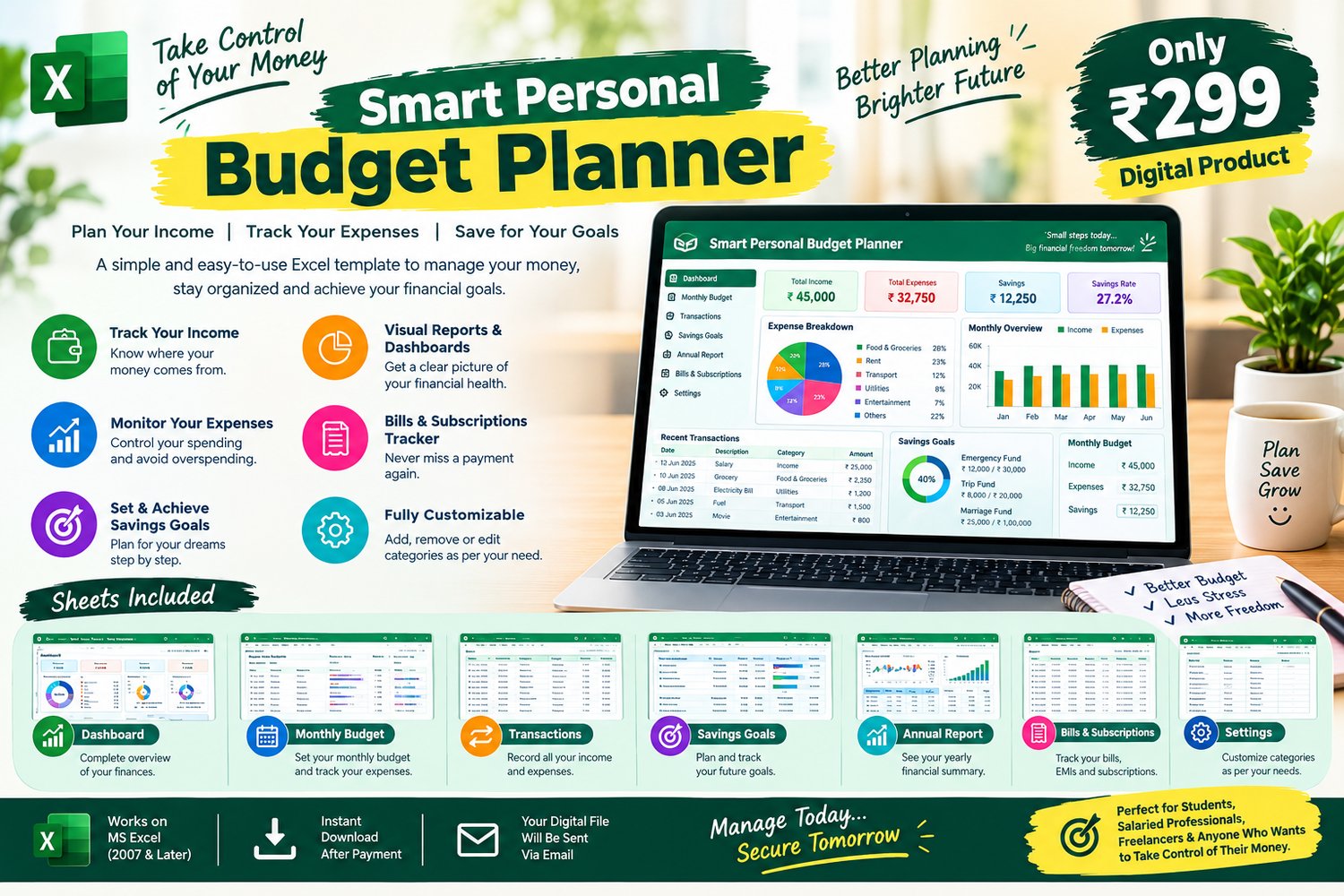
With a dedicated dashboard, transaction tracker, monthly budget planner, savings goals manager, annual financial report, and bills and subscriptions tracker, you can manage your personal finances in one organized Excel workbook.
Whether you are a student, salaried employee, freelancer, or small business owner managing personal expenses, this template helps you build better money-management habits and make more informed financial decisions.
✨ KEY FEATURES & BENEFITS
1. 📈 Personal Finance Dashboard
Get a clear overview of your monthly financial situation in one place.
- View total monthly income.
- Monitor total monthly expenses.
- Track total investments.
- Review total savings.
- Check remaining cash after expenses and investments.
- View your total planned monthly budget.
- Monitor your remaining budget.
- Calculate and review your savings rate.
- Select a month and year to review your financial performance.
- See a monthly financial summary without manually calculating every figure.
Key Benefit: Understand your financial position at a glance and identify opportunities to improve your spending and savings habits.
2. 💰 Monthly Budget Planner
Plan your spending before the month begins and compare your budget with actual expenses.
- Set your monthly income target.
- Create planned budgets for different expense categories.
- Compare planned budgets with actual expenses.
- Calculate the remaining budget for each category.
- Monitor the percentage of your budget used.
- Identify categories that are within budget, approaching their limits, or overspent.
- Review total planned budget, actual expenses, and remaining budget.
- Customize expense categories according to your lifestyle.
Key Benefit: Stay organized, control unnecessary spending, and make better decisions before your money runs out.
3. 🧾 Income & Expense Transaction Tracker
Record your everyday financial transactions in one centralized sheet.
- Record transaction dates.
- Categorize transactions as Income, Expense, or Investment.
- Add transaction descriptions.
- Select payment methods such as Cash, UPI, Debit Card, Credit Card, Bank Transfer, or Other.
- Enter transaction amounts.
- Automatically calculate the transaction month and year from the date.
- Maintain a detailed record of your financial activities.
- Support up to 5,000 transaction-entry rows.
Key Benefit: Know where your money comes from and where it goes. Keep your financial records organized instead of relying on memory or scattered notes.
4. 🎯 Savings Goals Tracker
Turn your financial dreams into clearly defined savings targets.
- Create multiple savings goals.
- Assign a category to each goal.
- Set a target savings amount.
- Enter your current savings.
- Calculate the remaining amount required to reach your target.
- Track your progress as a percentage.
- Record start dates and target completion dates.
- Monitor progress toward goals such as an emergency fund, marriage, travel, education, or a major purchase.
Key Benefit: Stay motivated, measure your progress, and understand how much more you need to save to achieve your goals.
5. 📅 Annual Financial Report
Review your finances across the entire year with a dedicated annual report.
- View monthly income totals.
- Track monthly expenses.
- Review monthly investments.
- Calculate remaining cash after expenses and investments.
- Monitor monthly savings.
- Review your monthly savings rate.
- Track the number of expense transactions.
- Select a year to review the corresponding financial summary.
- Compare financial performance across different months.
Key Benefit: Understand your spending patterns over time, identify expensive months, and plan your finances more effectively for the coming year.
6. 🔔 Bills & Subscriptions Tracker
Keep track of recurring financial obligations and upcoming payments.
- Record bill and subscription names.
- Assign categories to different payments.
- Enter payment amounts.
- Set payment frequencies, such as weekly, monthly, quarterly, or yearly, as applicable to your entries.
- Record due dates.
- Track payment status.
- Record payment dates.
- Add notes for additional information.
- Monitor upcoming and overdue obligations using the tracker’s date-based status indicators.
Key Benefit: Organize recurring expenses, keep payment information in one place, and reduce the chance of overlooking important due dates.
7. ⚙️ Customizable Settings
Personalize the workbook to match your financial lifestyle.
- Customize income categories.
- Manage expense categories.
- Organize investment categories.
- Select from supported payment methods.
- Add, remove, or edit categories according to your requirements.
- Organize your financial records using categories relevant to your needs.
Example categories include salary, freelance income, groceries, rent, transportation, utilities, healthcare, education, mutual fund SIPs, recurring deposits, fixed deposits, and stocks.
Key Benefit: Make the planner more relevant to your personal financial situation instead of being restricted to a fixed set of categories.
8. 🚀 Beginner-Friendly Workflow
The workbook includes a dedicated Start Here sheet with a quick-start guide to help you get started.
The suggested workflow explains how to:
- Review settings and customize your categories.
- Enter income, expenses, and investments in the Transactions sheet.
- Select a month and year and enter planned amounts in Monthly Budget.
- Add savings goals and recurring bills.
- Review monthly performance through the Dashboard.
- Review your financial results using the Annual Report.
Key Benefit: Follow a structured process to organize your finances, even if you are new to personal budgeting in Excel.
📂 WHAT'S INCLUDED IN THE EXCEL FILE?
Your purchase includes one Excel workbook containing these 8 dedicated worksheets:
1. Start Here – Quick-start instructions and workbook usage guidance.
2. Dashboard – Monthly financial overview with income, expenses, investments, savings, budget indicators, and performance summaries.
3. Monthly Budget – Planned versus actual expense tracking, remaining budget, and budget utilization.
4. Transactions – Centralized income, expense, and investment records with automatically calculated month and year fields.
5. Savings Goals – Target amounts, current savings, remaining amounts, progress percentages, and target dates.
6. Annual Report – Monthly financial summaries for reviewing income, expenses, investments, remaining cash, savings, and savings rates.
7. Bills & Subscriptions – Bill details, amounts, frequencies, due dates, payment statuses, payment dates, and notes.
8. Settings – Customizable income, expense, investment, and payment-method categories.
🎯 WHO SHOULD USE THIS TEMPLATE?
This planner is suitable for:
- Students: Learn budgeting and develop responsible spending habits.
- Salaried Professionals: Organize monthly salaries, expenses, investments, and savings.
- Freelancers: Track irregular income and manage personal spending.
- Young Professionals: Build a structured personal finance routine.
- Families and Individuals: Organize household expenses and savings targets.
- Savings-Focused Users: Plan for an emergency fund, marriage, travel, education, or other financial goals.
- Excel Users: Manage personal finances using a familiar spreadsheet environment.
💻 SYSTEM REQUIREMENTS & COMPATIBILITY
- File format: Microsoft Excel workbook (.xlsx).
- Compatible with Microsoft Excel 2007 and later versions.
- Designed for personal financial planning and record-keeping.
- No separate budgeting software is required when using a compatible version of Excel.
- The workbook contains formulas that calculate supported financial summaries automatically as you enter your data.
Important: Enter accurate transaction details and update your budget, savings, and payment records regularly to keep your financial summaries useful. This is a budgeting and tracking tool, not a banking application or investment-return guarantee.
💵 PRICE & DELIVERY
Price: ₹299 — One-Time Payment
- Digital product only; no physical item will be shipped.
- The Excel workbook will be delivered after successful payment.
- Use the included worksheets to start organizing your finances.
- Suitable for personal budgeting, expense tracking, and savings planning.
🌟 WHY CHOOSE SMART PERSONAL BUDGET PLANNER?
Instead of maintaining separate notebooks and scattered spreadsheets, bring your everyday financial records together in one organized workbook.
Plan your budget. Track your expenses. Monitor your savings. Organize your bills. Review your financial progress.
Your money deserves a plan. Start today and take a step toward a more organized financial future!
Note: This template is intended for personal budgeting and financial organization. It does not provide professional financial advice or guarantee savings or investment returns.