
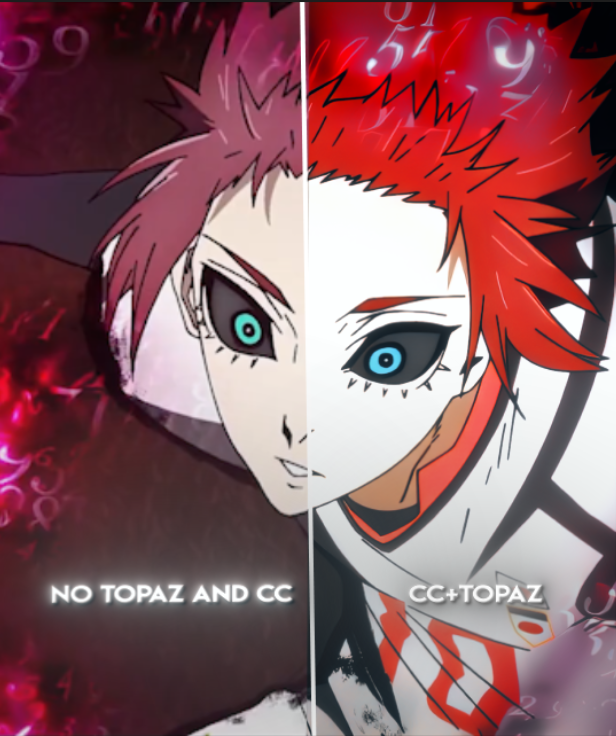
CC+TOPAZ SETTINGS
HOW TO USE MY TOPAZ SETTINGS
So guys you need to import my files into topaz(version 3.4.3)
Once you have done that here are the steps of how to use them:
1.- Have your edit ready and export it (without shakes ,transitions, texts and CC(only twixtor)).
2.- Import it on Topaz and use "Murasaki topaz 1" and then "Murasaki topaz 2"
3.- Now import that topaz video on AE(it will be double sized to make it same resolution that you had) and now add your CC and effects, then export it.
4.- Now use the last topaz "Murasaki topaz 3".
5.- thats it
6.- I made it export as medium quality in topaz, you can change to high, but after 3rd export from topaz you most likely would need to use handbrake to decrease size of your edit.
HOW TO USE MY CC
to use this cc you would need just magic bullet looks
how to use it:
1.-get done with your edit(twixtor, topaz, shakes, other effects etc.)
2.- put an adjustment layer upon your edit and add my cc to it.
3.-IMPORTANT! if you have any text in the edit, put it above your cc first, then add your cc to adjustment layer, otherwise it willl make your deepglow effect bug.(maybe not for everyone but it happens to me)
thats it
TIP: if youre crashing during exporting your edit, or it takes too long, try to export without cc first, then add your edit back and export it with cc.(after adding your edit back to the same pj, turn off the sound of alayers and other layers to export quicker)
Any question DM discord: Murasakipablo