
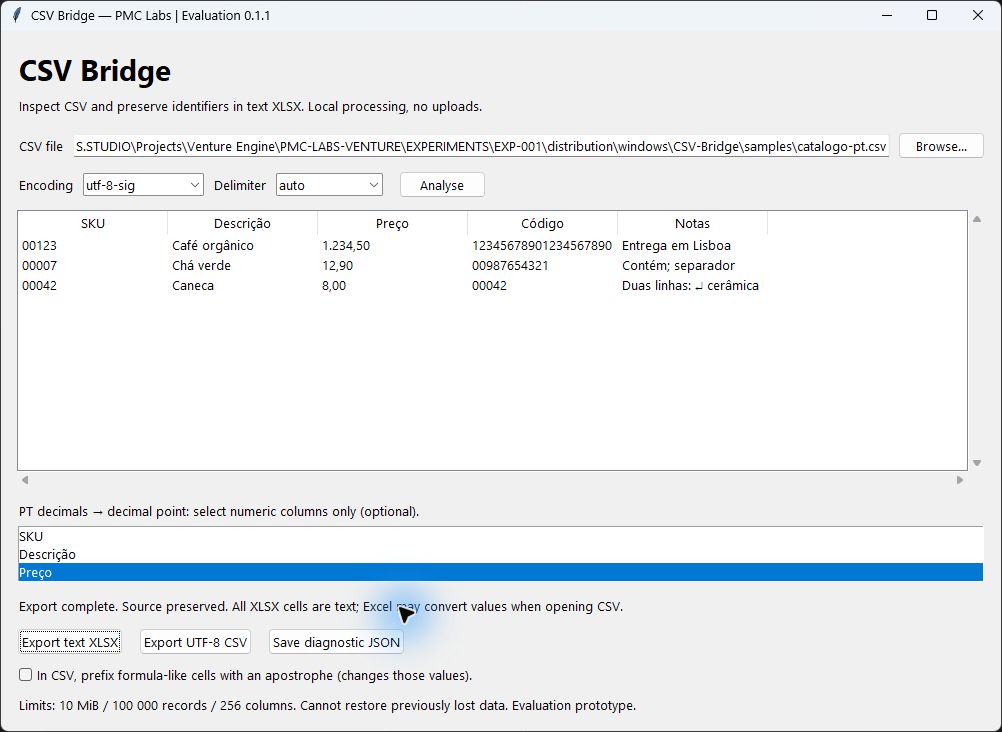
CSV Bridge — Free Windows Evaluation
Inspect CSV files on your computer and export a new Excel workbook with every cell stored as text. Preserve leading zeros and long identifiers that are still present in your source file.
Included features
• Local processing, without accounts, uploads or telemetry.
• UTF-8, Windows-1252 and UTF-16 input; automatic or explicit separators.
• Preview and structural diagnostics before exporting.
• Optional Portuguese decimal conversion for columns you select.
• Text XLSX, UTF-8 CSV and diagnostic JSON outputs.
• Portable Windows x64 package, sample CSV, English guide, MIT application source and runtime licence notices.
Example: code 00123 stays 00123; a twenty-digit identifier stays text. In a selected Portuguese price column, 1.234,50 becomes 1234.50. Prices are also text cells, rather than numeric cells for calculations.
Free evaluation, version 0.1.1
The native interface and Excel output were tested on the development Windows PC. Compatibility on a separate clean Windows machine and a real customer workflow remain unverified. The executable is unsigned. This is not a Microsoft Store release; do not disable your Windows protections to run it.
Extract the full folder and keep _internal beside CSV-Bridge.exe. No Python installation is required for the executable. Source is included for Python users. Limits: 10 MiB, 100,000 records and 256 columns; preview displays the first 100 records.
CSV Bridge cannot restore zeros or precision already lost, infer the right decimal columns, or validate a particular ERP/Shopify import. Excel may still convert values when opening CSV directly; use text XLSX when preservation matters. CSV formula-prefix protection changes those values. Existing destination files are refused.
Feedback: pmclabs.studio@gmail.com. Please use fictitious examples and do not send confidential CSV files.
PMC Labs Studio — https://pmclabs.studio