
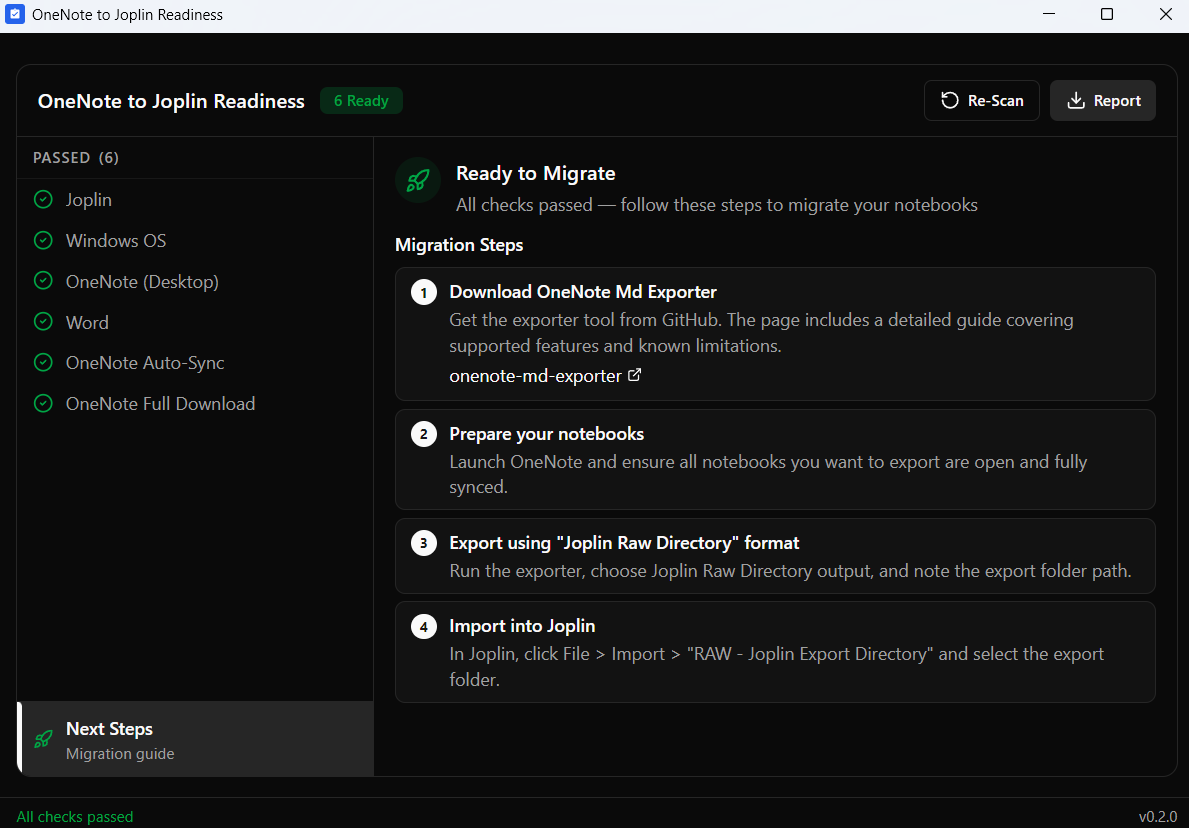
OneNote to Joplin Readiness
Migrating from Microsoft OneNote to Joplin is doable, but the execution can feel pretty complex.
There's a solid migration tool out there, onenote-md-exporter, but it's a console application and it's easy to run into blockers before you even get started.
This tool runs first. It checks if your Windows setup meets all the requirements for a successful migration, the right OneNote version, correct settings, and all necessary dependencies. Each check returns a clear pass, fail, or warning with steps to fix what's broken.
This is the full packaged version with a proper installer. Download, run the setup, and you're done.
What it checks:
- Joplin desktop app installed
- Windows 10/11 version
- OneNote desktop (not the Store version) with working COM automation
- Microsoft Word with COM automation
- OneNote sync-on-close enabled
- Notebooks fully downloaded, not cloud-only stubs
The actual migration runs through onenote-md-exporter, a free open-source console application. The installer includes guidance on where to get it and how to use it.
The tool is read-only. It doesn't touch your notes, files, or system settings. Source code is public on GitHub if you want to verify that yourself.
About the Supporter Edition I originally built these tools for my own workflow, and your purchase directly supports their ongoing development.
- Personal Project: These are personal tools shared "as-is." While I’ll do my best to squash bugs in future updates, I cannot offer formal guarantees or individual support.
- Digital Download: Because this is a digital product and a contribution to my work, all sales are final and non-refundable.
Thanks for the support!