

Pick 3 Live Pair Analyzer
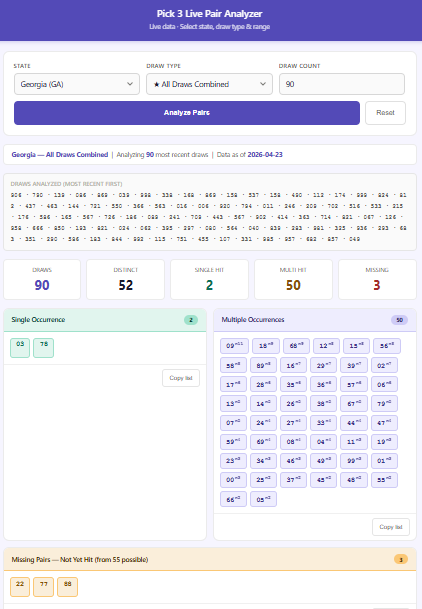
Stop tracking pairs by hand. The Pick 3 Live Pair Analyzer pulls live draw results directly from the NanasNumbers database and does the counting for you — instantly. No more dealing with Excel or Sheet workbook limits!
Select your state, choose your draw type, set your draw count, and get a complete pair frequency breakdown in seconds. See exactly which pairs have hit once, which are repeating, and which haven't shown up at all — organized and ready to work with.
What it shows you:
- Single Occurrence — pairs that have appeared exactly once in your selected range
- Multiple Occurrences — pairs hitting more than once, ranked highest to lowest frequency
- Missing — pairs with zero appearances in your selected range
- Furthest Out — pairs that have hit but haven't been seen in the longest time
Features:
- Live data — always current, no manual entry required
- All U.S. states, Canadian provinces, and Puerto Rico
- Midday, Evening, Morning, and Night draws available by state
- ★ All Draws Combined option for full-day analysis
- Works on most devices — phone, tablet, or desktop
- No Excel, no installation, no subscription
For organizational and tracking purposes only. Results from any tracking are not guaranteed. For entertainment use.
How to Open & Access Your App
On PC (Windows Recommended)
- Save the file to a folder on your computer
- Right-click the file and select Open with → Google Chrome
- Do not open directly from Google Drive on PC — download it to your computer first, then open from your local folder
On Android
- After Downloading, locate & save the file to your Google Drive
- Open Google Drive on your Android device
- Tap the three dots, then choose Open with → Chrome
- The app will run directly in your browser
General Notes
- Google Chrome is strongly recommended for the best experience
- The app does not require installation — it runs entirely in your browser
- An internet connection is required for live data apps
- Bookmarking the open file in Chrome makes it easy to return to without navigating to the file each time
✅ PC Windows — confirmed works
✅ Android — confirmed works
⚠️ Mac — not guaranteed
❌ iPhone — not supported
⚠️ iPad — not guaranteed