

Inkwell: A Typewriter for Authors
Inkwell: The Distraction-Free Studio for Fiction Writers
Write, organize, and publish your novel—with complete privacy, zero subscriptions, and no cloud lock-in.
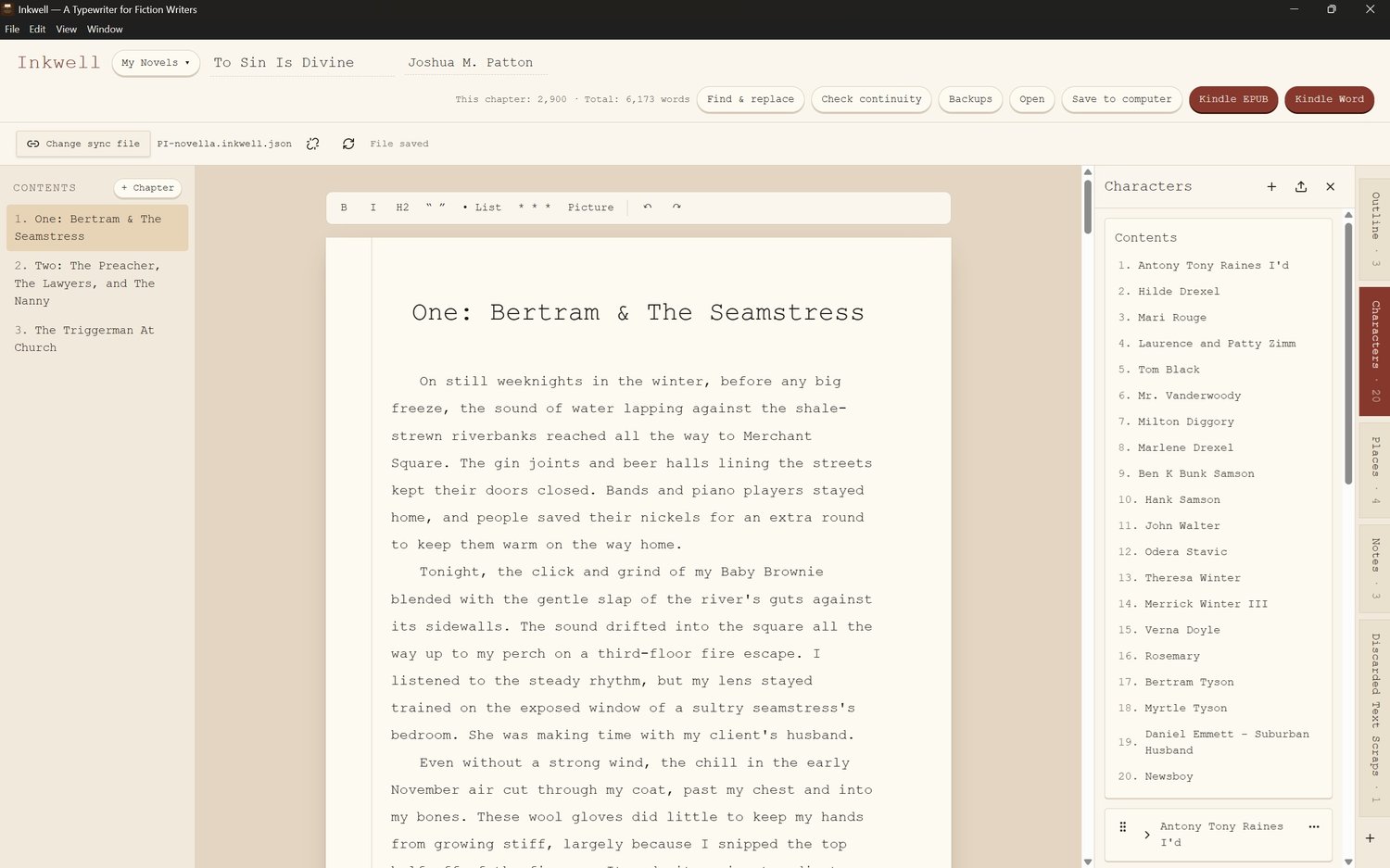
Inkwell is a dedicated writing studio crafted specifically for novelists and storytellers. Inspired by the warm, tactile aesthetic of vintage typewriters and aged cream paper, Inkwell strips away the overwhelming bloat of traditional office software so you can lose yourself in your story.
Unlike modern cloud tools that charge monthly fees or train AI on your private writing, Inkwell runs entirely on your own machine. Your words never leave your computer.
Note: Inkwell is an independent, DRM-free app. On Windows, click 'More info → Run anyway' if prompted. On Mac, right-click the app and choose 'Open' the first time you launch it. So long as you get your copy from this authorized provider, the program is 100% safe.
Key Features at a Glance
- Classic Typewriter Aesthetic: Warm paper tones and crisp typewriter typography designed for long, comfortable writing sessions without screen fatigue.
- Side-Tab Story Studio: Keep your Outlines, Characters, Worldbuilding Places, and Notes right beside your manuscript—expandable on click, with drag-and-drop index cards, nested lists, and quick-jump tables of contents. Add your own custom tabs whenever you need them.
- Instant Kindle Formatting: Export clean, professional EPUB 3 or Microsoft Word (.docx) files ready for direct upload to Amazon KDP, complete with an automatically generated, clickable Table of Contents.
- Chapter & Novel Word Counts: Track live word counts for the active chapter as well as your entire manuscript at a single glance.
- Smart Local Continuity Checks: Catch misspelled character names, inconsistent place names, or forgotten cast members locally—without sending a single syllable to an AI server.
- Full Novel Find & Replace: Search and replace across a single chapter or your entire book with whole-word and case-matching controls.
- Wide Document Import: Bring existing work into Inkwell from Word (.docx / .doc), Rich Text (.rtf), Markdown, and plain text files. For novels, each of your headings are separated into chapters automatically. For outlines or notes, each heading creates its own card.
- 100% DRM-Free & Offline: No accounts, no passwords, no activation keys, and no internet connection required.
How Inkwell Works
1. Your Memory & Library: 100% Local and Private
Most modern writing apps store your manuscripts on their corporate servers. Inkwell takes the opposite approach: your writing stays on your computer.
- Generous Local Capacity: Inkwell stores your entire novel library—including embedded illustrations, research cards, and rolling chapter drafts—directly in your local browser or desktop database. You can manage multi-book series and massive epic sagas without hitting arbitrary size limits.
- Shared Author Memory: Type your author or pen name once, and Inkwell remembers it across every novel you create in your library.
- Rolling Automatic Backups: While you write, Inkwell silently saves rolling snapshots of your draft every five minutes (storing up to 12 restore points per novel), plus an extra backup whenever you switch projects. If you ever make a mistake or want to revert a scene, your past versions are a click away.
2. Linked File Sync: Continuous Autosave Where You Want It
Inkwell gives you the best of both worlds: local privacy and modern cloud safety.
- Link Directly to a File on Your Drive: Use the Link sync file button to connect your novel to any folder on your computer. If you pick a folder inside your Dropbox, Google Drive, OneDrive, or iCloud, your book automatically backs up to the cloud without needing a special plugin or subscription.
- Real-Time Background Autosave: About one second after you pause typing, Inkwell quietly writes your changes directly to that linked file on your disk. You never have to worry about hitting "Save."
- External Edit Protection: If you open or edit your file on another computer, Inkwell notices the change and pauses before overwriting, protecting you from lost work.
- One-Click Snapshots: Whenever you want an independent copy to email to a beta reader or stash on a thumb drive, the Save to computer button downloads a complete, self-contained backup snapshot in one click.
3. Publishing to Kindle (DOCX & EPUB): Ready on the First Try
Formatting a novel for Amazon Kindle can be one of the most frustrating parts of self-publishing. Inkwell handles the technical details for you:
- Automatic Clickable Table of Contents: Amazon KDP requires a functional, linked Table of Contents so readers can jump between chapters. Inkwell automatically builds this into both Word (.docx) and EPUB files based on your chapter titles.
- Kindle-Ready EPUB 3: Download a standardized EPUB file that passes Amazon’s ingestion checks with flying colors, complete with embedded illustrations and clean typography.
- Formatted Word Documents (.docx): If you prefer uploading a Word file to KDP or sending your book to an editor, Inkwell produces a clean, styled Word document with proper heading hierarchy, bookmarks, and hyperlinked navigation.
System Requirements & Platforms
- Windows: Compatible with Windows 10 and Windows 11 (64-bit).
- macOS: Compatible with Apple Silicon (M1/M2/M3/M4) and Intel-based Macs.
- Linux: Compatible with modern 64-bit Linux distributions (Ubuntu, Fedora, Debian, Mint, Arch, etc.).
- Zero DRM: Pay once, keep the installer, and run Inkwell forever on any computer you own.
- Once again: Inkwell is an independent, DRM-free app. On Windows, click 'More info → Run anyway' if prompted. On Mac, right-click the app and choose 'Open' the first time you launch it.