







Swing Trading Journal Excel | Any-Broker CSV Import with Column Mapper, Position Sizer & Dashboard
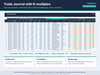
Stop retyping trades from your broker. Paste almost any broker's trade CSV into this workbook, pick your columns from drop-downs, and its formulas turn every fill into a clean round-trip trade. Scale-ins, partial exits, shorts and fees are handled. Then paste the trades into a swing-trading journal that calculates P&L, R-multiples, holding days and return on cost.
Paste your CSV at cell A5, then on the Column Mapper choose which of your columns is the date, time, symbol, side, quantity, price and up to five fee columns. Set the date order (MDY, DMY or YMD), the words your broker uses for buy and sell, and whether the file lists newest trades first. No side column? The sign of the quantity is used. No macros, add-ins, logins or subscription, and your data never leaves your file.
It also has a built-in position-size calculator. Enter your entry, stop and target to get shares, position value, % of account and reward:risk, capped by your max position size. The portfolio heat table pulls your open trades from the journal and warns you before total open risk goes over your limit.
The dashboard updates itself: net P&L, win rate, profit factor, expectancy in R, payoff ratio, max drawdown, an equity curve, and P&L by month, setup, weekday and side. A 'cost of mistakes' table shows what chasing entries or moving stops really cost you.
It comes with 22 fictional example trades, a fictional sample CSV to practise the import (46 executions, 22 trades) and a 10-page PDF guide with a step-by-step import walkthrough.
What's included
• Rangefolio-Swing-Journal-Any-Broker.xlsx (11 sheets: Start Here, Settings, Trade Journal, Dashboard, Position Sizer, CSV Import, Column Mapper, Import Results, Lists, plus 2 protected helper sheets)
• sample-any-broker-trades.csv (fictional sample, 46 executions / 22 trades)
• User-Guide.pdf (10 pages: setup, mapping your CSV, importing, journaling, sizing, dashboard, troubleshooting)
Who it's for
• Stock and ETF swing traders on any broker that exports trades as CSV
• Traders who think in R-multiples and want to know their real expectancy
• Anyone who wants a risk-first routine: size every trade and cap total portfolio heat
• People who prefer a spreadsheet they own to a monthly journaling subscription
File formats and compatibility
• Microsoft Excel .xlsx workbook, sample CSV and PDF user guide, delivered as one zip
• Built for Microsoft Excel 2019/365 (.xlsx, no macros). Tested in LibreOffice Calc. Google Sheets import is possible but not officially supported.
• Formulas only: no macros or VBA, no add-ins, works offline
• Instant digital download; no physical item is shipped
FAQ
Q: Does it connect to my broker account?
A: No. Nothing logs in or syncs. You export a file from your broker, open it and paste it in. Your data stays in your own file.
Q: Does it handle partial exits and scaling in?
A: Yes. Fills are grouped from flat to flat for each symbol. Adds are averaged into the entry price and partial sales into the exit price. A trade stays marked Partial until it's fully closed. Short trades are supported.
Q: Will it work with my broker?
A: If your broker exports one row per fill (or per filled order) with a date, symbol, quantity and price, yes. Files that only list closed positions, PDFs and statements with decimal commas (1.234,56) can't be mapped; type those trades into the journal instead.
Q: How is this different from the IBKR version?
A: It's the same journal, sizer and dashboard. Only the import sheet differs: this one maps any CSV.
Q: Is this financial advice?
A: No. It's a record-keeping and calculation tool for education only. It doesn't recommend any trade. All example data is fictional.
Not affiliated with or endorsed by any broker.
Disclaimer: For educational and record-keeping purposes only. Not financial, investment, tax or trading advice. Trading involves substantial risk of loss. Example data is fictional. Not affiliated with or endorsed by any broker. Export formats are based on public documentation and can change.