


E V show - Display language status on the second monitor
E V show - Display language status on the second monitor
🔥
Lúc bạn làm việc Full màn hình/Chơi game
thì biểu tượng E / V của EV-Key (Unicode) nó nhỏ, bị ẩn đi
🔥
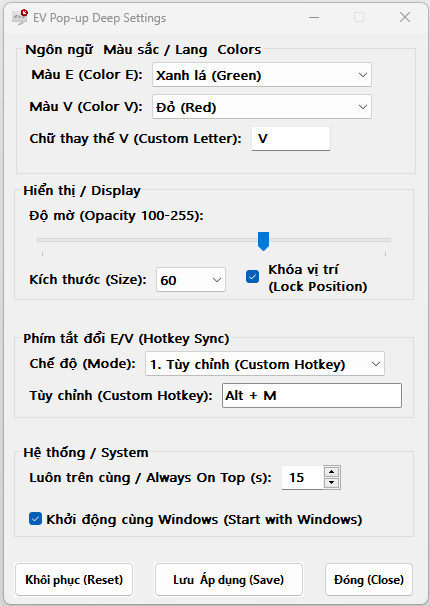
Không muốn cài 1 app có đồ hoạ nặng nề để nhân đôi giao diện Taskbar, thì chỉ cần chạy cái này rất nhẹ nhàng, nó hiển thị chữ E / V theo phím tắt bạn đặt cho EV-Key (Unicode)
🔥
Bạn có thể thấy icon đỏ, chữ V, đang ở màn hình khác (Phụ), còn chữ V của EV-Key (Unicode) ở màn hình Chính. Chơi game, làm việc cũng biết được để tránh xung đột ngôn ngữ bàn phím
🔥
Hỗ trợ đổi chữ để hiển thị trạng thái ngôn ngữ của nhiều quốc gia
👨💻 Developed by: Tan (Van Tan Phan)
===
🔥
When you're gaming or working in full-screen, the EV-Key (Unicode) icon is often too small or hidden.
🔥
Instead of installing a heavy app just to see your taskbar on both screens, this lightweight tool shows the E / V status based on your own shortcuts.
🔥
You can keep a red 'V' icon on your second monitor while the original stays on your main screen. No more typing errors or language conflicts!
🔥
Supports custom characters to display language status for multiple countries
👨💻 Developed by: Tan (Van Tan Phan)
===
===
📥 Check out my custom software & tools (including my 100% Free PC Optimization Tool - WinBastion): https://tanphan.gumroad.com/l/WinBastion
• Payhip: https://payhip.com/tanphan
• Gumroad: https://tanphan.gumroad.com
• Lemon Squeezy: https://tanphan.lemonsqueezy.com
📖 WinBastion Complete Documentation:
🌐 Connect with me:
• Email: Tanphan.Lct@gmail.com
• ArtStation: https://www.artstation.com/tanphandesign
• LinkedIn: https://www.linkedin.com/in/tanphandesign
• YouTube: https://www.youtube.com/@tanphanvan.Design
• Facebook: https://www.facebook.com/tanphan.3dDesign
• Substack: https://substack.com/@vantanphan/posts
===
## ❤️ Support the Author / Ủng hộ tác giả
If this software helps your workflow, consider buying me a coffee to support free updates!
(Nếu phần mềm giúp ích cho công việc của bạn, hãy ủng hộ tác giả để duy trì các bản cập nhật miễn phí nhé!)
☕ *PayPal:** Please send money directly to my email: tanphan.lct@gmail.com
💳 *Vietnamese Bank Transfer:**
Bank: *BIDV**
Account Number: *5510425104**
Account Name: *PHAN VAN TAN**