

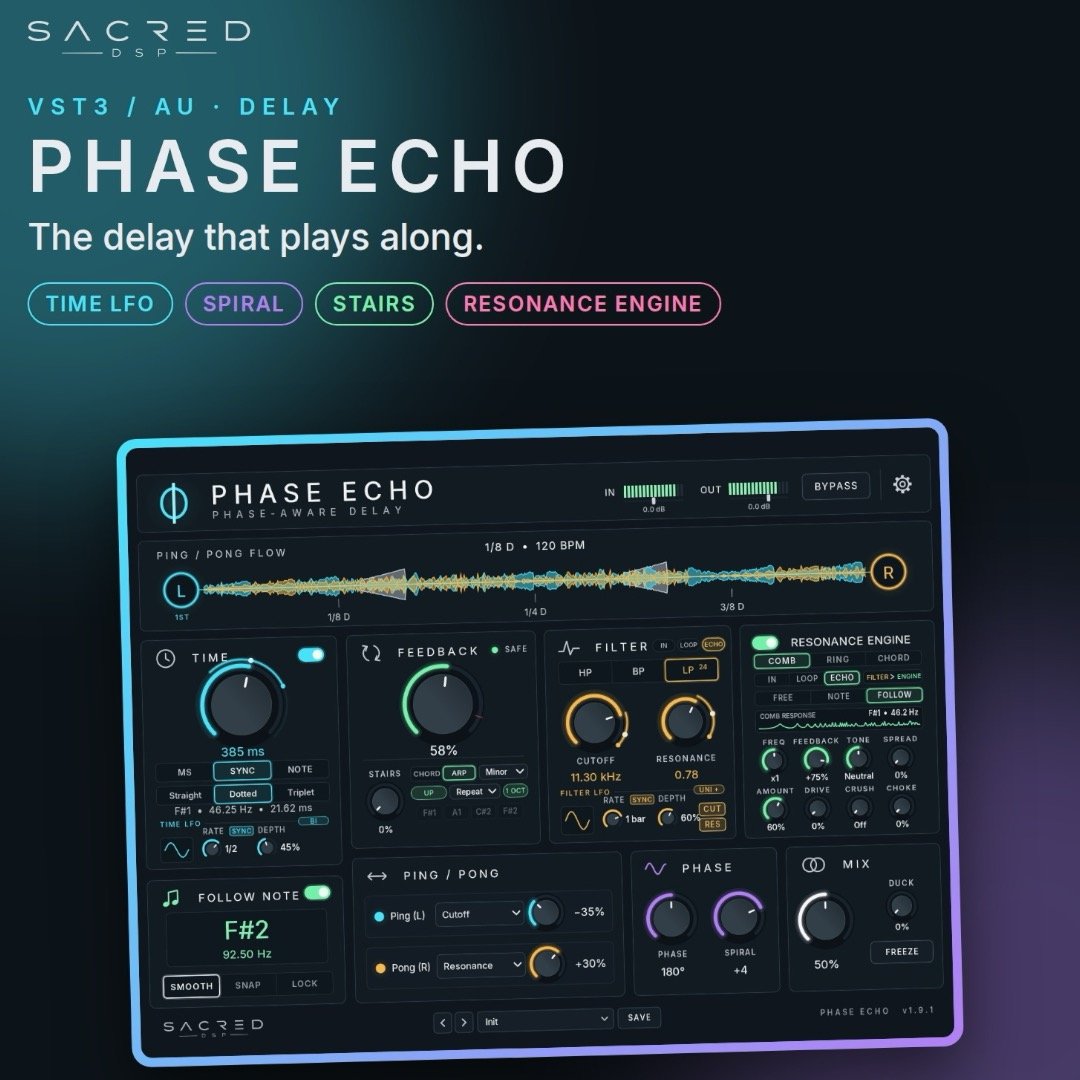
PHASE ECHO by SacredDSP
Phase Echo is a phase-aware delay by SACRED DSP.
A normal delay repeats your sound after a set number of milliseconds or a note value. On a rolling bass or a one-note psytrance lead, that time rarely matches the cycle of the note, so every repeat lands slightly out of phase and the low end gets muddy.
Phase Echo can measure its time in the cycles of the note itself. The repeats stay in phase and in tune, and when the melody moves, the timing moves with it.
WHAT’S NEW IN 1.9.5 (free update for everyone)
- Now works on macOS 10.15 Catalina. Fixes the “AU can’t be loaded” error and the VST3 not showing up in Ableton Live on older Macs.
- LOCK MIX. A new button in the MIX panel. When it’s on, flipping through presets keeps your mix amount.
- Ring mod across the whole spectrum. The ring modulator FREQ now covers 20 Hz to 20 kHz. In FOLLOW tuning it steps from /8 up to x512 of your note.
- The manual now has a “What’s new” page.
Existing projects and presets load as before.
FEATURES
- TIME: MS, SYNC or NOTE. In NOTE mode the delay locks to the cycle of the note you play (e.g. F#1 · 46.25 Hz · 21.62 ms). Straight, dotted and triplet values, plus a tempo-synced time LFO.
- FOLLOW NOTE: reads the pitch of the incoming sound and keeps the timing locked to it (Smooth / Snap / Lock).
- FEEDBACK + STAIRS: feedback with a SAFE indicator against runaway repeats. STAIRS lets the repeats climb through the notes of a chord over one or two octaves.
- RESONANCE ENGINE: comb, ring and chord resonators inside the echo, tuned freely, to the note, or following it. The ring modulator runs from 20 Hz to 20 kHz.
- FILTER: HP, BP or 24 dB LP on the input, in the feedback loop or on the echoes, with a synced LFO.
- PING / PONG: left and right repeats each drive their own parameter, so the stereo image moves instead of just bouncing.
- PHASE + MIX: phase and spiral controls, ducking, FREEZE and LOCK MIX.
- WIDTH + MONO BELOW: stereo width from mono to 200%, and a mono-maker for the low end (keeps kick and bass centred and club-safe).
- 49 factory presets, and you can save your own.
Built with psytrance in mind, but it works on anything: basses, leads, vocals, plucks, drums and pads, in any style.
PAY WHAT YOU WANT
Download it for free, or pay what you think it’s worth. Every contribution helps build the next SACRED DSP plugins.
WHAT YOU GET
- Phase Echo 1.9.5 for macOS: AU + VST3, Apple Silicon & Intel, macOS 10.15 Catalina or newer
- Phase Echo 1.9.5 for Windows: VST3, 64-bit, Windows 10/11
- PDF manual with a change log
Works in Logic Pro, GarageBand, Ableton Live, Bitwig, Reaper, Studio One, FL Studio and other AU/VST3 hosts.
INSTALLATION
Mac: copy PhaseEcho.component to ~/Library/Audio/Plug-Ins/Components and PhaseEcho.vst3 to ~/Library/Audio/Plug-Ins/VST3 (in Finder press Cmd+Shift+G and paste the folder path).
The plugin is not signed by Apple yet, so macOS asks once: go to System Settings > Privacy & Security > Open Anyway and restart your DAW.
Still not showing? Run this once in Terminal:
xattr -dr com.apple.quarantine ~/Library/Audio/Plug-Ins/Components/PhaseEcho.component ~/Library/Audio/Plug-Ins/VST3/PhaseEcho.vst3
Windows: copy the PhaseEcho.vst3 folder to C:\Program Files\Common Files\VST3 and restart your DAW.
UPDATING FROM AN OLDER VERSION
Download the new files from your original Payhip link, replace the old plugin files, and restart your DAW. Click the PHASE ECHO name in the plugin to confirm it says 1.9.5.
Support: support@sacreddsp.com
★ Enjoying Phase Echo?
Thanks so much for downloading. An honest review on KVR genuinely helps a one-person studio: leave a review on KVR.
Follow @sacred_dsp on Instagram for new plugins, demos and sneak peeks. Made something cool? Tag me, I love hearing it.