

STR Payout Reconciler Core: Airbnb + Vrbo Payout Reconciliation Spreadsheet
The problem this solves
Airbnb and Vrbo do not pay you the way your books need to be kept.
A single bank deposit can cover several reservations from different listings. A refund or a resolution adjustment can land in a later payout, long after the stay it belongs to. Your 1099-K shows a gross number that does not match what actually reached your bank — because it was never supposed to. Platform fees, cleaning fees, taxes the platform collected and remitted, taxes passed through for you to remit, and damage deposits held and returned are all different kinds of money, and the platform exports do not separate them the way a tax return does.
So most hosts end up doing the same work by hand, every month, in a spreadsheet they built themselves: cross-checking two dashboards, a transaction history, and a bank statement, trying to answer one simple question — does what I was paid actually explain what I earned?
This workbook was built to do that one job properly, for both platforms, in one file.
What it is
One .xlsx workbook that works in both Google Sheets and Microsoft Excel. No subscription. No bank-linking. No new bank account. No login for your financial data to live on someone else's server. You download the file, you own the file, and your numbers stay in your file.
What's inside, tab by tab
1. README
Setup instructions, the order to use the tabs in, and how to get your payout exports out of Airbnb and Vrbo.
2. Setup_Properties
Your listings in one place. Airbnb listing names and Vrbo property IDs are mapped to one internal property name, so the same home is the same property in every report — even though the two platforms call it different things.
3. Import_Airbnb
Paste your Airbnb payout/transaction export here, exactly as it comes off the platform. Nothing else goes on this tab.
4. Import_Vrbo
Paste your Vrbo payment export here, exactly as it comes off the platform. Vrbo's export is structured completely differently from Airbnb's — it is payment-based, not reservation-based — which is why it gets its own import tab instead of being forced into Airbnb's shape.
5. Ledger_Normalized
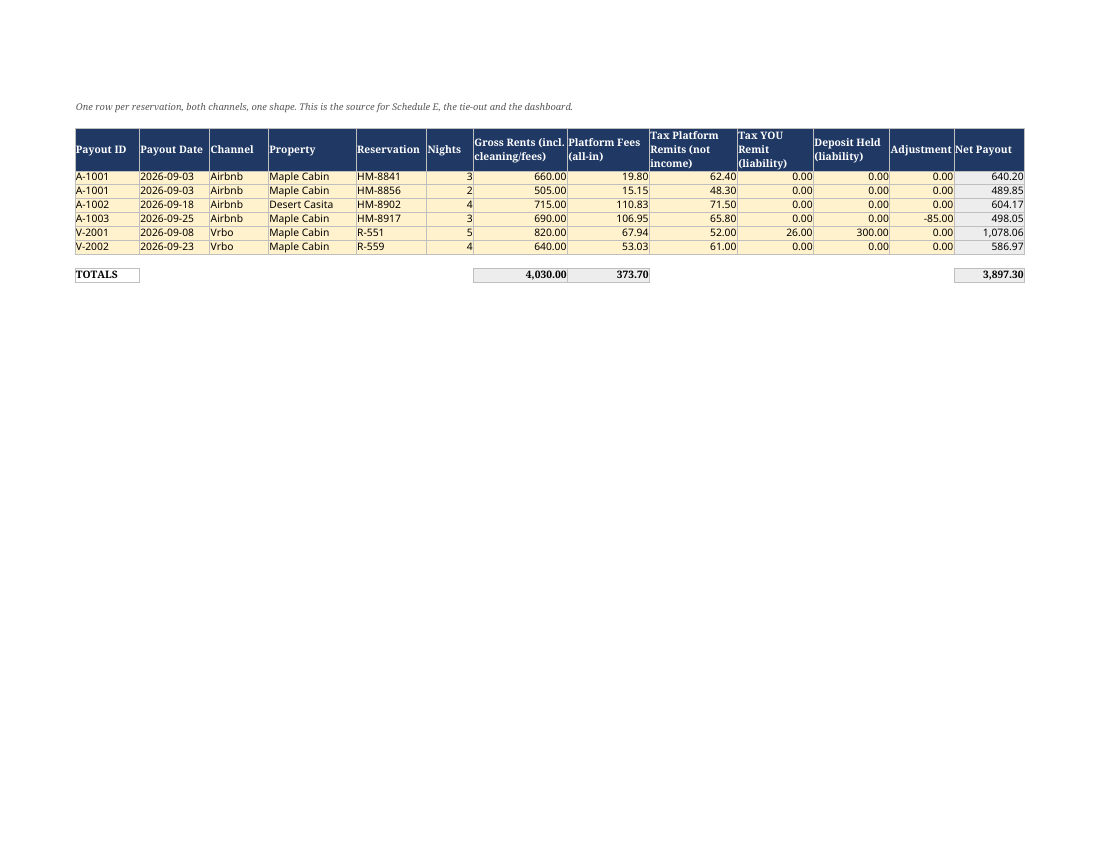
Both imports converted into one clean ledger: one row per item, with the property, the stay dates, the payment date, gross amounts, platform fees, cleaning fees, taxes, refunds, and adjustments separated into their own columns.
6. Payout_TieOut
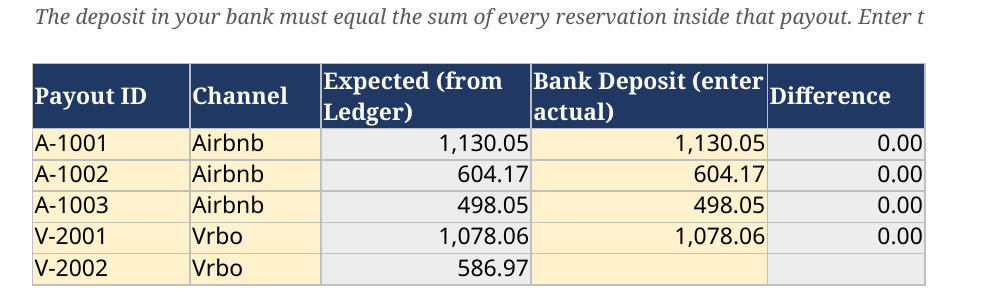
Payouts grouped by payout, the way the money actually moved, and compared against the bank deposit you enter. Groups that do not match are flagged. Late-settling items — refunds, resolution adjustments, and cancellations deducted from a later payout — are flagged instead of silently changing a month you already closed.
7. Expenses
Your own costs, logged by property, in categories that line up with the Schedule E summary.
8. ScheduleE_Summary (per property)
Gross rents reported gross — including cleaning and pet fees collected — with platform fees shown as an expense, never netted against income. Platform-remitted occupancy tax is treated as neither income nor an expense. Pass-through tax is tracked as an amount you owe until you remit it. Damage deposits are tracked as held money until they are kept or returned.
9. Tax_TieOut_1099K
Your ledger totals set next to the gross figure on your 1099-K, with the differences itemised — fees, refunds, and remitted taxes — so the gap between the form and your bank account is explained line by line instead of guessed at in April.
10. Repricing_Calculator
Airbnb's fee structure and Vrbo's fee structure have both changed, and older bookings sit under the old rules while new bookings sit under the new ones. This tab works backwards: enter the net you want to keep and it tells you the gross price you need to charge under each fee regime.
11. Turnover_Checklist
A per-turnover checklist for cleaning and reset, so the same standard is hit every stay whether you clean it yourself or hand it to a cleaner.
12. Linen_Inventory
Linen and consumables by property, with reorder alerts when stock runs low.
13. Hour_Log_STR (material participation)
A dated log of the hours you spend on your rental activity. If you are tracking your hours for the short-term rental tax rules and their hour tests, this is the record — kept as you go, not reconstructed at year-end.
14. Dashboard
Gross, fees, expenses, net, occupied nights and payout-match status at a glance.
15. Edge_Cases
The ten situations that break host books — lumped payouts, late adjustments, cancelled-but-kept fees, installment commissions, deposits, cross-month stays — and how this workbook handles each.
Sample data is worked into every tab: a complete fictional month, filled in end to end and tying to the cent, so you can see exactly what a finished month looks like before you touch your own numbers.
Fee regimes handled — read per booking, never hardcoded
Fee rates in this workbook are never a fixed formula. The rate is read from each booking's own statement line, because your ledger has to handle all of these at the same time:
- Airbnb's current 15.5% host-only fee
- Airbnb's legacy 3% split-fee structure, on bookings made before a host's switch — old and new bookings sit side by side in the same year
- Vrbo's legacy 5% commission plus 3% payment processing
- Vrbo's new flat 12% commission, from October 29, 2026
That is also why the Repricing Calculator covers each regime separately: the gross price that protected your net under the old fee is not the gross price that protects it under the new one.
Who this is for
- Self-managed hosts with 1 to 5 units listed on Airbnb, Vrbo, or both
- Hosts who reconcile monthly and want the deposit explained, not just the income totalled
- Hosts who will not link a bank account, will not open a new bank account, and do not want another monthly subscription to do a job a file can do
- Hosts who do their own books and hand a clean summary to a tax preparer
- Hosts keeping an hours record for the short-term rental tax rules
Who this is NOT for
- Property managers and co-hosts reporting to owners as your main job — look at the Portfolio listing instead; it adds the roll-up and owner statements. If you handle trust accounting, you need dedicated software, not a spreadsheet.
- Hosts with more than 5 units — at that volume, manual import stops being the right tool.
- Hosts who want fully automatic bank feeds and live sync. This workbook does not connect to your bank and does not pull data by itself. You paste the platform exports in. That is a deliberate trade: automation in exchange for no bank-linking, no subscription, and a file you own outright. If automatic sync matters more to you than that, buy the tool that does sync.
- Anyone who wants tax advice. This is a bookkeeping and reconciliation tool. It is not tax advice, and it does not replace a CPA or tax professional — see the disclaimer below.
How it works, in 4 steps
1. Download and open the .xlsx file in Google Sheets or Excel, and set up your properties on the Setup_Properties tab.
2. Paste your exports — Airbnb into its import tab, Vrbo into its import tab. Nothing to retype.
3. Check the flags on the Payout_TieOut tab. Enter the bank deposit, and work through anything flagged: mismatches, late adjustments, unmatched payouts.
4. Read your summaries — monthly ledger, per-property Schedule E summary, and at year-end the 1099-K tie-out.
Editions and updates
This purchase includes the 2026 edition and the 2027 edition. Platform payout formats and fee structures change, and when they do, the updated edition is how those changes reach your file. The included editions are the ones named here — 2026 and 2027. Editions after 2027 are sold separately.
FAQ
Is this a Google Sheets file or an Excel file?
Both. It is one .xlsx workbook that opens and works in Google Sheets and in Microsoft Excel. Buy it once, use it in whichever you prefer.
Do I need to link my bank account?
No. Nothing is linked. You paste in the payout exports from Airbnb and Vrbo and you type in the bank deposit amount on the tie-out tab. That is the whole data flow.
Is there a subscription or a monthly fee?
No. It is a one-time purchase. You own the file.
Does it import automatically from Airbnb or Vrbo?
No, and that is on purpose. You download your payout export from each platform and paste it into the matching import tab. There is no connection to your Airbnb, Vrbo, or bank accounts.
I only list on Airbnb. Is the Vrbo half wasted?
No. Use the Airbnb import, the ledger, the tie-out, the Schedule E summary, and the 1099-K sheet. The Vrbo tab simply stays empty. If you add Vrbo later, it is already there.
My bookings span the Airbnb fee change. Will the numbers be wrong?
No. Fees are read per booking from the statement, never applied as one fixed rate across the whole file, specifically so legacy split-fee bookings and current host-only-fee bookings reconcile correctly in the same ledger.
What about Vrbo's new 12% commission?
Handled as its own regime, alongside the legacy 5% plus 3% structure, and the Repricing Calculator shows you the gross price you need under each one.
How many properties does Core cover?
Core is built for 1 to 5 units. If you need a combined roll-up across 5 properties plus statements for owners or co-host partners, that is the Portfolio edition.
What if a payout does not match my bank deposit?
That is exactly what the tie-out tab is for. It flags the mismatch and the likely causes built into the layout — grouped reservations in one deposit, and late adjustments deducted from a later payout — so you can find the difference instead of writing it off.
Can I get a refund?
This is a digital download, and once the file has been delivered it cannot be returned the way a physical item can, so refunds are not offered simply for a change of mind. If the file is damaged, will not open in Google Sheets or Excel, or is not what the listing describes, message the shop and it will be fixed or made right. Please read the "who this is NOT for" section before buying — most disappointment comes from expecting automatic bank sync, which this workbook deliberately does not do.
Is this tax advice?
No. See the disclaimer below.
Disclaimer
This workbook is a bookkeeping, reconciliation, and record-keeping tool. It is not tax advice, accounting advice, or legal advice, and it is not a substitute for a qualified CPA, enrolled agent, or tax attorney who knows your situation. Tax treatment — including whether an amount belongs on Schedule E or Schedule C, how platform fees should be categorised, and whether you meet any hours test — depends on your facts. Use this file to keep clean records, and take those records to a professional.
License: the workbook file is licensed for use in your own hosting business, including properties you co-host. Please don't redistribute or resell the file.