
Cash & Runway Planner (Excel 365)
See how many months the cash covers if a client pays late or leaves.
30-day money-back guarantee. No questions asked.
One-time purchase. No subscription. No macros.
How many months can we cover if a client pays late?
For small agencies, studios, consultancies and freelancers with retainers, project invoices and a payroll to cover.
Three questions, answered every month
• How many months does the cash cover? Months in a row, from the month you start, in which cash at month end stays at or above the minimum buffer you set, for up to 12 months.
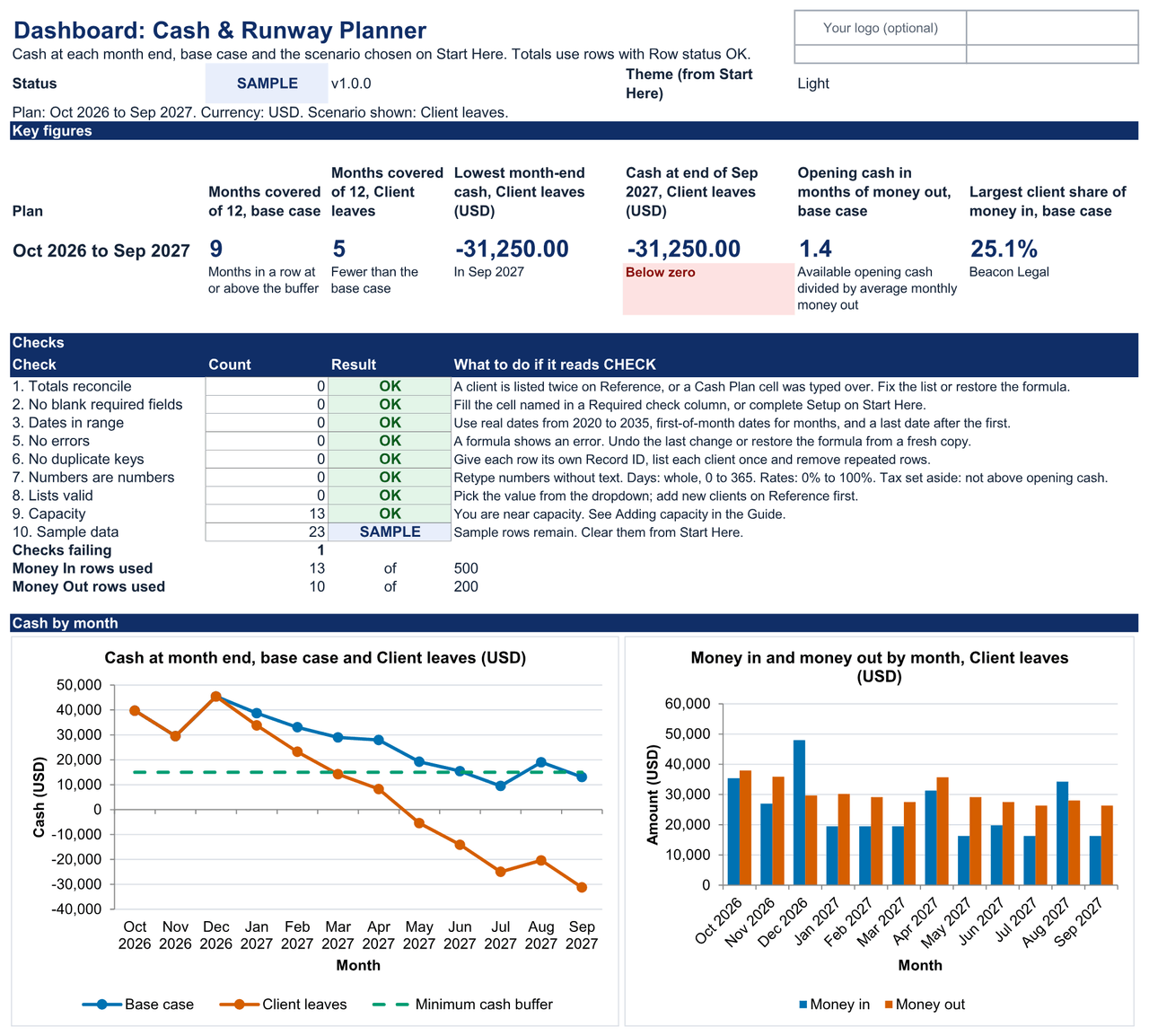
• What if a client pays late or leaves? Type extra days late or a leave month next to any client, pick the scenario, and see the months covered, the lowest month-end cash and the month it happens, beside the base case.
• How much rests on one client? Your largest client's share of the year's money in, and a check against the fees in your Client Profitability Tracker, so a missing or doubtful client stands out.
Seven sheets, one job
• Start Here: setup in five steps: currency, start month, opening cash, minimum buffer, optional tax set-asides and the scenario to show.
• Dashboard: months covered for the base case and your chosen scenario, the lowest month-end cash and when it happens, your largest client's share, the checks and two charts.
• Money In: one row per retainer or project invoice. Each client's usual delay moves the payment into the month it really arrives.
• Money Out: one row per committed cost (payroll, contractors, rent, software, loans and drawings), paid once, weekly, every two weeks, monthly, quarterly or yearly.
• Cash Plan: twelve months of money in, tax set-asides, money out and cash at month end, for the base case and the scenario, with costs by category and money in by client.
• Reference: your client list with each client's usual delay, the optional scenario columns, and a place to paste fee totals from the Client Profitability Tracker.
• Guide: every input, calculation, scenario and check explained, including how to roll the plan forward each month.
Built to be checked
Yellow cells: you type. Leave every other cell to the workbook.
Yellow: you type here · White: calculated, don't type here · Grey: lists and reference values
Named checks give one status on every sheet: OK, CHECK (n) or SAMPLE. The start month must be the first day of a month, so a day and month typed the wrong way round can't start the plan in the wrong month.
Sheets are protected without a password, so formulas aren't overwritten by accident. No macros, no external links, no hidden sheets.
Setup
Fill in Setup, list your clients and what they owe you, add your committed costs: about 10 minutes, plus about 1 minute per row. A first plan with 6 clients and 10 costs takes about 25 minutes.
The worked example is a fictional studio that starts October 2026 with US$48,000 in the bank and wants at least US$15,000 at every month end. Its plan covers 9 months; if its brand client Sample Studio leaves in January, 5. Clear it in three steps to start your own.
Light or Dark theme for Start Here and the Dashboard. Print setup for US Letter, checked on A4.
Tested in Excel 365 for Windows desktop: 36 of 40 checks passed, 4 not yet run, workbook 1.0.0, Excel build 16.0.20430.20182 on Windows Server 2025 Standard 10.0.26100, Oct 21, 2026. Not applicable, so not counted: 3.11 (plausibility warnings: every input rule here is a hard limit); 3.17 (exchange-rate check: each file holds one currency). Excel for Mac, Excel for the web and Google Sheets are not yet tested.
What's in the download
One ZIP file:
• cash-runway-planner-v1.0.0-blank.xlsx: the workbook for your own plan
• cash-runway-planner-v1.0.0-worked-example.xlsx: the same workbook with a demo plan and scenarios
• START-HERE.html: open this first. It lists every file and where to begin.
• quick-start.md: setup steps, reading the Dashboard and using scenarios
• metric-dictionary.md: every field and calculation defined
• support-and-compatibility.md: where it's tested, and how to get help
• license.md: the license terms
• release-notes-v1.0.0.md: what is in this version
• money-back-guarantee.md: the 30-day money-back guarantee
• MANIFEST-cash-runway-planner-v1.0.0.sha256: checksums, so you can check every file arrived intact
Not for you if
• You need bookkeeping, invoicing, payroll, bank reconciliation or tax returns.
• You need a daily or weekly cash forecast, or one longer than 12 months.
• You hold cash in several currencies and need each forecast separately.
• You want payments and balances to arrive automatically from your bank or other software.
• You need several people editing at once with permissions or change history.
Known limitations
• It is a cash plan, not accounting. Balances are estimates from what you type, not your bank records.
• One currency per file. Convert money in other currencies before you type it. There are no live exchange rates.
• Cash is shown at each month end for 12 months from the start month. A dip between paydays shows only in the "Low point if costs go out first" column, so set your buffer to cover it.
• Tax set-asides are percentages you choose, not tax calculations or advice. The plan assumes tax bills are paid from money set aside.
• Tested in Excel 365 for Windows desktop. Mac, Excel for the web and the Google Sheets edition are not yet tested.
• Excel mobile and the Google Sheets mobile apps are for viewing only, not data entry.
• Capacity is 500 Money In rows, 200 Money Out rows and 200 clients; more needs the steps in the Guide.
License
Single-business, US$29
For one business or sole trader, and everyone who works in it: staff and contractors.
Allowed: edit and extend the workbook, keep backups, share reports and results with your team, clients, advisers and board.
Not allowed: using it for a second business, giving an editable copy to a client or anyone outside the business, reselling it or posting it online.
Agency/Team is store-wide
If your business holds the Client Profitability Tracker's Agency/Team license (US$99), it covers this planner too, with working copies for up to 5 client businesses you manage. This planner has no Agency/Team price of its own. Agency/Team is bought with the tracker: https://payhip.com/b/jq87M
The full terms are in license.md in your download and at https://metricvalley.com/license/
30-day money-back guarantee
If the planner isn't right for your business, email support@metricvalley.com within 30 days of purchase with your order number. You'll get a full refund to your original payment method. No questions asked and no forms to fill in. We reply within 1 business day and start the refund then. Downloading the files doesn't affect the guarantee. We only ask that you delete your copies.
This guarantee is in addition to your rights under the Australian Consumer Law and any other consumer law that applies to you.
Updates: free updates to the 1.x line, delivered through your Payhip download link.
Google Sheets edition: included free for every buyer when it ships. It isn't available yet.
Support: email support@metricvalley.com. We reply within 1 business day, Monday to Friday, Australian Eastern time. Included: help getting the workbook working as described, and fixes for anything that doesn't. Not included: custom setup, importing your data, redesigning formulas, or accounting and tax advice.
Prices are in US dollars. Any sales tax or VAT that applies is shown at checkout before you pay.
Metricvalley is independent of Microsoft and Google.
Tax set-asides are percentages you choose. Nothing in the planner is tax, accounting or financial advice.