



Tree Service Job Math Sheet: Trim, Removal & Stump Pricing Template (Google Sheets + Excel)
A tree job price has to cover a lot more than the climb: helper wages, the chipper, dump fees, rigging and cleanup, the drive and the insurance. A big removal can look great and still pay less per hour than a quick trim.
The Tree Service Job Math Sheet does that math for every service on your menu. You type your own numbers into the yellow cells. The formulas do the rest.
For each service it shows:
• Real hourly rate: what the job pays per hour of your time, before and after a tax set-aside.
• Owner compensation and business profit, kept separate: your wage at your target pay, and what the business keeps after paying you.
• Cost floor: the price that only covers costs and pays you $0.
• Break-even price: the lowest price that pays your full target hourly, with $0 left for the business.
• Suggested price: target pay plus your profit goal, rounded up.
• Suggested trip fee: what the drive costs you, if you bill it as its own line, plus 4 distance bands.
• A status flag: LOSES MONEY, BELOW TARGET PAY, BELOW PROFIT GOAL, or ON TARGET.
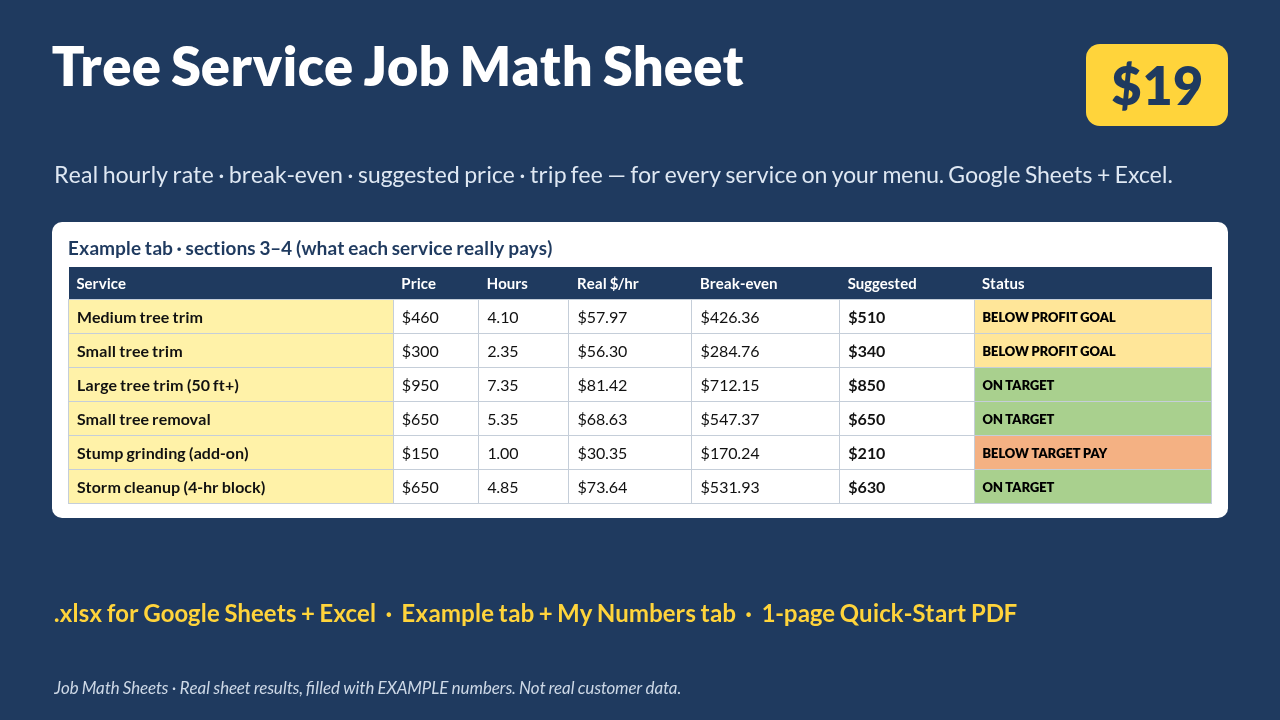
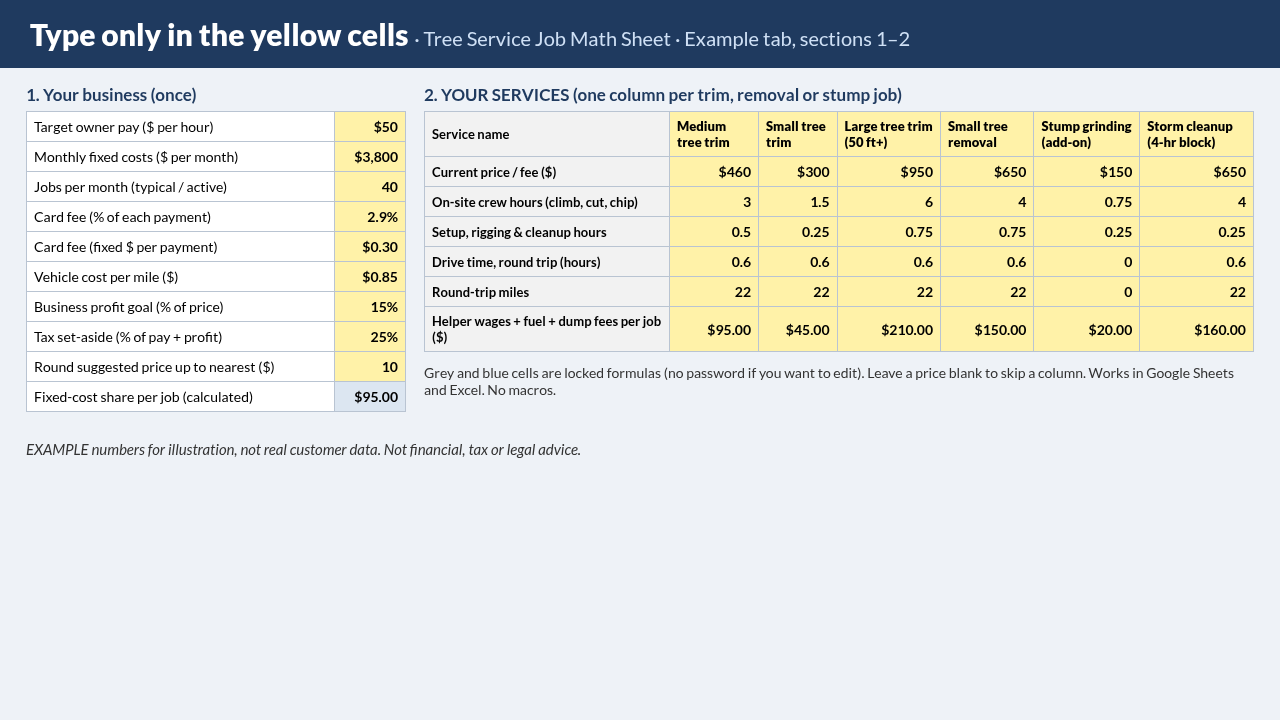
Example tab (illustrative). The sample tab is filled with EXAMPLE numbers for a two-person tree crew's menu: small, medium and large tree trims, a small removal, a stump-grinding add-on and a 4-hour storm-cleanup block; $3,800 a month in fixed costs over 40 jobs, 2.9% + $0.30 card fees, $0.85 a mile, and a $50/hr target. With those inputs the Medium tree trim column at $460 shows about $57.97/hr, a $426.36 break-even, a $510 suggested price and a $51 trip fee (STATUS: BELOW PROFIT GOAL). The $460 medium-tree trim sits near the 2026 national average Angi reports for tree trimming (about $460 per tree, with most jobs between $270 and $1,800), not a promise. These are example numbers for illustration, not real customer data. Your results depend on what you enter.
Every formula is visible. Formula cells are locked so a stray tap can't break them, and you can unlock them (no password) if you want to change something.
What's included
• Tree-Service-Job-Math-Sheet.xlsx, with 3 tabs:
• Start Here: short instructions and definitions.
• Example: filled in with an example menu (6 columns: Medium tree trim, Small tree trim, Large tree trim (50 ft+), Small tree removal, Stump grinding (add-on), Storm cleanup (4-hr block)).
• My Numbers: blank prices, up to 6 columns with name hints, and 4 trip fee distance bands.
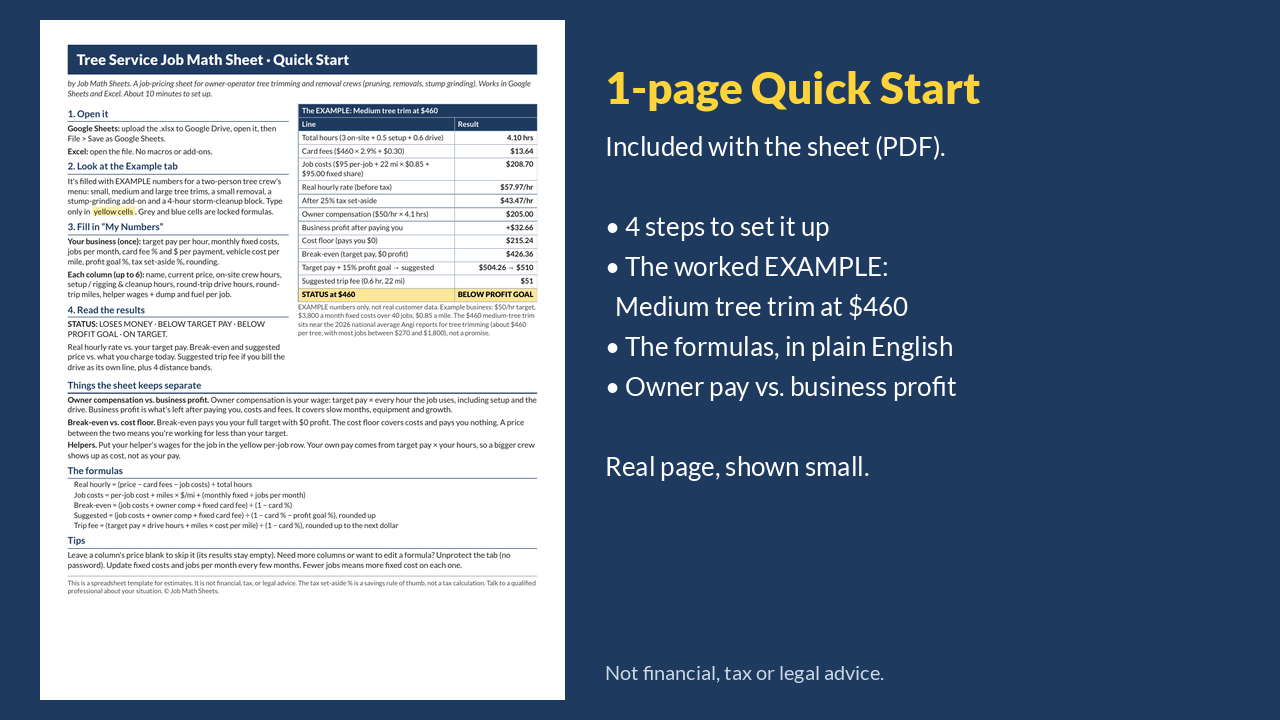
• Tree-Service-Job-Math-Sheet-Quick-Start.pdf: a one-page quick-start guide with the worked example and the formulas.
Works in Google Sheets (upload to Drive, then File > Save as Google Sheets) and Microsoft Excel. No macros, add-ons or subscription.
Who it's for
• Owner-operator tree trimming and removal crews who set their own job prices.
• Owners who want to check whether a tree trim, a removal, a stump grinding add-on or a storm-cleanup block covers their time and costs.
• Not built for payroll, scheduling, inventory, bookkeeping or customer quotes/invoices.
FAQ
Does it work in Google Sheets?
Yes. Upload the .xlsx to Google Drive, open it, and choose File > Save as Google Sheets. It also opens directly in Excel.
Do I need to know spreadsheets?
No. Type only in the yellow cells. The grey and blue cells are formulas.
Can I add more services?
The blank tab has 6 columns. For more, unprotect the tab (no password) and copy a column to the right.
Where do my helpers' wages go?
In the yellow per-job row (helpers × hours × rate, plus fuel and dump fees). Your own pay comes from target owner pay × your hours, so a bigger crew shows up as cost, not as your pay.
Why do add-on columns sometimes show LOSES MONEY?
Each column still carries a full fixed-cost share when priced alone. When an add-on rides on top of a main job, that share is already covered by the main job.
Is this financial or tax advice?
No. It's a spreadsheet template that does arithmetic on the numbers you enter. The tax set-aside % is a savings rule of thumb, not a tax calculation. Talk to a qualified professional about your own situation.
Will this increase my income?
The sheet doesn't promise any result. It shows what your current prices pay you, based on your inputs. What you charge is your decision.
Are the example numbers real?
No. They're illustrative numbers, not data from a real business.
How do I get support?
Use the Contact link on our store page and we will help.
Disclosures
• This is a spreadsheet template for estimates, not financial, tax, or legal advice.
• All example numbers are illustrative, not real customer data.
• AI assistance: AI tools helped draft the spreadsheet, the guide, this listing, and the product images. The formulas were checked with a LibreOffice recalculation against independent calculations.