




Valley Plan Crosshair
Valley Plan Crosshair
Draw with confidence where different roof pitches meet.
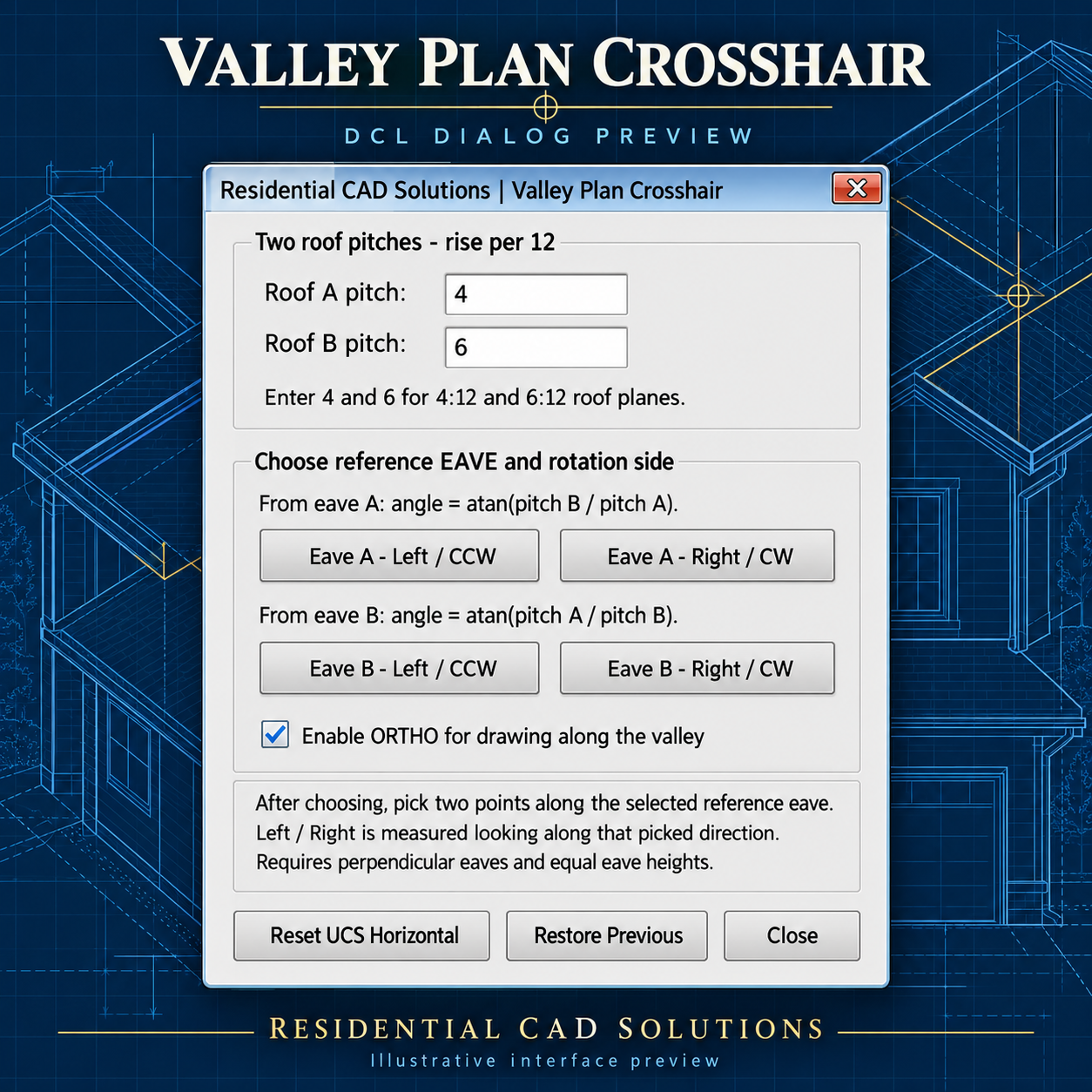
Valley Plan Crosshair calculates the valley’s plan angle between two roof planes and rotates your AutoCAD crosshairs to match—helping you lay out unequal-pitch roof intersections with less manual calculation.
Enter both roof pitches, select the reference eave, choose left or right rotation, and pick two points along that eave. Enable ORTHO to draw along the calculated direction.
Key Features
- Separate inputs for two roof pitches.
- Valley angle calculated from reference eave A or B.
- Clockwise and counterclockwise rotation.
- Two-point eave reference for rotated roof plans.
- Optional ORTHO activation.
- Reset to UCS horizontal.
- Restore the previous crosshair angle and ORTHO setting.
- Simple gray DCL interface.
Example: A 4:12 roof meeting a 6:12 roof produces a valley angle of 56.310° from the 4:12 roof’s eave, or 33.690° from the 6:12 roof’s eave.
Download Includes: AutoLISP program, DCL dialog, and installation instructions.
Designed for perpendicular eaves at equal heights. This tool rotates the crosshairs and snap/grid orientation; it does not automatically draw the valley or solve unequal-height roof intersections.