


Shift Rotation Planner: 10/4, 14/7, 21/7, 7/7 and 5/2 Crew Schedules with Printable Wall Calendar (Excel)
Tagline: Plan your rotations, then print a wall calendar every crew can read.
Description
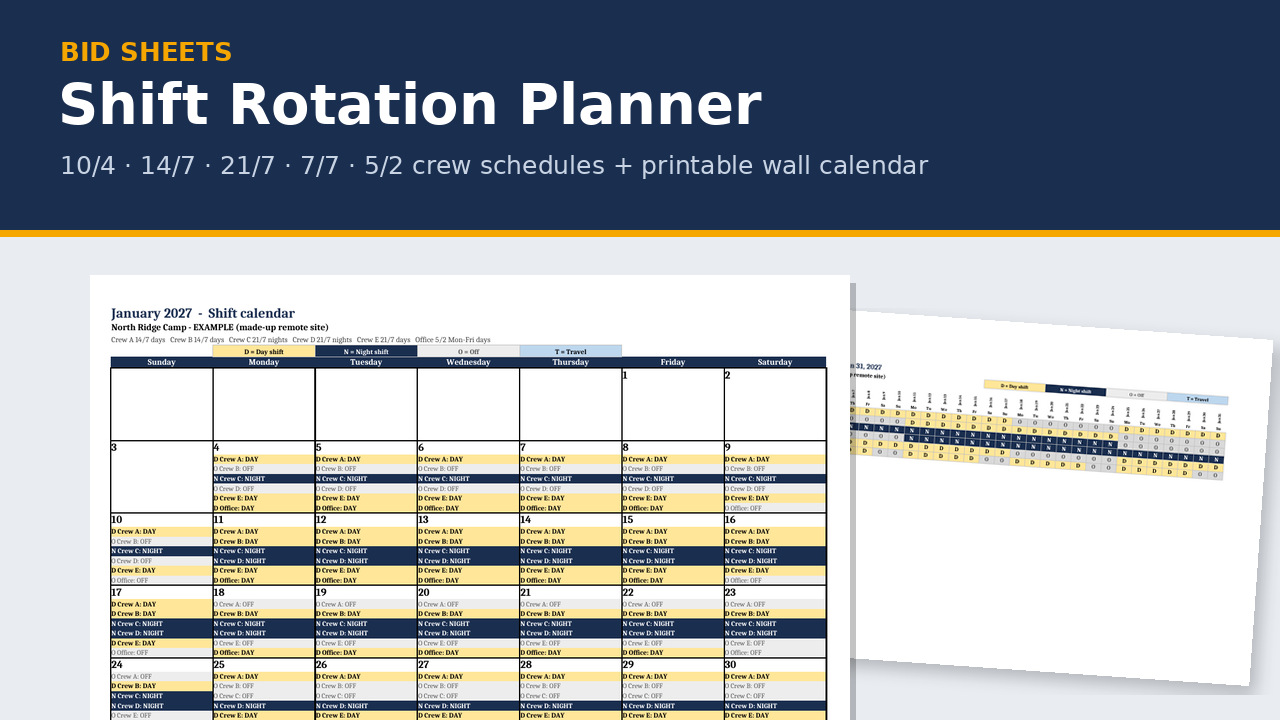
Rotation crews need one clear answer: am I on, and is it days or nights? This planner works it out for up to 6 crews on 10/4, 14/7, 21/7, 7/7, 5/2 or your own custom rotation, starting on the year, month and day you pick. Each crew is steady days or steady nights, with no swap days, and a 24-hour view shows day and night coverage side by side.
When it's set, print a month wall calendar to post in the lunchroom or site office, or hand out a 28-day crew strip.
What's in the zip
- EXAMPLE planner (.xlsx), filled in for a made-up remote site and crews
- BLANK planner (.xlsx)
- Print preview PDF showing sample printed pages
- README quick start
- 11 tabs: Instructions · Setup · Planner · Month View · 24-Hour · Calendar · Calendar Print Set · Crew Strip · Crew Summary · Rotation Reference · Lists
Key features
- 5 standard rotations: 10/4, 14/7, 21/7, 7/7 and 5/2, plus Custom with your own days on and days off.
- Start selectors: pick the year, month and day the planner starts, and each crew's start offset.
- 24-hour schedule: day crews and night crews, with a coverage check that flags gaps.
- Steady days or steady nights for each crew. No swap days.
- Printable month wall calendar: one landscape page per month, every crew listed in each day box (D for day, N for night), readable in black and white. Pick the month and a Sunday or Monday week start. A print set prints 12 months from your start date.
- 28-day Crew Strip: one row per crew, ready to hand out.
- Pop-ups and dropdowns on every input cell, with stop messages when something doesn't fit. No macros.
Who it's for
Small contractors, shops and service crews running rotations on remote, camp, plant or shutdown work.
FAQ
Does it work in Google Sheets? You can upload it, but Google Sheets shows the pop-up help differently (or not at all), drops the sheet protection and ignores the print layouts. Use Excel for printing.
Does it check labour law? No. The check flags are planning aids only. They don't apply Alberta Employment Standards, the Canada Labour Code, overtime, rest-period, averaging or union rules, and nothing in it says a schedule is compliant.
Does it do payroll? No. It plans who works when. For hours and pay, see the Weekly Timesheet.
What about GST? The price is CA$20. No GST is charged.
Disclaimer: a planning aid, not payroll or legal advice. Example crews and dates are made up.
About the maker
Built by a tradesperson with 35 years in fabrication and construction across Western Canada.
Compatibility (spreadsheets)
- Made for Microsoft Excel 2016 or newer, Windows or Mac. Plain .xlsx with no macros.
- LibreOffice Calc (free): every workbook recalculates with no formula errors.
- Does it work in Google Sheets? You can upload the .xlsx and open it in Google Sheets, but Sheets drops the sheet protection (so grey formula cells can be typed over) and ignores the print layouts. For printing, Excel is recommended.
- Not tested in Apple Numbers.
- Type in the yellow cells. Grey formula cells are locked (no password), so you can't break a formula by accident.
- Grab the free Bid Go/No-Go Scorer first. It's built the same way, so if it opens and works on your computer, the paid sheets will too.
Licence
One-business licence: use it across your business (all its sites and crews) on as many jobs as you like. Please don't resell, share or publish the blank templates outside your business. Completed job files and filled-in forms can go to your clients, prime contractors, auditors and regulators.
Refund policy
Because these are digital downloads, I don't offer refunds once a file has been delivered. Please check the compatibility list above before you buy, and grab the free Bid Go/No-Go Scorer to test on your computer first. If a file won't open or something isn't working, email me at support@bidsheets.ca and I'll help you sort it out.
Updates
Buyers get the 2027 update free. I'll email you the new version when it's ready. Each January I refresh the payroll rates (CPP, EI, WCB) in the estimating workbook and fab calculator, re-check the Alberta OHS and prompt-payment references in the safety and billing products, and re-check the standards references in the takeoffs.
Support
Questions? Email support@bidsheets.ca. I usually answer within 2 business days.