

Neyko Precomp
⚡ Neyko Precomp — Precompose in 1 click
The fastest way to precompose in After Effects.
No more right-click → Precompose → rename →
repeat for every layer. Just click.
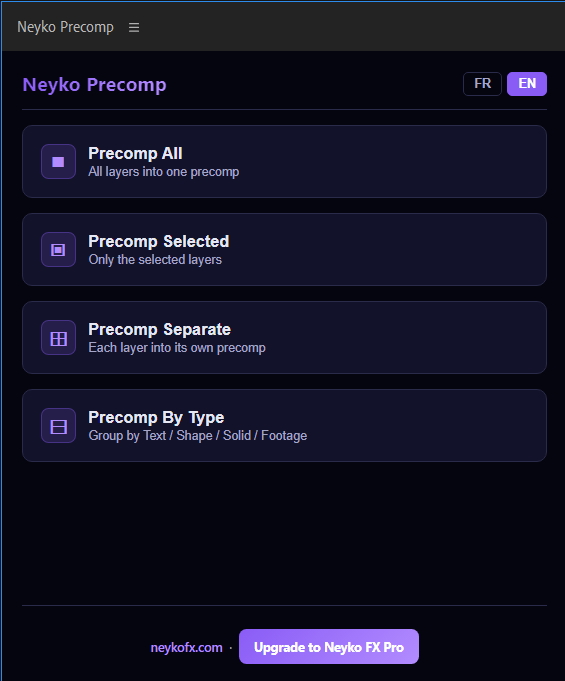
4 POWERFUL BUTTONS
⬛ PRECOMP ALL
Groups every layer in your composition
into a single precomp instantly.
Perfect for cleaning up a messy timeline.
▣ PRECOMP SELECTED
Precomposes only the layers you've selected.
Name it, click, done.
⊞ PRECOMP SEPARATE
Each selected layer gets its own precomp
automatically named after the layer.
Ideal for organizing complex projects.
⊟ PRECOMP BY TYPE
Automatically groups your layers by type:
Texts → "Textes"
Shapes → "Shapes"
Solids → "Solids"
Footage → "Footage"
One click, perfect organization.
📥 INSTALLATION 2 minutes
1. Download the ZIP and extract it
2. Double-click Install.bat (Windows)
or Install.command (Mac)
3. Reopen After Effects
4. Window > Extensions > Neyko Precomp
5. That's it no account, no token needed.
✅ 100% OFFLINE
No internet connection required.
No subscription. No account.
One purchase, yours forever.
✅ 30-DAY MONEY BACK GUARANTEE
Not satisfied? Reply to your purchase
email for an immediate refund.
Compatible with After Effects 2022, 2023,
2024 and above.
Windows 10/11 & macOS 10.14+
Want more? Check out Neyko FX Pro
the full AI panel with Voice Director,
Premium 3D Text, Beat Sync and more.
→ neykofx.com