
Alberta Sub Quote Comparison Sheet (PDF + Excel)
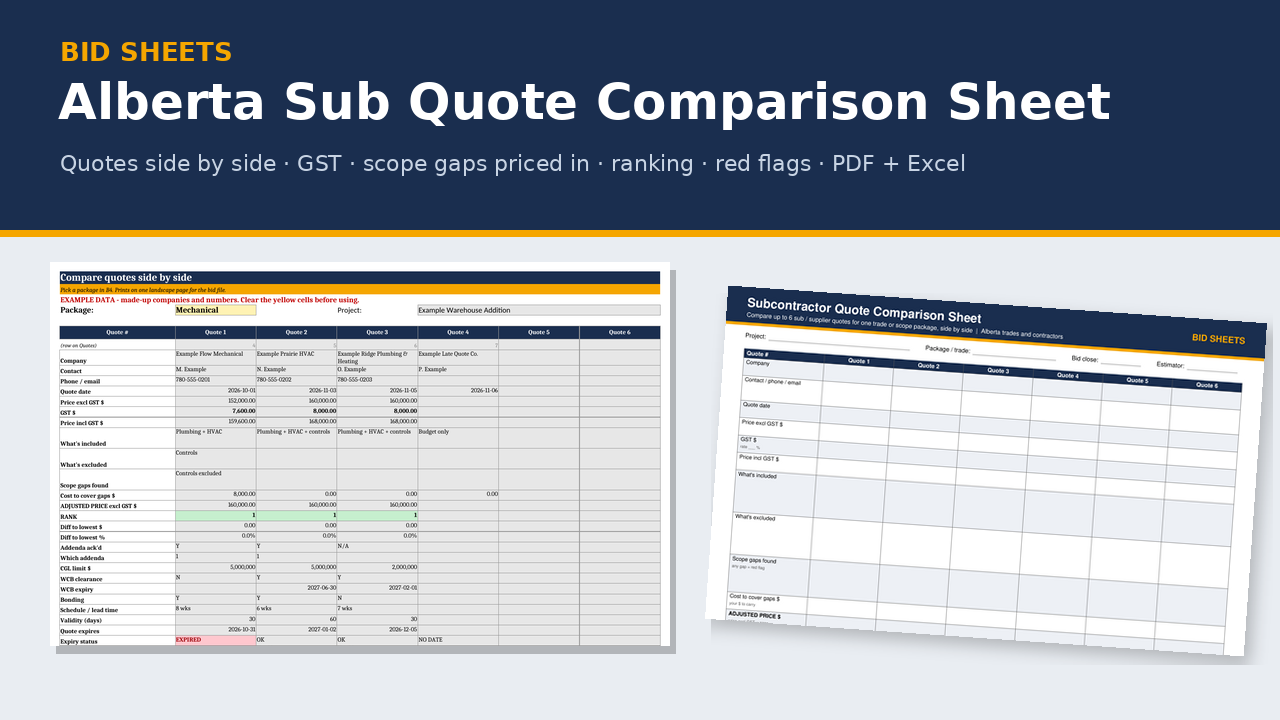
Three sub quotes, three different scopes. This sheet lines them up so you compare like with like before you pick one.
What's in the zip
- EXAMPLE workbook (.xlsx), filled in with made-up companies and numbers, labelled EXAMPLE
- BLANK workbook (.xlsx)
- Printable 2-page landscape PDF form for the truck or the site trailer
- README quick start
- 6 tabs: Instructions · Setup · Packages · Quotes · Compare · Summary
Excel version
- Up to 6 quotes side by side per package, up to 10 packages
- GST totals calculated for you
- Adjusted price after you enter the cost of any scope gaps
- Ranking and difference to the lowest price
- Red-flag count per quote: missing WCB clearance, missing insurance, addenda not acknowledged, expired quote, and scope gaps. Bonding and holdback are shown on the sheet but not counted as red flags.
- Quote expiry check against your bid close date
- Printable compare page and summary page for the bid file
- Pick-and-why line for each package
- No macros; Excel 2016 or newer
Who it's for
Alberta estimators, general contractors and trades who collect sub and supplier quotes at bid time.
FAQ
Does it work in Google Sheets? You can upload it, but Google Sheets shows the pop-up help differently (or not at all), drops the sheet protection and ignores the print layouts. Use Excel for printing.
Does it check WCB, insurance or lien rules for me? No. It records what each quote shows and flags what's missing. Check current WCB-Alberta clearance, prompt payment and lien holdback rules, and the insurance and bonding requirements in your own contract documents.
What about GST? The price is CA$15. No GST is charged.
Disclaimer: a comparison aid, not legal, insurance or tax advice. Example companies and numbers are made up.
About the maker
Built by a tradesperson with 35 years in fabrication and construction across Western Canada.
Compatibility (spreadsheets)
- Made for Microsoft Excel 2016 or newer, Windows or Mac. Plain .xlsx with no macros.
- LibreOffice Calc (free): every workbook recalculates with no formula errors.
- Does it work in Google Sheets? You can upload the .xlsx and open it in Google Sheets, but Sheets drops the sheet protection (so grey formula cells can be typed over) and ignores the print layouts. For printing, Excel is recommended.
- Not tested in Apple Numbers.
- Type in the yellow cells. Grey formula cells are locked (no password), so you can't break a formula by accident.
- Grab the free Bid Go/No-Go Scorer first. It's built the same way, so if it opens and works on your computer, the paid sheets will too.
Licence
One-business licence: use it across your business (all its sites and crews) on as many jobs as you like. Please don't resell, share or publish the blank templates or blank form outside your business. Completed job files and filled-in forms can go to your clients, prime contractors, auditors and regulators.
Refund policy
Because these are digital downloads, I don't offer refunds once a file has been delivered. Please check the compatibility list above before you buy, and grab the free Bid Go/No-Go Scorer to test on your computer first. If a file won't open or something isn't working, email me at support@bidsheets.ca and I'll help you sort it out.
Updates
Buyers get the 2027 update free. I'll email you the new version when it's ready. Each January I refresh the payroll rates (CPP, EI, WCB) in the estimating workbook and fab calculator, re-check the Alberta OHS and prompt-payment references in the safety and billing products, and re-check the standards references in the takeoffs.
Support
Questions? Email support@bidsheets.ca. I usually answer within 2 business days.