
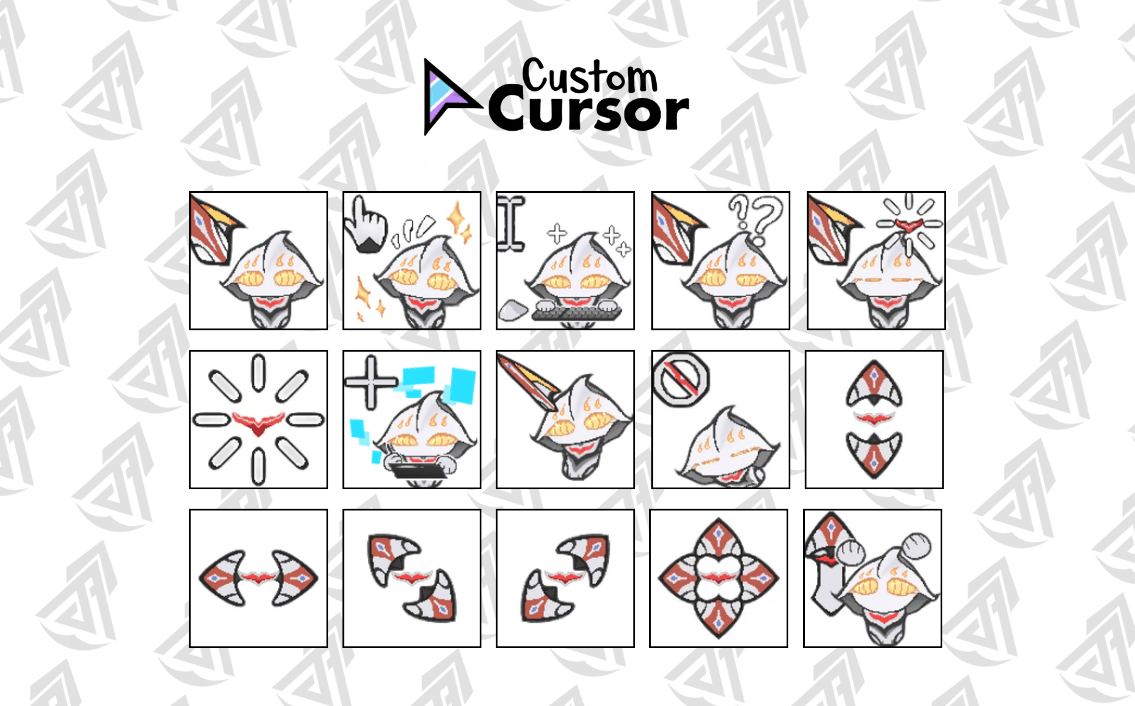
Ultraman Nexus Anphans Custom Windows Cursor Pack (128x128 HD)
On Sale
$20.00
$20.00
✨ Ultraman Nexus Anphans Custom Windows Cursor Pack (128x128 HD) ✨
Level up your desktop aesthetic with this adorable, hand-drawn Ultraman Nexus Anphans custom cursor bundle! Perfect for fan collections, desktop customization lovers, and daily productivity with a cute ultra touch.
📦 What’s Included in the Bundle ($20 USD):
You will receive a complete set of 15 ready-to-use .cur files in high-definition 128x128 pixel resolution:
- 🎯 Normal Select: Nexus Anphans Pointer
- 🔗 Link Select: Happy Sparkle Pointer (Hand Click)
- ✍️ Text Select: Typing / I-Beam Cursor
- ❓ Help Select: Question Mark Pointer
- ⏳ Busy / Working: Glowing Core Pulse
- 🎯 Precision Select: Crosshair Target
- 🖊️ Pen / Drawing Select: Drawing Stylus Mode
- ↗️ Diagonal Resize 1: Angle Scale Pointer
- 🚫 Unavailable: Disabled / No Entry Sign
- ↕️ Vertical Resize: Up-Down Stretch Arrow
- ↔️ Horizontal Resize: Left-Right Stretch Arrow
- ⤢ Diagonal Resize 2: Top-Right / Bottom-Left Scale
- ⤡ Diagonal Resize 3: Top-Left / Bottom-Right Scale
- 🔄 Move / Pan: 4-Way Move Anchor
- 📍 Location / Alternate Select: Alternate Pointer
🛠️ Product Features:
- 💎 High Resolution: Ultra-sharp 128x128 px quality (no pixelation or blur on HD/4K screens).
- ⚙️ Perfect Hotspots: Calibrated click points (center-aligned for resize cursors) for smooth, accurate clicking.
- 🖥️ Compatibility: Fully compatible with Windows 10 & Windows 11.
- 📁 Format: Pre-converted .cur files (ready to apply in Windows Mouse Settings in seconds).
💡 Easy Alternative Setup (Browser Extension):
If you prefer an effortless setup without changing system settings, these .cur files are also compatible with the Custom Cursor extension for Chrome/Edge! Just upload the cursors directly through the extension app to instantly use them while browsing
📥 How to Install:
- Download & extract the .zip file.
- Go to Windows Settings $\rightarrow$ Bluetooth & Devices $\rightarrow$ Mouse $\rightarrow$ Additional Mouse Settings.
- Go to the Pointers tab, click Browse..., and select the corresponding .cur file for each cursor type.
- Click Apply and enjoy your custom desktop setup!
⚠️ Terms of Use: This is a digital download product. Personal use only. Re-selling, redistributing, or modifying for resale is strictly prohibited.