
PIXEL ARC SATURATOR
PIXEL ARC Saturator
**Version:** 1.0.0
**Format:** VST3
**Platform:** Windows x64
**Publisher:** PIXEL BEATZ
PIXEL ARC Saturator is an original, blue-themed saturation effect for adding console-inspired drive, harmonic color, and tone shaping to vocals, drums, bass, guitars, and other sources.
Install
1. Close your DAW.
2. Extract `PIXEL-ARC-Saturator-v1.0.0-Windows-x64.zip`.
3. Copy the complete `PIXEL ARC Saturator.vst3` folder into `C:\Program Files\Common Files\VST3`.
4. Open your DAW and run its VST3/plugin scan if the effect does not appear automatically.
5. Insert **PIXEL ARC Saturator** as an effect on an audio track.
The release contains a 64-bit Windows VST3. It does not include a VST2 build, macOS build, standalone application, installer, or signed installer. The VST3 bundle is portable; do not move only the binary from inside its `Contents` folder.
Signal path and controls
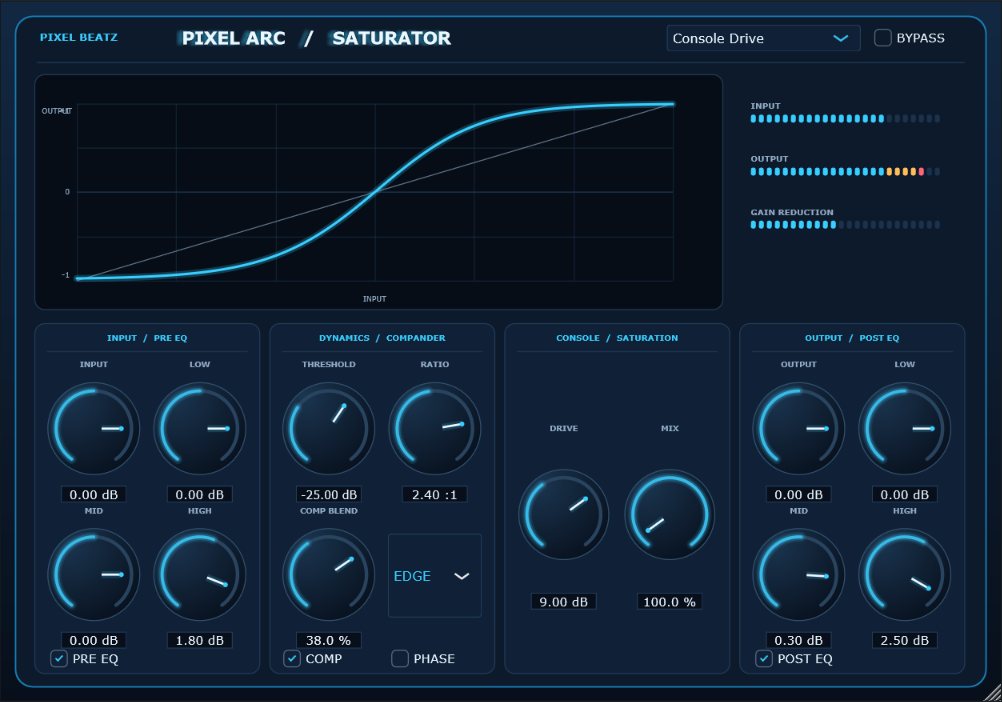
The processing path is Input → Pre EQ → Compander → Console saturation → Post EQ → Output. The plugin supports mono and stereo buses, four-times oversampling, host automation, saved state, and ten factory programs.
- **Input / Output** adjust gain before and after processing.
- **Pre EQ / Post EQ** provide low shelf (200 Hz), mid bell (740 Hz), and high shelf (2.55 kHz) tone shaping.
- **Compander** controls threshold, ratio, blend, and phase for level-dependent band excitation.
- **Console Character** selects Round, Edge, or Off.
- **Drive / Mix** set nonlinear drive and parallel dry/wet balance.
- **Preset selector** loads the factory programs: Console Drive, Console Glue, Vocal Air, Drum Bite, Bass Focus, Guitar Push, Parallel Colour, High Exciter, Crunch, and Clean Through.
- **Bypass** lets you compare the processed signal with the plugin bypassed.
The default is the more forward **Console Drive** setting. Lower Drive or Mix for subtler coloration and use Output to level-match comparisons.
Compatibility
Windows 10 or Windows 11 (64-bit) and a 64-bit DAW that supports VST3 effects are required. The installed bundle reports a fixed oversampling latency to the host for delay compensation. Performance and behavior can vary by DAW, buffer size, sample rate, and project load.
## Product and reference note
This is an independently written effect inspired by broad analog console saturation concepts. It does not contain Waves code, presets, or assets and does not claim exact sonic equivalence to another manufacturer's product. The supplied audio references informed initial voicing only; no level-matched blind test against a running commercial reference plugin is claimed.
## Licensing and release status
This build uses JUCE 8.0.6. JUCE is dual-licensed; review the applicable JUCE license and ensure your distribution model and revenue meet its current terms before publishing or selling this binary. See the [JUCE licensing FAQ](https://juce.com/get-juce/) and [JUCE 8 EULA](https://juce.com/legal/juce-8-licence/). This README is not legal advice.
This is a Windows x64 VST3 release package. It is not code-signed, and it has not been validated in every DAW or certified by a plugin compatibility test suite. Test it in your target hosts and sign the package if your distribution platform or customers require publisher verification.
## Build from source
The source project is generated with JUCE 8.0.6 and Visual Studio 2022. Open `projucer-conversion806/PixelArc/PixelArc.jucer` with Projucer, save/regenerate the Visual Studio project, then build `PixelArc_VST3.vcxproj` using **Release | x64**. The checked-in exporter points at the local JUCE checkout used for this build; adjust that module path for another development machine.