


Universal File Converter for Windows – Portable All-in-One File Conversion Tool for Images, Audio, Video, Documents & Data Files
Universal File Converter for Windows
Powerful All-in-One File Conversion Tool for Windows Users
Convert images, audio, video, documents, and data files from one format to another with Universal File Converter, a powerful all-in-one desktop application for Windows. Designed for productivity and convenience, this portable application lets you handle dozens of common file conversions from a single interface.
Whether you're a student, content creator, office worker, or professional, Universal File Converter helps you quickly transform files without relying on online services.
No installation required. No internet connection required.
✅ What’s Inside the ZIP Folder:
- UniversalConverter.exe – The main Windows application (portable, no installation required)
- README.txt – Quick start guide with setup and usage instructions
- LICENSE.txt – License and usage information
✅ Key Features:
Convert files across multiple categories using one easy-to-use desktop application.
Features include:
- Support for image, audio, video, document, and data conversions
- Convert files completely offline without uploading to third-party websites
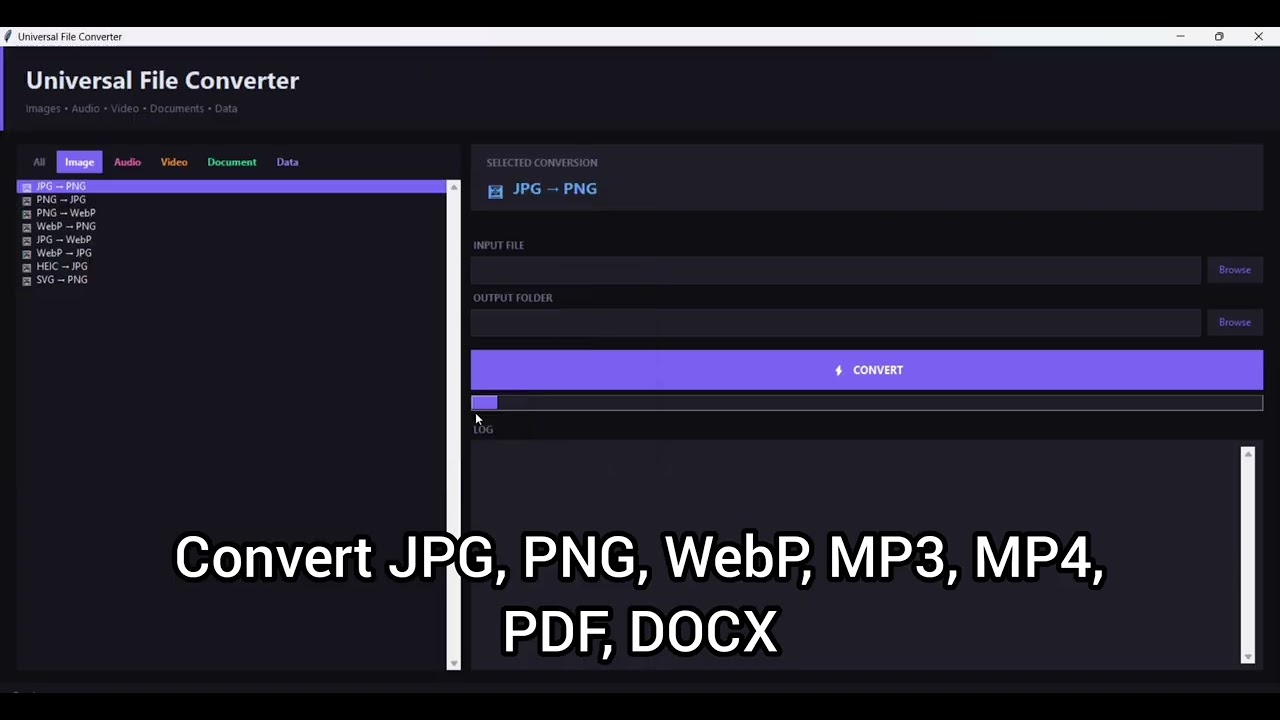
- Clean and user-friendly interface with category tabs
- Built-in FFmpeg engine for audio and video processing
- Fast file conversion with customizable output locations
- Portable application no installation required
- Organize conversions by category for quicker workflow
- All converted files are saved directly to your selected output folder
✅ Supported Conversion Types
Images (8 Conversions)
- JPG ⇄ PNG
- PNG ⇄ WebP
- JPG ⇄ WebP
- HEIC → JPG
- SVG → PNG
Audio (7 Conversions)
- MP4 → MP3
- MP3 ⇄ WAV
- MP3 ⇄ AAC
- WAV ⇄ FLAC
Video (9 Conversions)
- Video → MP3 (MP4, MKV, AVI, MOV, WEBM)
- MP4 ⇄ MKV
- MP4 ⇄ AVI
- MP4 ⇄ MOV
- MP4 ⇄ WEBM
Documents (8 Conversions)
- PDF → DOCX
- PDF → TXT
- PDF → PPTX
- DOCX → PDF (requires Microsoft Word)
- PPTX → PDF (requires Microsoft PowerPoint)
- XLSX → CSV
- CSV → XLSX
- CSV → JSON
Data / Web (4 Conversions)
- JSON ⇄ CSV
- JSON ⇄ XML
- XML → JSON
- HTML → PDF (requires GTK3 Runtime)
✅ Easy to Use
- Extract the ZIP file.
- Double-click UniversalConverter.exe.
- Select a conversion category and choose the desired conversion type.
- Browse and select your input file.
- Choose an output folder.
- Click CONVERT.
- Your converted file will be automatically saved to the selected location.
✅ Perfect For
Students, Office Workers, Content Creators, Video Editors, Digital Professionals, Developers, Small Business Owners, Freelancers, and anyone who regularly works with multiple file formats.
🎁 Instant Digital Download
Purchase once and use the application anytime on your Windows PC.
No subscriptions, no recurring fees, and no installation required.
Simply download, extract, and start converting files in minutes.
⚠️ Important Note:
This is a digital product only. No physical item will be shipped.
The application is provided as a downloadable ZIP file containing the executable and documentation files.
Some conversion features may require additional software such as Microsoft Word, Microsoft PowerPoint, or GTK3 Runtime.Due to the nature of digital downloads, all sales are final and non-refundable.