
Club Treasurer Ledger (UK)
Instant download, two spreadsheet files.
A cashbook, a subs list and an AGM summary in one file, for the volunteer who looks after the club's money.
If you're the treasurer of a small club, society, allotment association or PTA, you probably keep the books in the evenings, round a day job. This spreadsheet is built for that. Type each receipt and payment into the cashbook and the running balance works itself out. Tick off the subs as they come in. When the AGM comes round, the summary page is already filled in and fits on one sheet of paper.
What you get
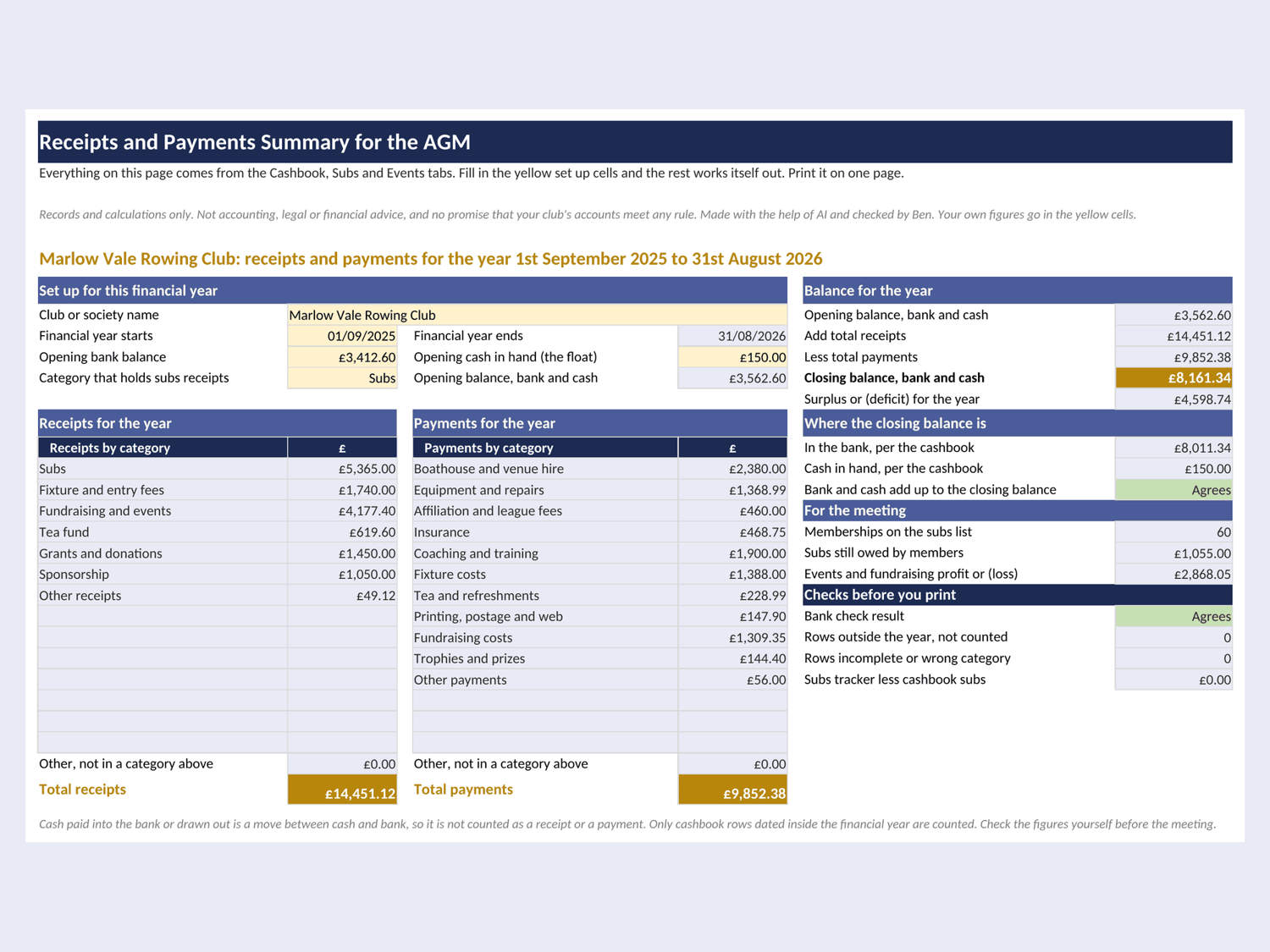
Two files in one download: the blank ledger, ready for your own club, and a filled in example, Marlow Vale Rowing Club (an invented club with 60 members), so you can see every tab working before you start. A quick start PDF is included too.
What's inside
- Cashbook: date, detail, category, in or out, amount, cash or bank, cleared date and a running balance. Room for 250 rows. A row check flags anything incomplete, outside your financial year or in the wrong category.
- Subs: one row per member. Pick full, junior, family, honorary or your own categories. Type the standard sub for each on the Lists tab and it fills in. Type what's been paid and it shows who has paid, who owes, and the total still owed.
- Events and fundraising: income, costs and profit for each quiz night, raffle, fixture day or sale, with a small table that adds them up by type.
- Bank check: type the statement date and balance. It takes off the payments not yet presented, adds the receipts not yet cleared, and compares the answer with your cashbook. It lists up to 20 of the rows that haven't reached the statement and counts the rest. Last year's uncleared cheques and receipts can be carried forward: type them with their old date and they show as Brought forward. There's also a cash count for the float and the kitty.
- AGM summary: type the day your financial year starts and it shows receipts and payments by category, opening and closing balance, where the money is (bank and cash), and a few checks to look at before you print.
- Lists: your own categories and sub rates. Every dropdown comes from here.
How it works
- Make your own copy (Excel: save under a new name. Google Sheets: File, then Make a copy).
- Set up the AGM summary tab with your club name, year start and opening balances.
- Keep the cashbook as you go, then run the Bank check before each committee meeting.
A few honest details
It records and adds up what you type. It doesn't connect to your bank, and it isn't accounting advice. It doesn't claim your accounts meet any rule, so please check what your own club's constitution or governing body asks of you. Cash paid into the bank is entered as two rows and isn't counted as a receipt or a payment. The Start here tab shows how.
Built and tested in LibreOffice Calc, then the example was opened and checked in Excel for the web on 1st November 2026, and the figures matched. It hasn't been tested in Google Sheets yet, so if that's what you use, open the example first. It's a standard .xlsx file with no macros or scripts. Formula cells are locked (no password) and every cell you type in is yellow with a short hint. Dates are UK style, day then month, and money is in pounds.
Who made it
I'm Ben, and I make plain UK spreadsheets for everyday jobs. This one was made with the help of AI and checked by me.
Digital download. Nothing is posted to you.