
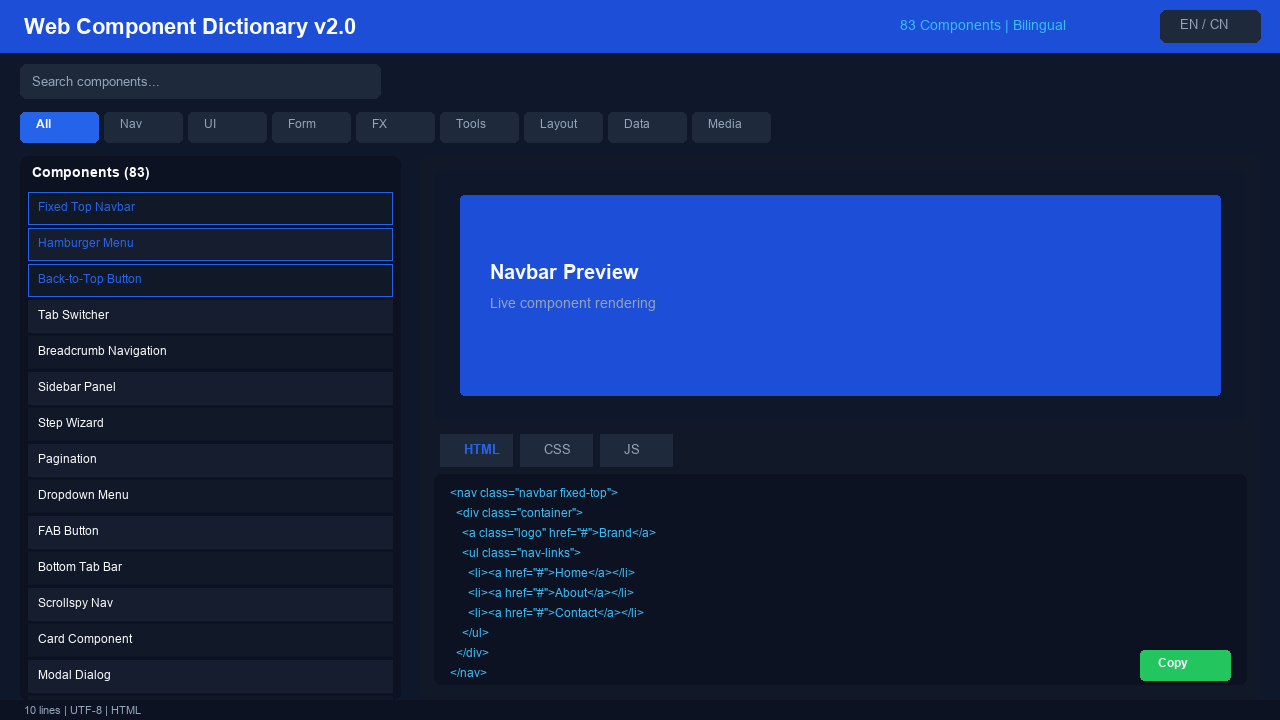
Web Component Dictionary v2.0 — 83 Ready-to-Use Web Components
<h2>Web Component Dictionary v2.0</h2>
<h3>83 Ready-to-Use Web Components — Bilingual (EN/CN)</h3>
<p><strong>Pick a component → Preview live → Copy the code</strong>, all in one self-contained HTML file. No frameworks. No dependencies. Just double-click and start building.</p>
<h3>What's New in v2.0</h3>
<ul>
<li><strong>Expanded from 26 to 83 components</strong> — nearly 3x more coverage</li>
<li><strong>2 new categories</strong>: Data Visualization (8) + Media Components (7)</li>
<li><strong>More layout templates</strong>: 8 total (Holy Grail, Masonry, etc.)</li>
<li><strong>Bilingual UI</strong>: Full Chinese + English interface and component data</li>
<li><strong>Enhanced search</strong>: Filter by name, tags, or functionality in either language</li>
</ul>
<h3>All 83 Components (8 Categories)</h3>
<p><strong>Navigation (12)</strong>: Fixed Top Navbar, Hamburger Menu, Back-to-Top, Tab Switcher, Breadcrumb, Sidebar Panel, Step Wizard, Pagination, Dropdown Menu, Floating Action Button, Bottom Tab Bar, Scrollspy</p>
<p><strong>Content Display (15)</strong>: Card, Modal Dialog, Toast Notification, Accordion, Tooltip, Badge, Avatar, Progress Bar, Tag, List Group, Timeline, Blockquote, Carousel, Image Gallery, Hero Section</p>
<p><strong>Form Elements (15)</strong>: Text Input, Button Styles, Toggle Switch, Select Dropdown, Checkbox, Radio Button, Textarea, Range Slider, Search Box, File Upload, Autocomplete, Form Validation, Date Picker, Color Picker, Multi-step Form</p>
<p><strong>Effects & Animation (10)</strong>: Fade In/Out, Slide In, Bounce, Rotate, Pulse, Skeleton Screen, Parallax Scroll, Typewriter, Particles, Ripple Effect</p>
<p><strong>Utility Tools (10)</strong>: Countdown Timer, Digital Clock, Color Picker, Copy to Clipboard, Image Lightbox, LocalStorage Manager, Lazy Load, Drag & Drop, Fullscreen Toggle, Dark Mode Switch</p>
<p><strong>Layout Templates (8)</strong>: Flexbox Center, CSS Grid, Sticky Footer, Holy Grail Layout, Masonry Grid, Responsive Grid, Overlay Layout, Equal Width Columns</p>
<p><strong>Data Visualization (8)</strong>: Bar Chart, Line Chart, Pie Chart, Radar Chart, Gauge, Heatmap, Donut Chart, Tree Map</p>
<p><strong>Media Components (7)</strong>: Image Carousel, Video Player, Audio Player, Image Compare Slider, Gallery Lightbox, Responsive Video, Playlist Player</p>
<h3>Key Features</h3>
<ul>
<li><strong>Single File</strong>: Everything in widget.html — no install, no setup</li>
<li><strong>Zero Dependencies</strong>: Pure HTML/CSS/JS, runs in any browser</li>
<li><strong>Live Preview</strong>: See the component, edit the code, watch changes in real-time</li>
<li><strong>Code Editor</strong>: Built-in HTML/CSS/JS tabs with syntax-highlighted editor</li>
<li><strong>One-Click Copy</strong>: Copy any code block to clipboard instantly</li>
<li><strong>Responsive</strong>: Works on desktop and mobile</li>
<li><strong>Searchable</strong>: Find components by name, tags, or description</li>
<li><strong>Bilingual</strong>: Switch between Chinese and English with one click</li>
</ul>
<h3>Bilingual Support</h3>
<p>This tool supports both <strong>Chinese and English</strong> throughout:</p>
<ul>
<li>Click the language toggle button in the header to switch</li>
<li>All UI text, component names, and descriptions are available in both languages</li>
<li>Default language auto-detects from browser settings</li>
</ul>
<h3>Who Is This For</h3>
<ul>
<li><strong>Frontend beginners</strong>: Learn by seeing live examples and reading clean code</li>
<li><strong>Developers</strong>: Skip the boilerplate — copy-paste and customize</li>
<li><strong>Product managers / Designers</strong>: Demo interactions without writing code</li>
<li><strong>Educators</strong>: Teach web development with interactive examples</li>
</ul>
<h3>How to Use</h3>
<ol>
<li>Extract <code>web-component-dictionary-v2.0.zip</code></li>
<li>Double-click <code>widget.html</code> to open in your browser</li>
<li>Browse components on the left panel</li>
<li>Preview live on the right, edit the code, and copy what you need</li>
<li>Paste into your project and go</li>
</ol>
<h3>Version History</h3>
<ul>
<li>v1.0: 26 components, 6 categories</li>
<li>v2.0 (current): 83 components, 8 categories, bilingual support</li>
<li>v3.0 (planned): Advanced components (maps, rich text editor, etc.)</li>
</ul>
<p><strong>Purchase now and get lifetime free updates.</strong></p>
<p><em>Disclaimer: This product is provided "as is" without warranty. See DISCLAIMER.md for details.</em></p>