
Distance Designer — Cinematic Perspective in One Move
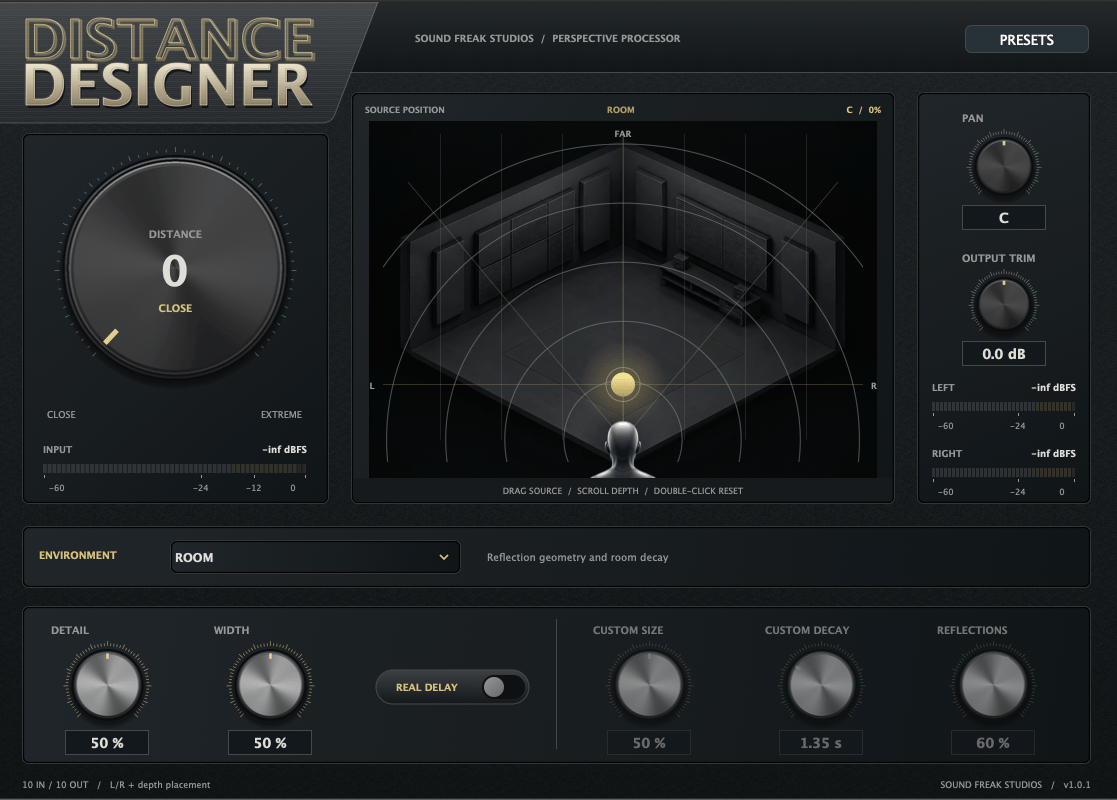
Bring dialogue, Foley and sound effects into the scene. Distance Designer combines tonal shaping, reflections, ambience and optional propagation delay to help close recordings feel farther away.
Move the source in the interactive display, choose an environment, and shape the result with Detail, Width, Pan and Output Trim.
Features
- 28 environments, including rooms, streets, forests, tunnels, cathedral, stadium and valley.
- Environment artwork that changes with your selection.
- Custom environment controls for Size, Decay and Reflections.
- Left/right panning, including mono-to-stereo processing.
- Optional Real Delay for distance-related timing.
- Factory presets, user preset saving and host automation.
- Native AAX for Pro Tools, including AudioSuite processing.
Mac compatibility
Requires macOS 12 Monterey or later and a compatible 64-bit audio host. Universal builds support Intel and Apple Silicon.
Includes AAX Native, VST3 and AU in one signed, Apple-notarized installer. Your DAW must also support your macOS version and the selected plugin format.
Windows compatibility
Requires Windows 11 (64-bit) on an Intel or AMD x64 computer and a compatible 64-bit audio host.
Includes AAX Native and VST3. The Windows AAX version is compatible with legacy Pro Tools versions, including Pro Tools 12. Your DAW must support your operating system and the selected plugin format.
Supports mono, mono-to-stereo, stereo, 5.0, 5.1, 7.0, 7.1, 7.0.2 and 7.1.2 layouts where supported by the host. Stereo or compatible multichannel output is required for panning.
Get started
- Quit your DAW and run the installer for your platform: .pkg for Mac or .exe for Windows.
- Reopen your DAW and insert Distance Designer.
- Activate with your purchase email and license key, or choose Try Demo — 14 Days.
- Select an environment and raise Distance to place the sound farther away.
- Adjust Pan, Detail and Width, then save your sound as a preset.
For AudioSuite, include enough extra selection length to capture the reverb tail.
License and demo
One license supports two computers. Internet is required for initial activation; paid authorization supports up to 30 days offline before renewal.
The same installer includes a 14-day demo. After expiry, the interface dims and audio passes through dry until activated. No customer iLok license or USB dongle is required for Distance Designer.
Windows version planned. The current download is for macOS; Windows requirements and availability will be announced separately.
Support: hello@soundfreakstudios.com