

Subathon Timer — 20 Designs, Subs & Bits Add Time by Themselves (OBS)
A countdown timer for subathons and marathon streams, in 20 designs.
Subscriptions, gift subs and bits add time on their own. Add view.html to OBS as a Browser Source (tick "Local file"), then add panel.html the same way as a second Browser Source — drag it outside the black canvas in the OBS preview so it is not streamed (hiding it with the eye icon also works, but the panel's display, such as the selection highlight, may then not update), right-click it and choose "Interact", and type your Twitch channel name there. No account to connect, no API key, no OAuth screen, no bot to invite to your channel, and no monthly service sitting in the middle of your stream.
It also works as a plain countdown if you just want a timer on screen.
20 designs
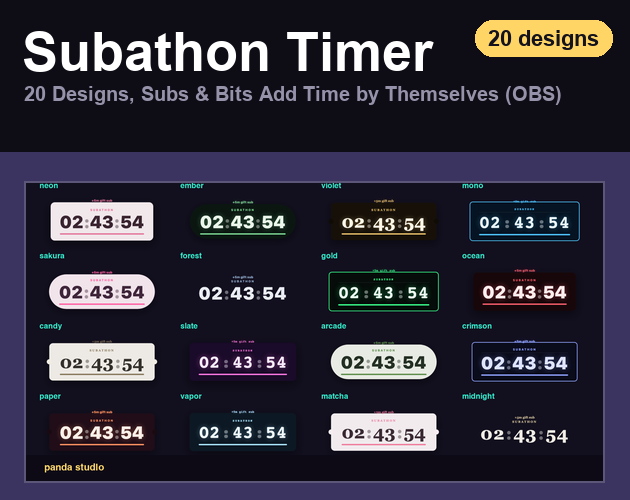
Each one is a different palette on one of five shapes (panel, chip, frame, ticket, tape) with its own font, so they look genuinely different rather than being the same box recoloured:
neon, ember, violet, mono, sakura, forest, gold, ocean, candy, slate, arcade, crimson, paper, vapor, matcha, midnight, sunset, ice, rose, ink.
You decide what each event is worth
- Subscription (default 5 minutes)
- Gift sub, counted for every gift in a batch (default 5 minutes each)
- Per 100 bits (default 1 minute)
- An optional ceiling, so a raid of gift subs cannot run the clock away from you
A small pop-up appears above the timer whenever time is added, so viewers can see their sub landed.
Built for a long stream
- The remaining time is stored, so refreshing the browser source or restarting OBS does not lose your timer
- Pause and resume at any point
- Add or remove time by hand (+1 min, +5 min, +1 hour, -5 min)
- Transparent background, so it sits over anything
- Nothing you type is uploaded anywhere. Twitch direct needs an internet connection to read chat (read-only, no account); without it, the widget makes no connection of its own
Honest note: follows are not detected. Twitch does not send follows over chat, so there is nothing to read without linking an account. Use the +1 min button for those.
Try it before you set anything up: open view.html?demo and it counts down with sample subs and bits arriving.
OBS 30.x or newer recommended, Windows / macOS. Also works with OneComme. Commercial use OK, modification OK, free updates.