

HSK 3.0 Level 1 — 300-Word Anki Deck (with Audio)
Includes the first 300 vocabulary items from the 2025 HSK 3.0 syllabus, complete with 300 accompanying audio clips.
• Follows the official HSK 3.0 sequence—the vocabulary numbering (1–300) aligns perfectly with the syllabus, ensuring that high-frequency words are prioritized.
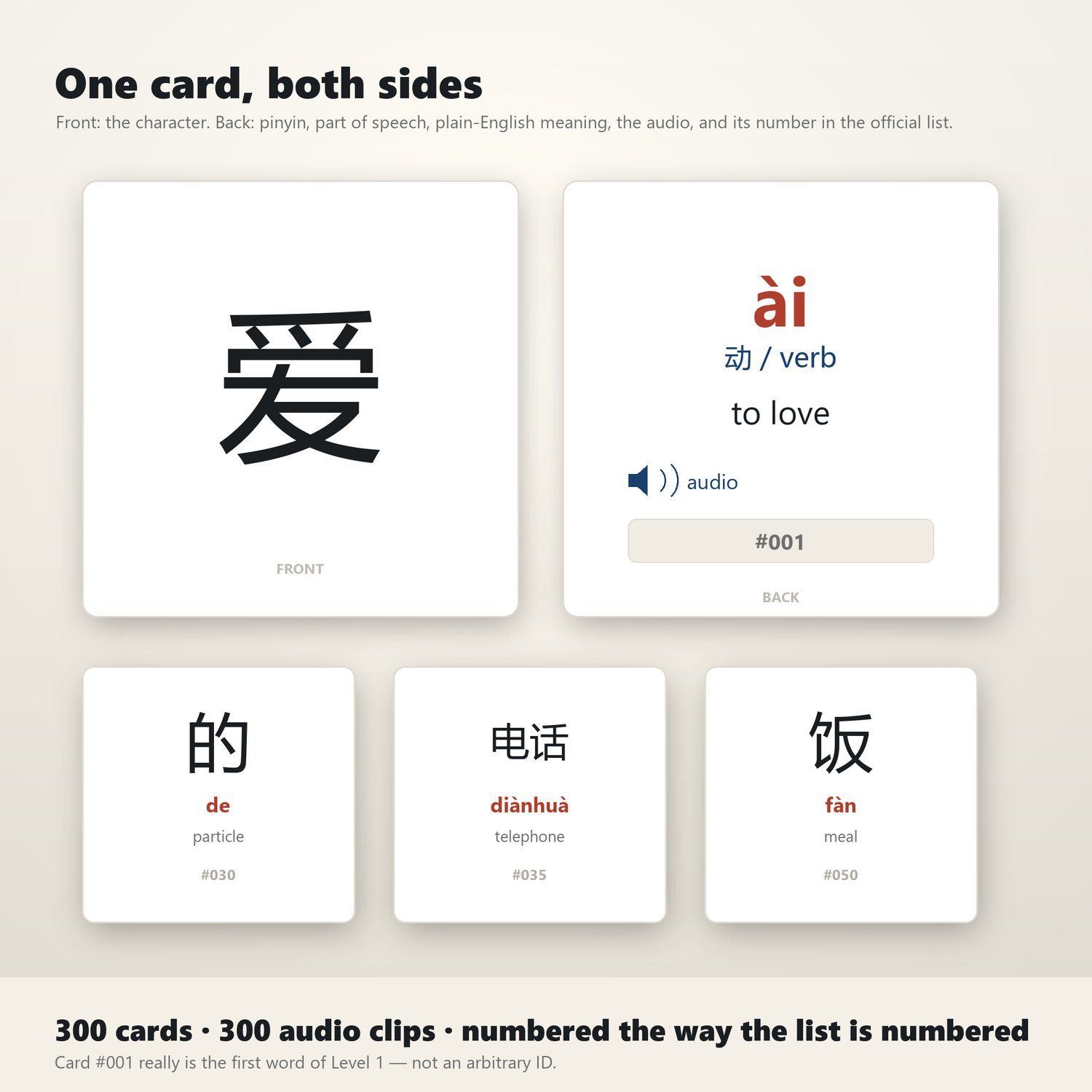
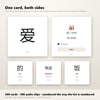
• 300 flashcards with 300 audio clips—the front displays the Chinese character, while the back provides the Pinyin, part of speech, definition, and pronunciation.
• Bonus content: Includes an additional, separate deck containing 246 "Level 1 Reading Characters"—get two decks for the price of one.
• Highly versatile—provided in `.apkg` format for use with Anki (Desktop, AnkiDroid, and AnkiMobile), as well as in `.tsv` format for easy import into Quizlet, Excel, or other applications of your choice.
• No complex setup required—there is no need to configure card templates, re-link media files, or map fields. Simply click "File" > "Import" to get started.
**Most Chinese learning decks currently on the market are still based on the HSK 2.0 standard.**
The 2025 syllabus sets the Level 1 vocabulary count at 300 words (up from 150 in the previous version). If you use an older deck created years ago, your study material will no longer align with current exam requirements—a discrepancy you might not discover until you actually sit for the test.
This deck is built according to the latest syllabus. The number on each card corresponds to its official position in the syllabus; for instance, card #001 is the very first word in the Level 1 list, and the first 100 cards cover the most frequently used vocabulary. When Anki displays "#127," it reflects your actual progress through the syllabus, rather than just an arbitrary number. What you will receive:
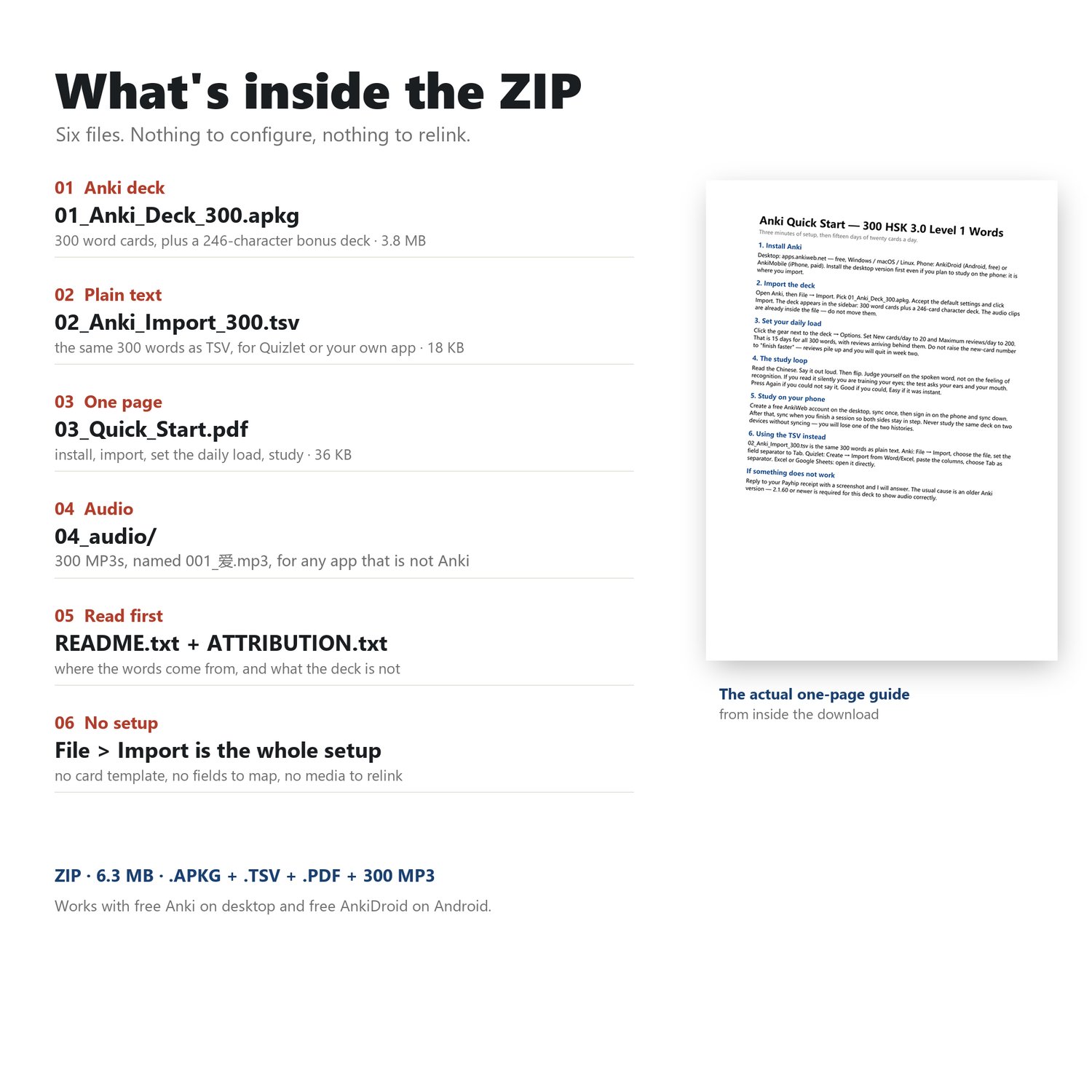
• `01_Anki_Deck_300.apkg` — Contains 300 vocabulary flashcards (each with accompanying audio), plus an additional set of "Level 1 Reading Kanji" (246 characters, no audio). • `02_Anki_Import_300.tsv` — A tab-separated text file containing the same 300 vocabulary items,
suitable for use with Quizlet, Excel, Google Sheets, or your own custom applications.
• `03_Quick_Start.pdf` — A one-page guide covering installation, importing, setting your daily study volume, and learning methods.
• `04_audio/` — Contains 300 MP3 audio files (e.g., `001_爱.mp3`),
which can be used in applications other than Anki.
Flashcard Example
Front: 爱
Back: ài · Verb · to love · [Audio] · #001
These flashcards do not include example sentences. This is a "recognition-based" deck,
designed to help you master word meanings and pronunciations. Example sentences should be incorporated at a later stage through reading and speaking practice.
Decks that cram example sentences onto every card may appear comprehensive, but they often end up slowing down your learning progress.
Study Tips
Aim to learn 20 new cards per day. This will allow you to complete all 300 vocabulary items in 15 days,
while also keeping up with your ongoing reviews. Before flipping a card, be sure to read the word aloud—
reading silently only trains visual recognition, whereas reading aloud engages both your auditory sense and your speaking ability.
If you only have ten minutes a day, focus on the words at the beginning of the deck;
the rest can be learned later. The deck has already been organized by priority.
**Do I need to purchase the paid version of the Anki app?**
No, you do not. The desktop version of Anki and the Android version, AnkiDroid, are both free. Only AnkiMobile (for iPhone) requires a purchase; this is the official pricing set by the Anki developers, for which I am not responsible.
**Is this a PDF file?**
No. This product includes an Anki deck file (.apkg), a text file (.tsv), a one-page PDF guide, and 300 MP3 audio files. If you require printable materials, please purchase the $19 bundle instead.
**Can I edit these cards?**
Yes. Once imported, you are free to edit them, reorder them, or merge them into your own existing decks.
**Can it be used offline?**
Yes. All content is contained within the files. You also have the option to sync your data using a free AnkiWeb account (syncing is entirely optional).
**What should I do if the audio doesn't play?**
Please check your Anki version and ensure it is 2.1.60 or higher. If the issue persists, please reply to your purchase confirmation email, and I will assist you in resolving it.
This product uses the standard .apkg file format and can be opened by any application that supports .apkg imports.
You are not locked into any specific app store, and no additional purchases are required. Android — Free
Download and install the free AnkiDroid app from Google Play. Unzip the downloaded file, tap on the .apkg file, and select
AnkiDroid. That’s all there is to the setup process.
iPhone / iPad — There are three options, two of which are free:
1. Free apps that support direct .apkg file imports—such as sumi, MintDeck, and MemU. All three of these apps
preserve the original audio. Note that MintDeck requires iOS 18 or later. These are
third-party applications and are not developed by the official Anki team. If you encounter issues—such as missing audio
or a discrepancy in the number of cards displayed compared to what was advertised—Try another option—the file itself is
perfectly fine. We recommend using the desktop version of Anki or AnkiMobile.
2. Free method (requires a computer): Install the free desktop version of Anki on your Windows or Mac,
import the .apkg file into it, and sync it to a free AnkiWeb account.
You can then study by visiting ankiweb.net via the Safari browser on your phone. Since AnkiWeb itself does not support direct .apkg file imports,
the initial import must be done using a computer. Additionally, using the web-based version
requires an active internet connection.
The audio files in the “04_audio” folder can be played using various media players—but please note that this package contains only the study deck. If you are looking for printable flashcards, please check out the “Starter Kit,” available for $19.