


Christmas & Holiday Budget + Gift Tracker 2026 – Spreadsheet for Excel & Google Sheets
Keep Christmas from turning into a January credit card bill. This tracker puts your whole holiday budget, gift list and spending in one place, so you always know what's left.
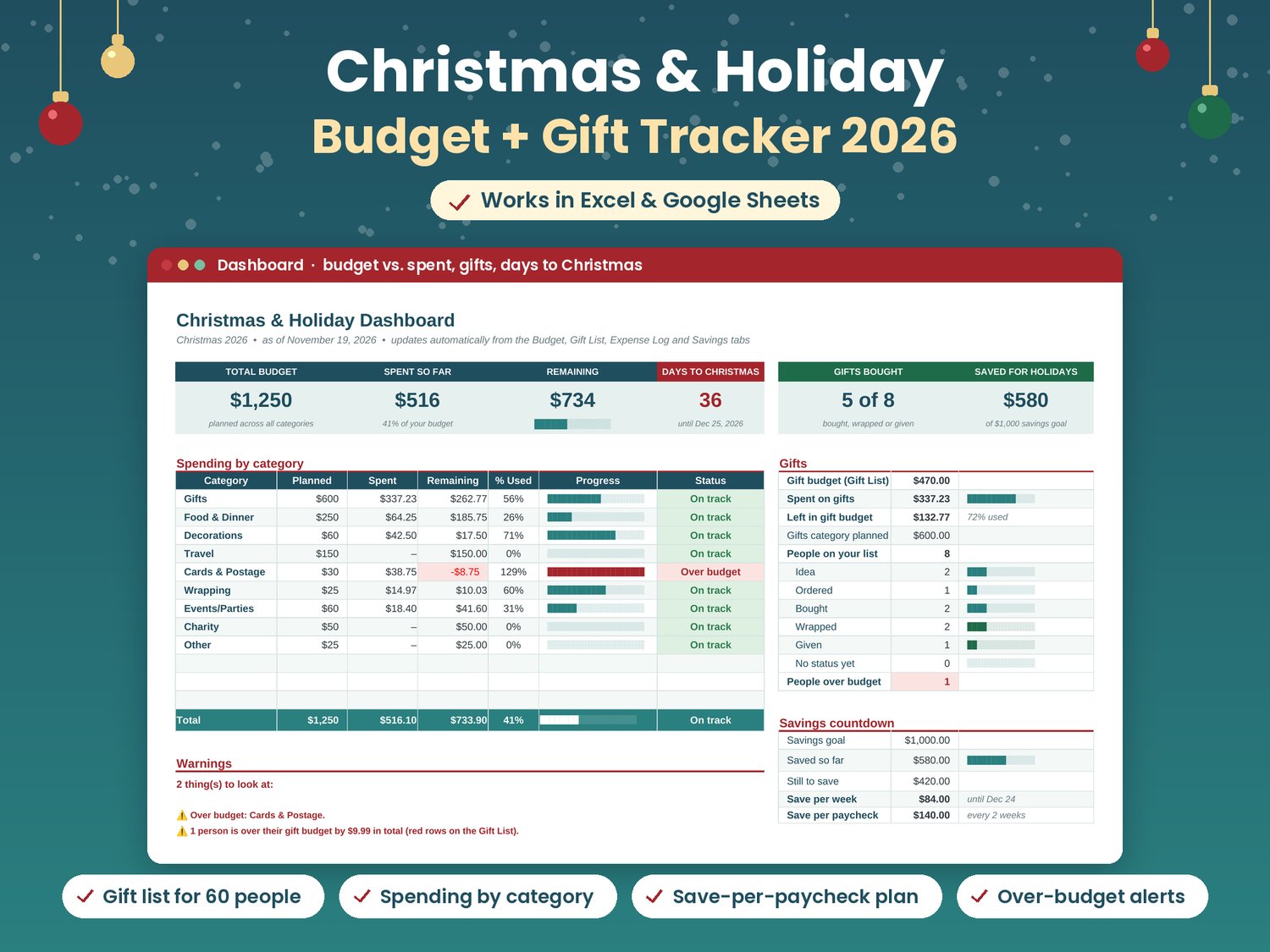
Set a planned amount for each category: gifts, food, decorations, travel, cards, wrapping, parties, charity and more. List everyone you're buying for with a per-person budget and track each gift from Idea to Ordered, Bought, Wrapped and Given. Log each purchase in a few seconds with dropdowns, and the Dashboard shows budget vs. spent vs. remaining, progress bars for each category, gift progress, days until Christmas and clear over-budget warnings. A Check column catches typos and amounts typed as text, so nothing slips through the cracks.
Money tight or income uneven? The Savings Countdown tells you exactly how much to put aside per week or per paycheck until December 24, with a simple weekly checklist.
No macros or add-ons. Just open it and start.
WHAT'S INCLUDED
- 1 spreadsheet file (.xlsx) with 6 tabs:
- Start Here: a 10-minute setup guide, color key, Google Sheets steps and how to reuse it next year
- Dashboard: total budget, spent and remaining, spending by category with progress bars, gift budget vs. gift spending, gifts bought/wrapped/given, days until Christmas, savings snapshot and over-budget warnings
- Budget: 9 ready-made categories plus 3 of your own, with planned vs. actual (added up from the log) and a status for each
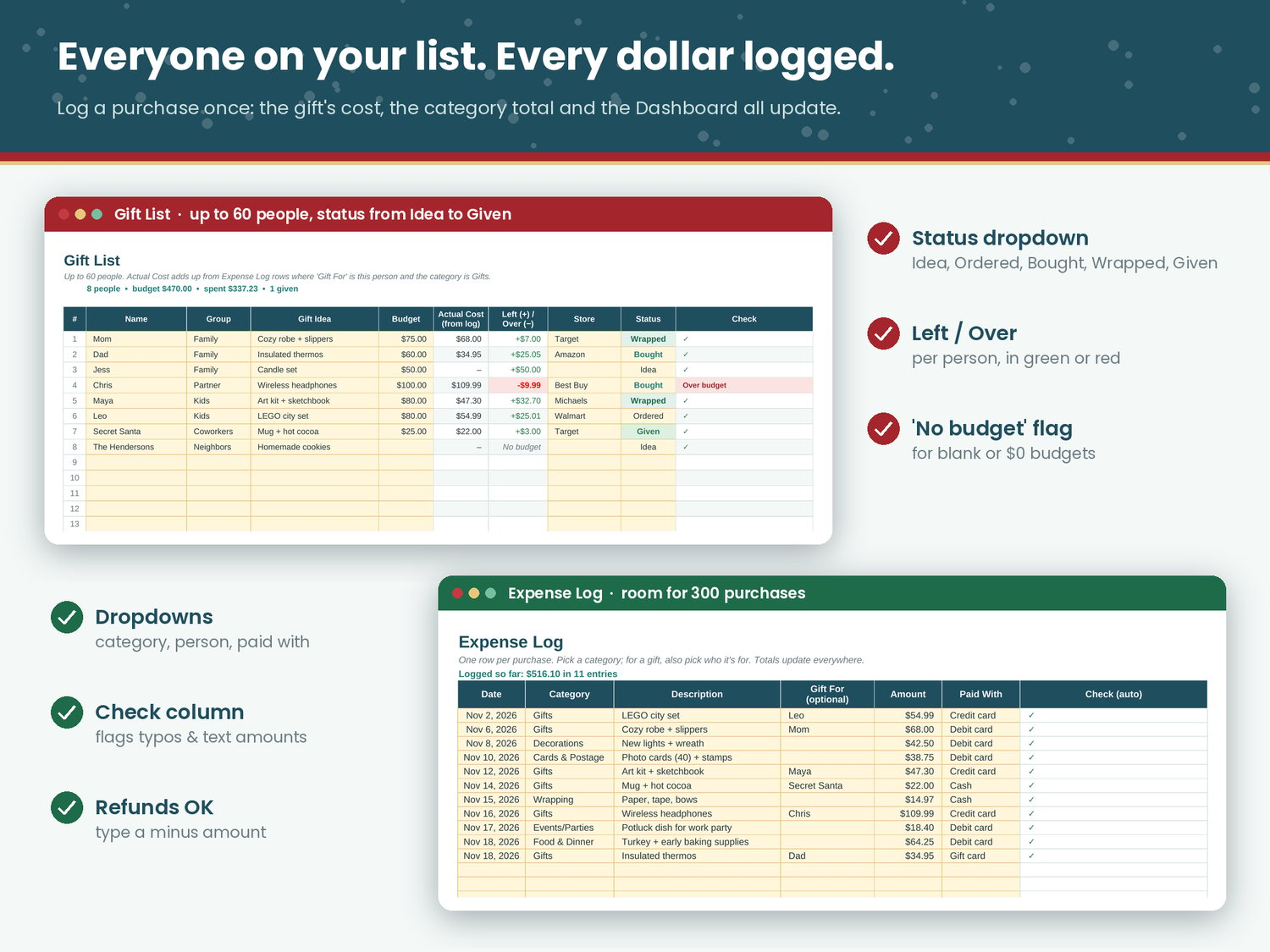
- Gift List: up to 60 people with group, gift idea, budget, actual cost, left/over, store and status
- Expense Log: room for 300 purchases with category, "gift for" and paid-with dropdowns, plus a Check column that flags anything not counted
- Savings Countdown: savings goal, saved so far, how much to save per week and per paycheck until Dec 24, and a weekly checklist
- Editable year and a "Notes for next year" area, so you can reuse it every Christmas
- Example budget, gifts and purchases so you can see how it works (delete them when you're ready)
- Print-ready pages
HOW TO USE IT
Excel (Windows, Mac or Excel for the web): download the .xlsx file and open it. On the Budget tab, set your planned amounts. Add the people you're buying for on the Gift List, then log each purchase in the Expense Log (for a gift, pick the person in "Gift For"). The Dashboard updates automatically. Only type in the cream-shaded cells; everything else is a formula.
Google Sheets: in Google Drive, click New > File upload and choose the .xlsx file. Open it, then go to File > Save as Google Sheets. All formulas, dropdowns and progress bars carry over. Then follow the same steps as above.
It also opens in LibreOffice Calc. It uses only functions that both Excel and Google Sheets support.
NOTE
This product was made with AI assistance.
Personal use only. This is a budgeting tool, not financial advice.