

AI 에이전트 스킬 팩 — SKILL.md 20종 | Agent Skill Pack — 20 SKILL.md Files
[한국어]
AI 에이전트가 자주 하는 일 20가지를 정해진 단계와 형식으로 하게 만드는 SKILL.md 파일 모음입니다.
받는 것
• 스킬 폴더 20개(skills.zip), 각각 SKILL.md 1개: YAML 머리말(name, description) + 단계·규칙·출력 형식
• 예: 회의 메모→할 일 표, 버그 리포트, 코드 리뷰, 커밋 메시지, 변경 기록, 주간 보고, 고객 답장 초안, SKILL.md 점검
• 형식 검사 스크립트(validate_skills.py)
• PDF 2개(한국어판·영어판, 20개 파일 전문 포함). 파일 본문은 영어입니다.
• 파일 검사 결과와 실제 AI 비포/애프터 실행 기록
이럴 때 씁니다
• 회의 메모를 결정·할 일·남은 질문으로 정리할 때
• 막연한 오류 설명을 재현 가능한 버그 리포트로 바꿀 때
• 코드 변경을 같은 기준으로 리뷰하고 싶을 때
• 내가 만든 SKILL.md의 형식을 점검할 때
쓰는 법
1. skills.zip을 풀어 원하는 폴더를 에이전트의 스킬 폴더(예: ~/.claude/skills/)에 복사합니다. 일반 채팅 AI라면 SKILL.md 내용을 지침 칸에 붙여 넣습니다.
2. 평소처럼 요청합니다(예: "이 회의 정리해 줘").
3. 파일을 고쳤다면 python3 validate_skills.py skills/ 로 형식을 확인합니다.
실제 테스트
• 파일 검사: "20/20 passed"
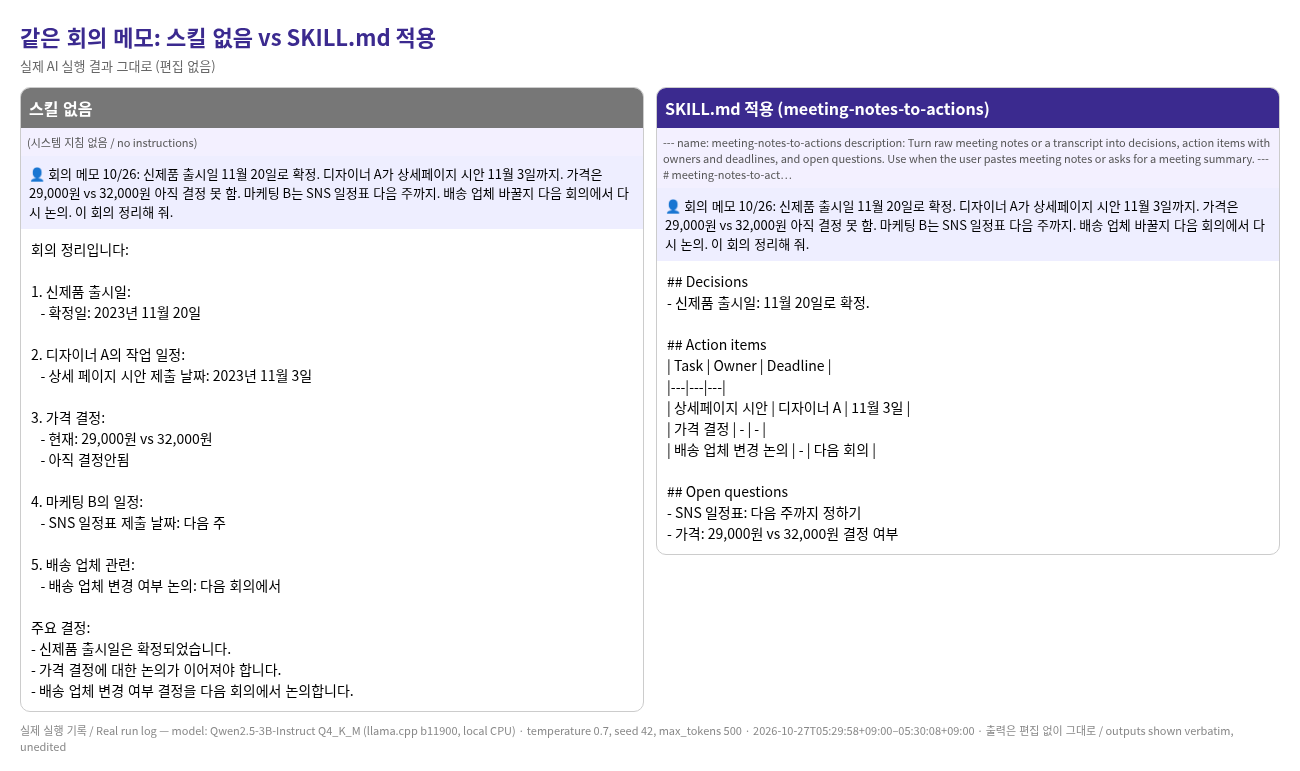
• 스킬 없음 (같은 회의 메모): "1. 신제품 출시일: - 확정일: 2023년 11월 20일"
• SKILL.md 적용: "| 상세페이지 시안 | 디자이너 A | 11월 3일 |"
솔직한 안내: 비포/애프터는 작은 무료 모델(Qwen2.5-3B, 내 컴퓨터에서 실행)에 SKILL.md를 시스템 지침으로 넣어 테스트했습니다. 실제 에이전트 도구가 스킬을 자동으로 불러오는지는 테스트하지 않았습니다. 스킬을 넣으니 표 형식으로 정리됐지만, 'SNS 일정표(마케팅 B, 다음 주)'를 할 일이 아닌 질문 칸에 넣었고, 영어 테스트에서는 가격 결정 담당자를 지어냈습니다. 스킬은 형식을 잡아 주지만 실수를 모두 막지는 못하니 결과를 확인하세요. 다운로드 상품입니다.
[English]
20 SKILL.md files that make an AI agent handle common tasks with set steps and a fixed output format.
What you get
• 20 skill folders (skills.zip), each with one SKILL.md: YAML frontmatter (name, description) + Steps, Rules and Output format
• e.g. meeting notes → action table, bug report, code review, commit message, changelog, weekly report, customer reply draft, SKILL.md checker
• A format validator script (validate_skills.py)
• 2 PDFs (Korean and English, with the full text of all 20 files)
• File-check output and a real AI before/after run log
What it helps you do
• Turn meeting notes into decisions, action items and open questions
• Turn a vague problem into a reproducible bug report
• Review code changes against the same checklist every time
• Check the format of your own SKILL.md files
How to use
1. Unzip skills.zip and copy the folders you want into your agent's skills folder (e.g. ~/.claude/skills/). In a plain chat AI, paste the SKILL.md into the instructions box.
2. Ask as usual (e.g. "Summarize this meeting").
3. After editing a file, run python3 validate_skills.py skills/ to check the format.
Real tests
• File check: "20/20 passed"
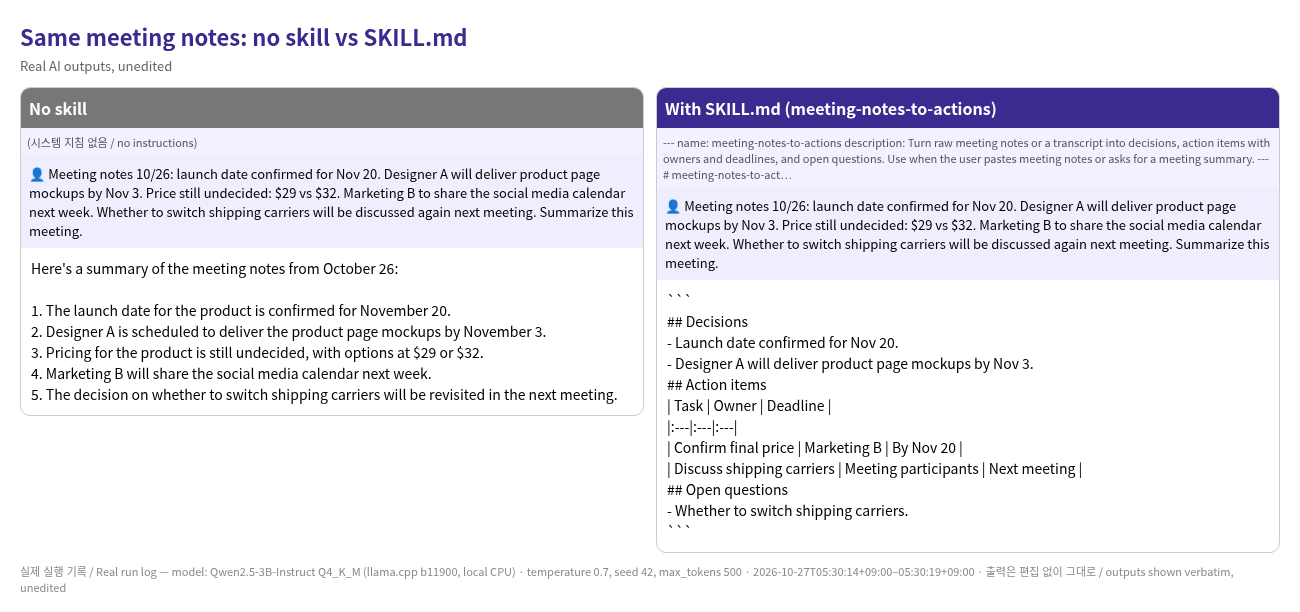
• No skill (same meeting notes): "5. The decision on whether to switch shipping carriers will be revisited in the next meeting."
• With SKILL.md: "| Discuss shipping carriers | Meeting participants | Next meeting |"
Honest note: the before/after used a small free model (Qwen2.5-3B, run locally) with the SKILL.md as the system prompt. Automatic skill loading in an agent tool was not tested. With the skill, the output followed the table format, but the model still broke the skill's own rule: it invented an owner ("Marketing B") and a deadline ("By Nov 20") for the price decision. Skills shape the format but don't prevent every mistake, so check the results. This is a digital download.