


School SLP Caseload & IEP Service Minute Tracker Spreadsheet — Speech Therapy Session Log, Make Up Minutes Owed and Re Eval Due Dates
Your caseload is not a headcount. It is a pile of minutes you promised — and nobody is counting them but you.
Thirty minutes, twice a week, times thirty-eight service weeks. That is 2,280 minutes on one student's IEP. Now subtract the week you were pulled for testing, the two days the building was closed, the Tuesday you were out sick. Nobody writes that number down. By spring it is a number you would rather not know.
This workbook knows it. Every week. For every student on your list.
THE PART NOTHING ELSE DOES: A RUNNING LEDGER OF MINUTES OWED
★ You enter each service line once — 30 minutes, 2 times, per Week — and mark which weeks of your year you actually serve.
★ From then on, required minutes accrue on their own, week by week, only in the weeks you marked. Delivered minutes come off your session log.
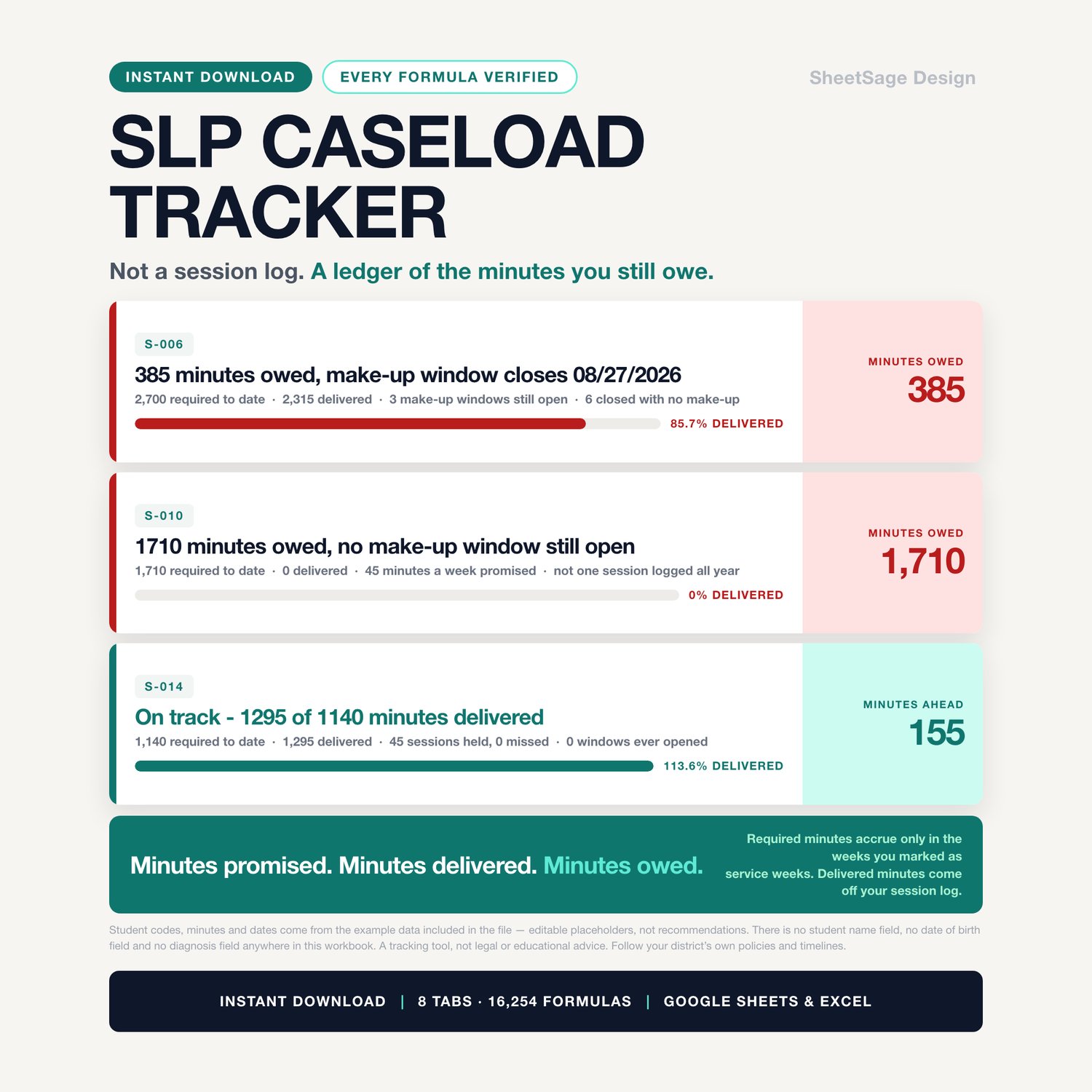
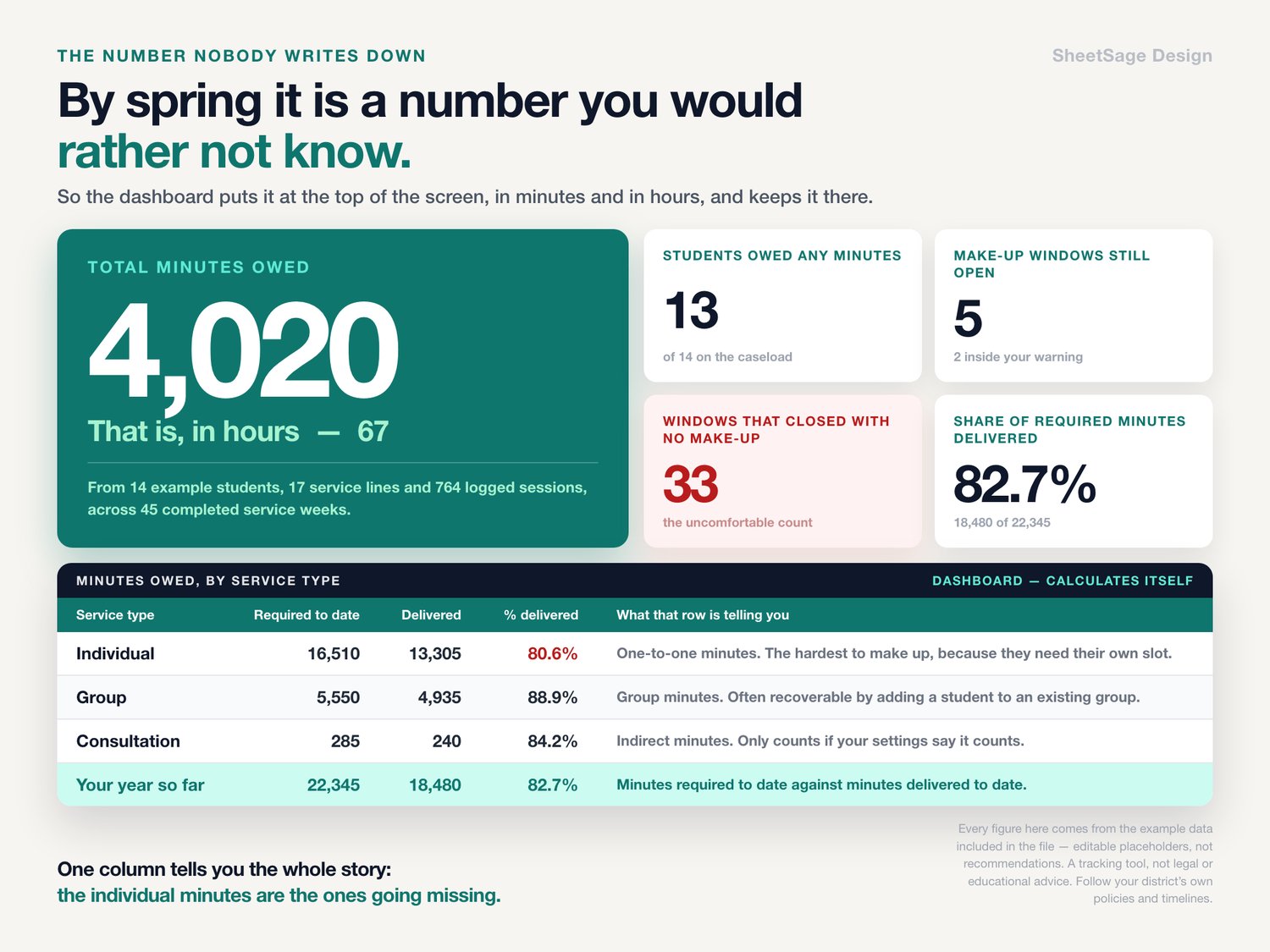
★ The difference is the number: minutes owed, per student, cumulative, split by individual, group and consultation.
★ And it is written in a sentence you can hand to somebody: "385 minutes owed, make-up window closes 08/27/2026."
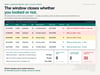
IT COUNTS THE MAKE-UP WINDOW DOWN
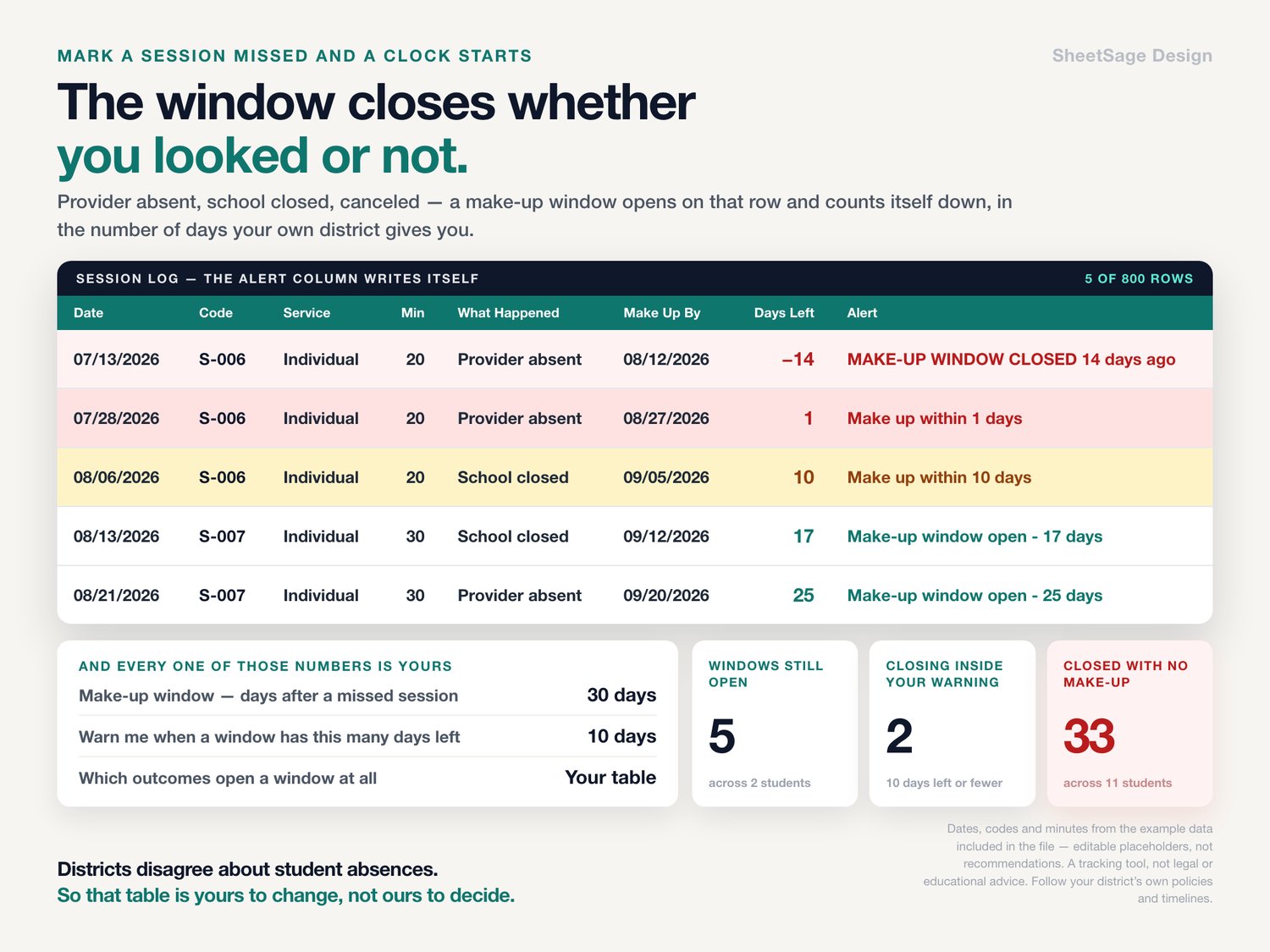
★ Log a session as provider absent, school closed or canceled, and a make-up window opens on that row automatically, using the number of days your own district gives you.
★ Days left turns amber, then red. Make up within 1 days · MAKE-UP WINDOW CLOSES TODAY · MAKE-UP WINDOW CLOSED 14 days ago.
★ The dashboard keeps two separate counts, and the second one is the uncomfortable one: windows still open, and windows that closed with no make-up.
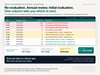
AND IT COUNTS THE DUE DATES DOWN
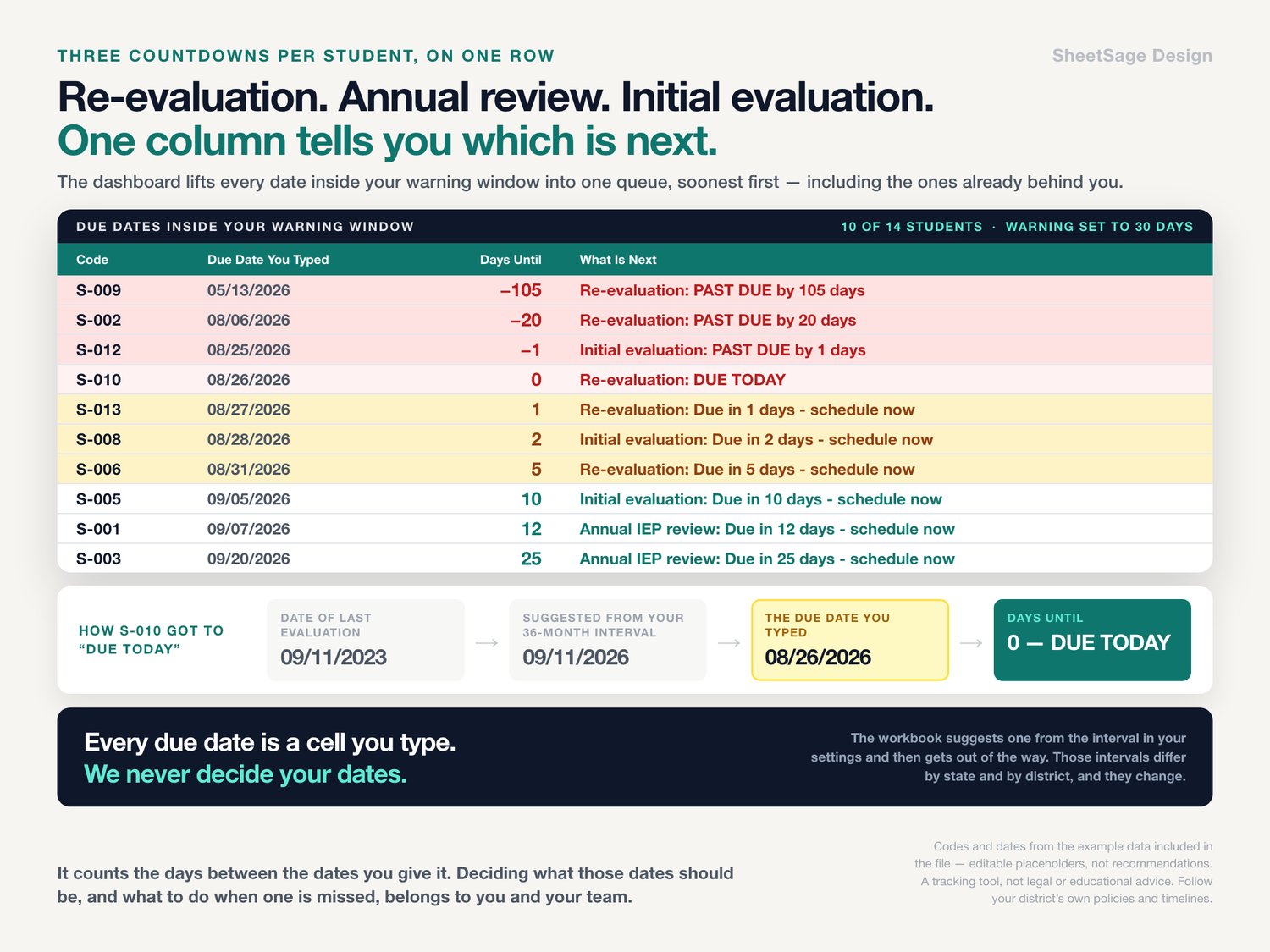
★ Re-evaluation, annual IEP review, initial evaluation — three countdowns per student, on one row.
★ Every due date is a cell you type. The workbook will suggest one from the interval in your settings, but it never decides your dates for you, because they differ by state and by district and they change.
★ One column tells you which of the three is next: Re-evaluation: PAST DUE by 20 days · Initial evaluation: Due in 2 days - schedule now · Annual IEP review: Due in 12 days - schedule now.
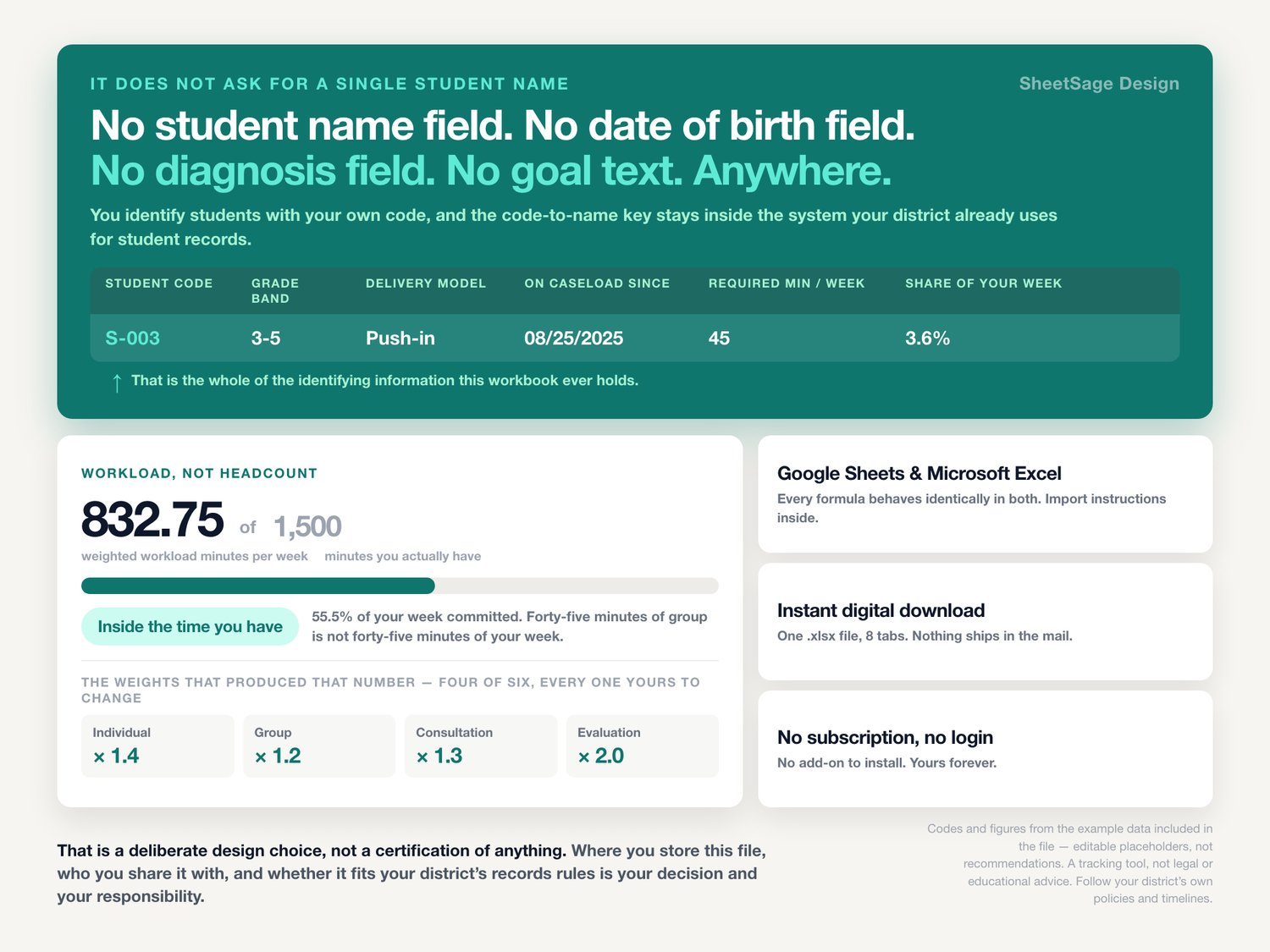
IT DOES NOT ASK FOR A SINGLE STUDENT NAME
★ No student name field. No date of birth field. No diagnosis field. No goal text. Anywhere.
★ You identify students with your own code — S-001, S-002 — and the code-to-name key stays inside the system your district already uses for student records.
★ That is a deliberate design choice, not a certification of anything. Where you store this file and who you share it with is your call.
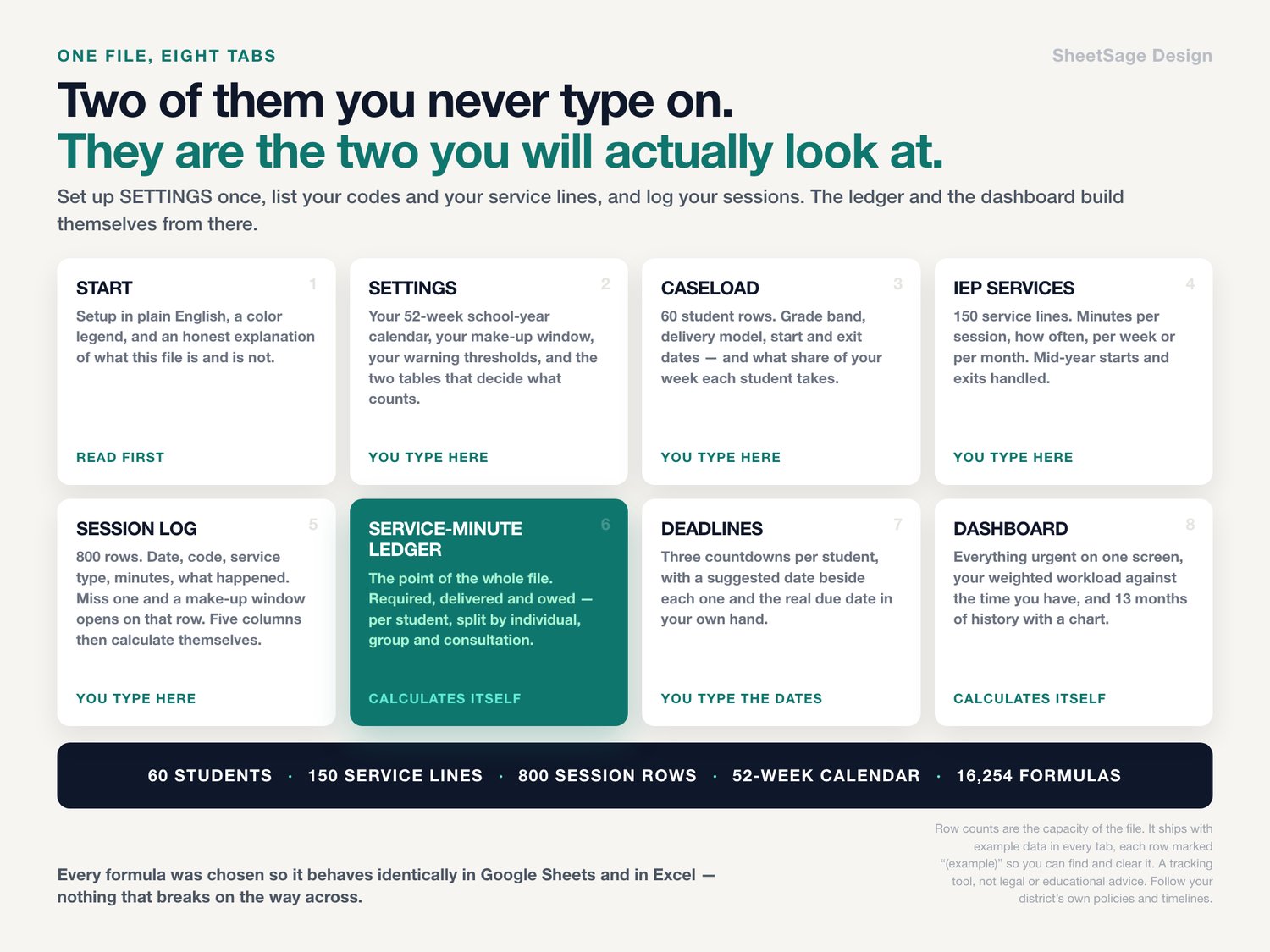
WHAT'S INSIDE (one file, 8 tabs)
★ SERVICE-MINUTE LEDGER — the whole point. Per student: required to date, delivered, owed, minutes ahead, percent delivered, required and delivered broken out by individual / group / consultation, sessions held, sessions missed, make-up windows open, windows closed unmade, the next deadline and the days left on it.
★ SESSION LOG — 800 rows. Date, student code, service type, minutes, what happened, made up yes or no. Five columns then calculate themselves, including a plain-English alert and a Check column that catches a code that is not on your caseload, a date in the future, or minutes you forgot to type.
★ CASELOAD — 60 student rows. Grade band, delivery model, start and exit dates, and each student's required minutes per week, weighted workload minutes per week, and what share of your week they take.
★ IEP SERVICES — 150 service lines. Minutes per session, how often, per week or per month, IEP start and end dates. Mid-year starts, mid-year exits and monthly-written minutes all handled.
★ DEADLINES — the three countdowns, with a suggested date beside each one and the real due date in your own hand.
★ DASHBOARD — total minutes owed and the same number in hours, students behind, windows closing inside your warning, windows already closed, share of required minutes delivered, your weighted workload against the minutes you actually have, the five weeks that cost you the most sessions, a ranked list of who is behind, a list of every due date inside your warning window, and thirteen months of history with a chart.
★ SETTINGS — your 52-week school-year calendar, your make-up window, your warning thresholds, and the two small tables that decide what counts as delivered and what opens a window. Districts disagree about student absences, so both tables are yours to change.
★ START — setup in plain English, a color legend, and an honest explanation of what this file is and is not.
WORKLOAD, NOT HEADCOUNT
Forty-five minutes of group is not forty-five minutes of your week. Each service type carries a weight you set, so the dashboard can tell you the real number — weighted workload minutes per week against the minutes you actually have — and say plainly whether you are inside the time you have or over it by how much.
WORKS WITH
Google Sheets (free) and Microsoft Excel. Every formula was chosen so it behaves identically in both — nothing that breaks on the way across. Instant digital download, one .xlsx file, import instructions inside. No subscription, no login, no add-on to install. Yours forever.
PLEASE NOTE
• Digital download — no physical item will be shipped.
• For your own use; please do not resell or share the file.
• A tracking tool, not legal or educational advice. Follow your district's own policies and timelines. It does not know your state's rules, your district's policies, your union contract or the terms of any individual IEP.
• Every interval in this workbook is a number you type — the make-up window, the re-evaluation cycle, the evaluation timeline. Those differ by state and by district and they change. The workbook counts days between the dates you give it; deciding what those dates should be, and what to do when one is missed, belongs to you and your team.
• It is built to be used without typing a student's name, but how and where you store and share the file is your decision and your responsibility.
• No outcome is promised.
• The file ships with example data in every tab, so nothing opens empty and you can see the math working before you clear it. Every number, code and date quoted above comes from that example data. It illustrates how the workbook calculates; it is not a recommendation, a benchmark, or advice about any interval or deadline of your own.
• Microsoft Excel and Google Sheets are trademarks of their respective owners. This is an independent product from SheetSage Design, with no affiliation to, sponsorship by, or connection with Microsoft or Google.
• Designed by us and built with the assistance of AI tools, then manually reviewed and verified — every formula was checked against an independent calculation before release.
Questions before you buy? Message us — we answer fast, and we are happy to help you set it up.