
Digital Product Mockup Studio
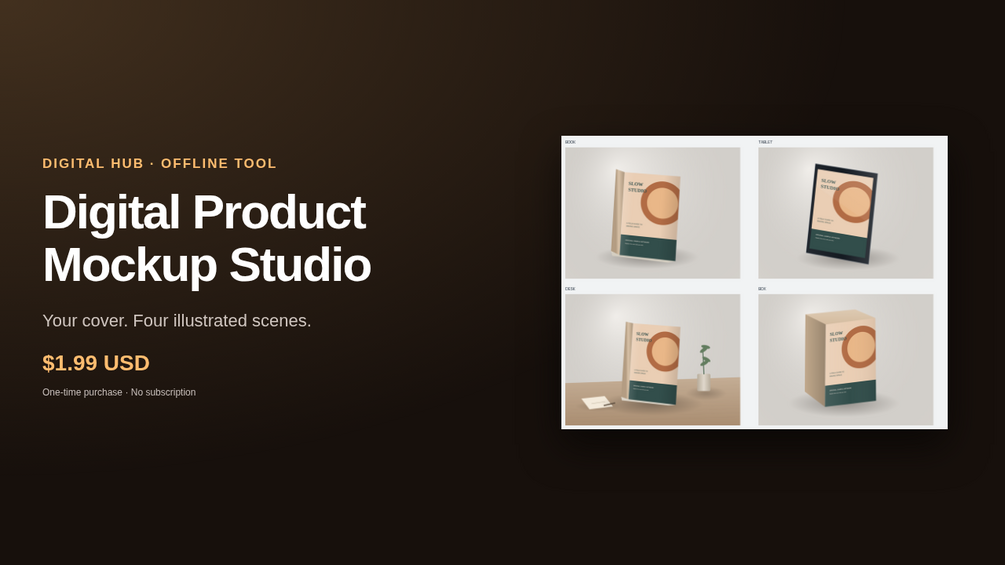
Place your real cover into four illustrated 3D-style scenes. Export locally as PNG, JPEG or WebP.
Your cover should stay yours. Not an AI reinterpretation.
Place the artwork you already made into repeatable illustrated 3D-style scenes. Adjust the crop and export, without asking a generator to redraw your cover.
Four illustrated scenes
Book, tablet, studio desk and product box, with the same source cover on their portrait front surface.
Make the crop deliberate
Choose fill or keep-full-artwork. Adjust zoom, horizontal/vertical placement, colors and lighting.
Ready-to-use image files
PNG, JPEG and WebP. Five size presets, up to 2400 x 1800. Download one scene or all four in a ZIP.
Your download
Digital-Product-Mockup-Studio-v1.0.zip containing the offline HTML app and start guide. Extract the ZIP and open the HTML in desktop Chrome or Edge. No subscription, account or internet connection required.
Know before you buy
Stylized illustrated 3D-looking scenes, not photorealistic renders, physical-product proofs or editable 3D models. Four fixed compositions. One cover at a time. No back-cover editor, arbitrary camera, AI generation or saved projects. PNG/JPEG/WebP inputs up to 15 MB / 30 MP. Portrait covers work best. Desktop Chrome/Edge recommended. Session data is not saved after reload.