

Sales Letter Writer Bot
On Sale
$2.99
$2.99
Scenario: Sales Letter Writer Bot ⚙️
Overview:
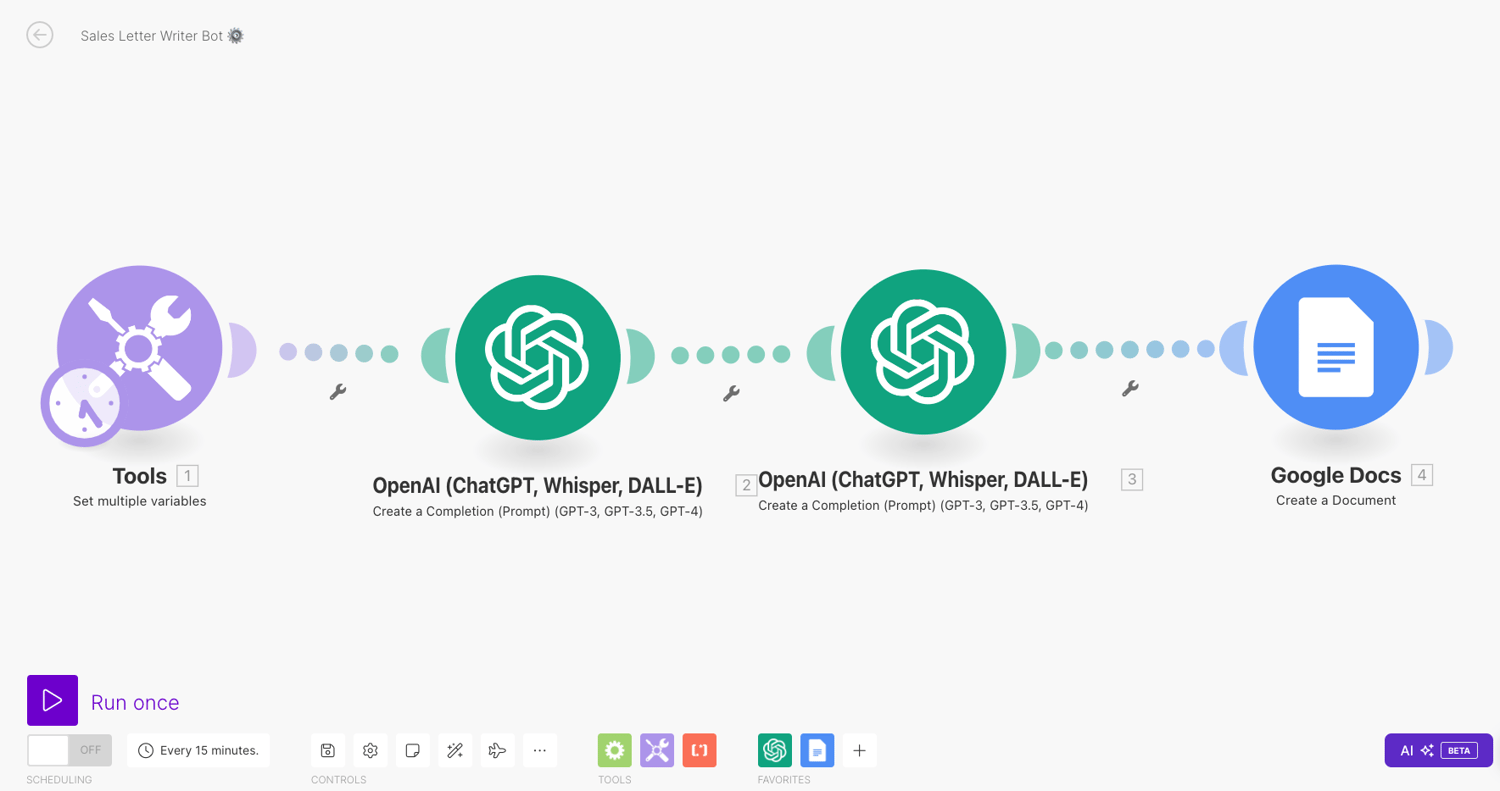
This Make.com scenario automates the creation of sales letters. It connects OpenAI's GPT-4 and Google Docs to generate compelling sales copy based on user inputs and predefined variables. The scenario ensures the sales letters are tailored to the specified style, niche, and business details, then saves the generated content in a Google Doc.
Flow Description:
- Set Variables
- ID: 1
- Module: util:SetVariables
- Version: 1
- Description: Initializes variables with predefined values.
- Parameters: {}
- Mapper:
- Scope: "roundtrip"
- Variables:
- Business_name: "QuickLifeSolutions"
- Style: "professional"
- Niche: "Digital Marketing & AI Automations"
- Metadata:
- Designer: { "x": -170, "y": -7 }
- Create Sales Page Headline with GPT-4
- ID: 2
- Module: openai-gpt-3:CreateCompletion
- Version: 1
- Description: Uses OpenAI's GPT-4 to generate a sales page headline based on the provided business details.
- Parameters:
- Connection: 531539
- Mapper:
- Model: gpt-4o
- Top_p: "1"
- Select: "chat"
- Messages:
- {"role": "system", "content": "You are a sales letter writer who writes sales copy in the style of {{1.Style}}"}
- {"role": "user", "content": "Create a sales page headline for the provided product, targeted at the provided avatar, in the provided niche. Make the title compelling to entice readers to read on.\nproduct - {{1.Business_description}}\navatar - {{1.Business_name}}\nniche - {{1.Niche}}\nConstraints: Do not include pretext or context, only return the sales page headline."}
- Max_tokens: "250"
- Temperature: "1.1"
- N_completions: "1"
- Response_format: "text"
- Metadata:
- Designer: { "x": 191, "y": 2 }
- Create Sales Letter with GPT-4
- ID: 3
- Module: openai-gpt-3:CreateCompletion
- Version: 1
- Description: Uses GPT-4 to generate a detailed sales letter based on the headline and business details.
- Parameters:
- Connection: 531539
- Mapper:
- Model: gpt-4o
- Top_p: "1"
- Select: "chat"
- Messages:
- {"role": "system", "content": "You are a sales letter writer who writes sales copy in the style of {{1.Style}}"}
- {"role": "user", "content": "Create a sales page headline for the provided product, targeted at the provided avatar, in the provided niche. Make the title compelling to entice readers to read on.\nproduct - {{1.Business_description}}\navatar - {{1.Business_name}}\nniche - {{1.Niche}}\nConstraints: Do not include pretext or context, only return the sales page headline."}
- {"role": "assistant", "content": "{{2.choices[].message.content}}"}
- {"role": "user", "content": "Use the sales letter below for inspiration to write a sales page, replacing each [] with characteristics, thoughts, concepts, products, and feelings related to {{1.Business_description}} in the {{1.Niche}} niche. Write the success story of with a visceral emotionally charged output with similar context. Keep a similar structure and format, leading with a more conversational and thought provoking tone using direct-response style language that inspires visceral feeling and emotional connection.\nConstraints: Do not include pretext or context, only return the sales letter."}
- Max_tokens: "1500"
- Temperature: "1.1"
- N_completions: "1"
- Response_format: "text"
- Metadata:
- Designer: { "x": 541, "y": -3 }
- Create Google Doc
- ID: 4
- Module: google-docs:createADocument
- Version: 1
- Description: Creates a Google Doc with the generated sales letter content.
- Parameters:
- Connection: 566106
- Mapper:
- Name: "{{2.choices[].message.content}}"
- Footer: false
- Header: false
- Content: "{{3.choices[].message.content}}"
- FolderId: "/"
- Destination: "drive"
- Metadata:
- Designer: { "x": 915, "y": -8 }
Technical Details:
- Built-in Modules: Set Variables, Create Completion with GPT-4, Create Google Doc.
- On-error Modules: None specified.
- App Connections: OpenAI (GPT-4), Google Docs.
This scenario automates the process of generating sales letters by using predefined variables and inputs to create engaging content with OpenAI's GPT-4. The generated content is then saved into a Google Doc for easy access and further use.