
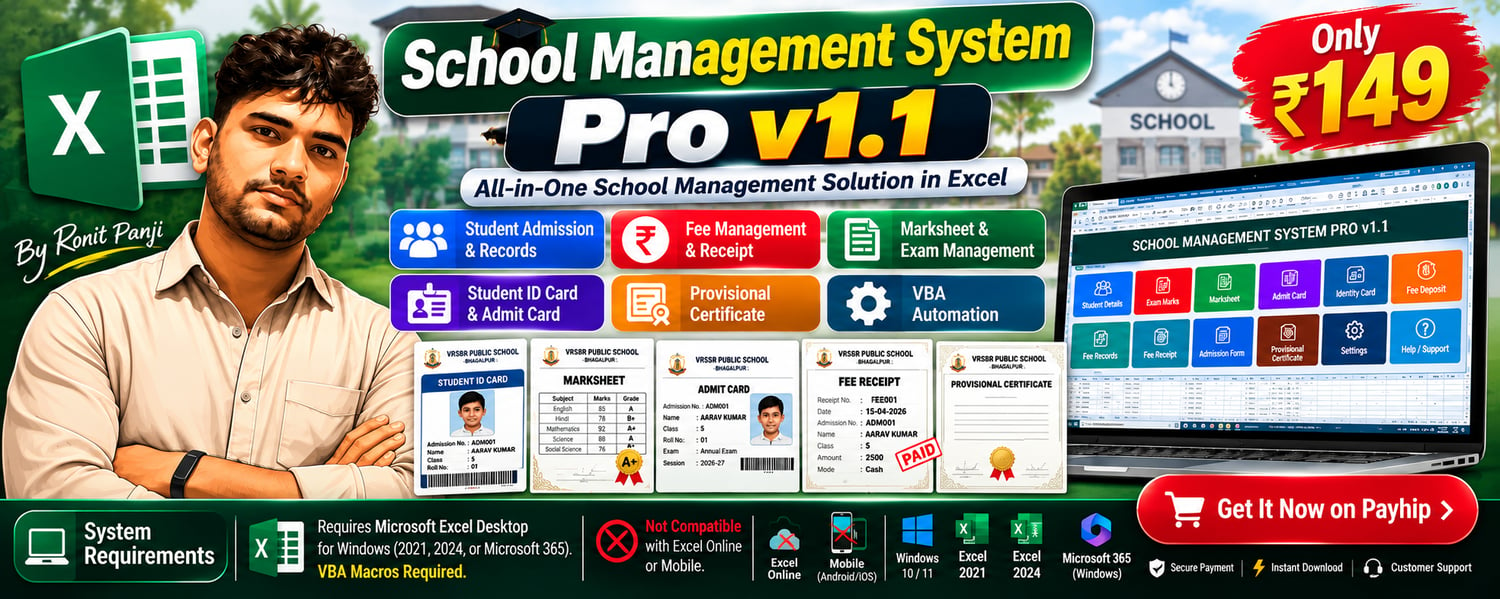
School Management System Pro v1.1 | Excel-Based Student Admission, Fee Management, Marksheet, ID Card & Receipt Generator
🏫 School Management System Pro v1.1
All-in-One School Management Solution in Microsoft Excel
Manage student admissions, fee payments, academic records, and school documents with one powerful Excel workbook!
School Management System Pro v1.1 is a macro-enabled Excel-based management tool designed for schools, coaching institutes, and educational organizations.
No separate school management software installation is required. Simply open the workbook in a compatible desktop version of Microsoft Excel and enable the required macros.
✨ Key Features
✅ Student Admission Management
- Add and manage student admission records.
- Store student and parent information.
- Add student, father, and mother photographs.
- Search student records using Admission Numbers.
✅ Student Marksheet & Exam Management
- Manage Test-01, Test-02, and Annual Exam records.
- Generate student marksheets.
- Select students using Admission Numbers.
✅ Student ID Card & Admit Card
- Generate student identity cards.
- Vertical student ID card with photo support.
- Create admit cards using stored student information.
✅ Fee Management System
- Record student fee payments.
- Maintain fee deposit history.
- View fee records and schedules.
- Track fee payments and balances.
- Generate printable fee receipts.
- Find and view previously recorded receipts.
✅ School Documents
- Student Admission Form
- Student Marksheet
- Admit Card
- Student Identity Card
- Vertical Identity Card
- Provisional Certificate
- Fee Receipt
✅ Additional Features
- Academic Session Management
- Excel VBA Automation
- Dropdown-Based Student Selection
- Printable Document Templates
- Linked Formulas and Student Records
- Organized Multi-Sheet Workbook
💻 System Requirements
Operating System: Windows 10 or Windows 11
Recommended Software: Microsoft Excel 2021, Excel 2024, or Microsoft 365 Excel Desktop for Windows.
File Format: .xlsm (Excel Macro-Enabled Workbook)
Important Requirements:
- Genuine, activated Microsoft Excel Desktop.
- VBA Macro support.
- Macros must be enabled or trusted for the workbook.
- A compatible Excel version with support for the workbook's formulas.
- Internet access may be required for email, WhatsApp, or other online features, where configured.
Not Recommended / Not Supported:
- Excel Online / Excel for the Web — VBA macros cannot run.
- Microsoft Excel Mobile (Android/iOS) — VBA macros cannot run.
- Google Sheets — Excel VBA automation is not supported.
- LibreOffice / WPS Office — full VBA compatibility is not guaranteed.
- macOS — full compatibility has not been verified.
⚙️ How to Set Up on a New Computer
Step 1: Download the File
After purchase, download the School Management System Pro v1.1 Excel workbook.
Step 2: Extract the File (If ZIP)
If the downloaded product is a ZIP file, extract it before opening the workbook.
Step 3: Open Microsoft Excel
Make sure a compatible desktop version of Microsoft Excel is installed and activated.
Step 4: Unblock the File (If Applicable)
On Windows, right-click the downloaded Excel file, select Properties, and check Unblock if that option is available. Click Apply and OK.
Only do this after confirming that the file comes from a trusted source.
Step 5: Enable Macros
Open the Excel file. If Excel displays a security warning and you trust the file, select Enable Content when available.
If macros are blocked, review Microsoft's macro security guidance. Do not disable macro protection globally.
Step 6: Configure School Information
Review the existing School Name, Academic Session, and other settings before entering student records.
Step 7: Start Using the System
Add students, enter examination marks, record fee payments, and generate school documents.
Step 8: Save and Back Up
Save the workbook in .xlsm format to preserve its VBA macros. Maintain regular backup copies to protect school records.
📦 What You Will Receive
- School Management System Pro v1.1 Excel Workbook (.xlsm)
- Clean Workbook with Student and Payment Records Removed
- Ready-to-Use Sheet Layouts and Automation Features
⚠️ Important Notes
- This is an Excel-based digital product, not a standalone Windows application or cloud-based school management platform.
- Microsoft Excel is not included with the purchase.
- Some features require VBA macros to be enabled.
- The workbook is supplied with an existing sample school name, which may require customization.
- Test the workbook with sample data before using it for live school records.
- Academic Session formulas and historical fee records should be reviewed when changing sessions.
- Compatibility can vary depending on Microsoft Excel version, security settings, and computer configuration.
📞 Customer Support
Need help using the Excel workbook or want customization?
WhatsApp Support Only
Contact us for setup guidance, product assistance, and customization inquiries.
Developed by Ronit Panji
Excel Automation | MS Office Tips & Tricks | Digital Productivity Tools