
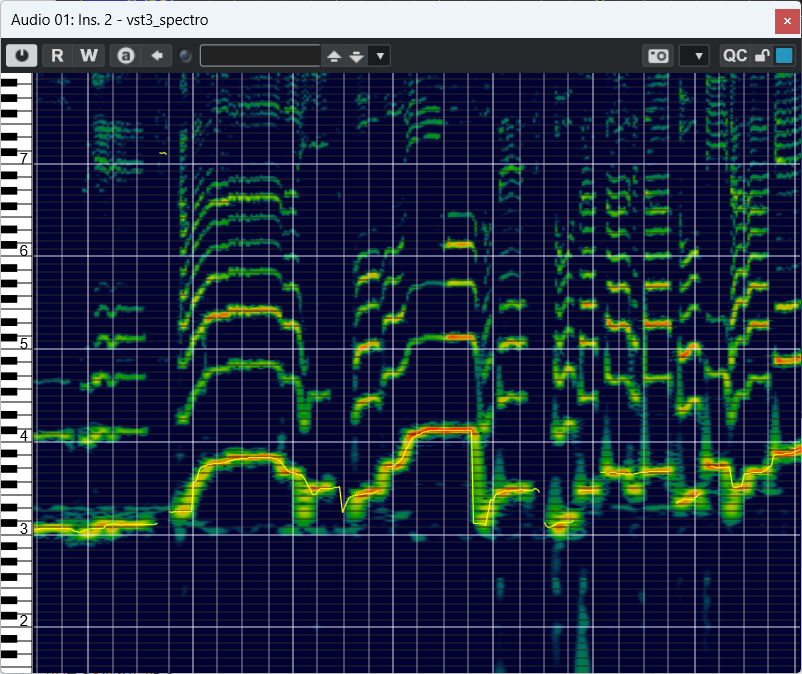
Audio Spectrogram Monitor VST3
On Sale
$5.00
$5.00
Audio Spectrogram Monitor VST3 — Real-Time CQT Spectrogram with Piano-Roll Axis for Windows
A clean, zero-latency spectrogram monitor you can drop on any track. Watch a smooth, scrolling constant-Q (CQT) display with 72 bins per octave, piano-roll style white/black-key axis, host-synced beat/bar lines, an optional pitch line, and a MIDI note overlay—perfect for ear-training, transcription, practice, sound design, and mix analysis.
Why you’ll love it
- Musical CQT grid (72 bins/octave) with semitone spacing and octave labels—easy to read like a keyboard. Frequency range spans C1 to B7, covering most voices and instruments.
- Piano-roll axis & hover highlight: white/black key regions at the left make orientation instant; hover to highlight the current semitone band.
- Host-synced guides: vertical beat (thin) and bar (thick) markers lock to your DAW’s tempo and time signature.
- MIDI note overlay: show active MIDI notes as smooth bands across the spectrogram—great for matching targets during transcription or scale practice.
- Optional pitch line: enable “Pitch Line” to draw a clear, continuous trace of the detected pitch.
- Fast, fluid UI controls: Shift + Wheel = time zoom, Ctrl + Wheel = pitch zoom, Wheel = vertical scroll, Ctrl + 0 = reset.
- No sound coloration: stereo audio passes through unchanged; this plug-in is a visual monitor only.
- Smooth updates (~30 fps) keep motion natural while keeping CPU use modest.
What’s included
- vst3_spectro.vst3.zip (Payhip “Download” file)
- → Inside is a folder named vst3_spectro.vst3.
System requirements
- Windows 64-bit only (Windows 10/11 recommended)
- VST3-compatible DAW
- Processes standard audio formats, including 32-bit floating-point.
Install (Windows)
- Download and locate vst3_spectro.vst3.zip.
- Right-click → Extract All…
- You’ll get a folder named vst3_spectro.vst3 (keep it as a folder).
- Copy the entire vst3_spectro.vst3 folder to:
- C:\Program Files\Common Files\VST3
- Restart your DAW and rescan plug-ins if needed. Look for vst3_spectro under VST3 (some DAWs may list it under “Other”).
Quick start
- Insert the plug-in on any audio track (mono or stereo).
- Hit Play to see host-synced beat/bar lines; the spectrogram scrolls in real time.
- (Optional) Toggle Pitch Enable to draw the detected pitch trace.
- (Optional) Route a MIDI track to the plug-in to visualize target notes—ideal for ear-training or transcription.
Controls & tips
- Shift + Mouse Wheel: horizontal time zoom
- Ctrl + Mouse Wheel: vertical pitch zoom
- Mouse Wheel: scroll up/down the frequency range
- Ctrl + 0: reset zoom & scroll
- Hover over the plot to see a highlighted semitone band and matching piano-key region.
- Beat/bar overlays require your DAW to provide tempo & time-signature information.
Notes & limits
- The spectrogram uses a constant-Q transform tailored for musical analysis; pitch tracing covers a practical range for voices and many instruments.
- This plug-in is Windows-only (no macOS version at this time).
- Audio is always passed through unmodified; the plug-in does not apply EQ/dynamics or generate sound.