



Procedural Rock and Dirt Material
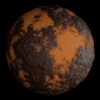
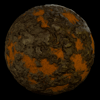
(Both of the images shown were made using the same material with different nodes values)
This material is fully procedural and node-based, designed to be flexible,
lightweight, and easily customizable for a wide range of environments such as:
- Terrain
- Ground surfaces
- Roads
- Ruins
- Game assets
- Archviz scenes
--------------------------------------------------
FEATURES
--------------------------------------------------
• 100% procedural (no image textures)
• Seamless / tileable
• Adjustable rock-to-dirt balance
• Custom crack intensity
• Independent sand and rock controls
• Bump and true displacement support
• Optimized node structure
• Works on any mesh scale
--------------------------------------------------
REQUIREMENTS
--------------------------------------------------
• Blender 3.0 or newer
• Cycles (recommended for displacement)
--------------------------------------------------
HOW TO USE
--------------------------------------------------
1. Open your Blender project
2. Append or import the material file
3. Assign the material to any object
4. Adjust the exposed parameters in the shader group:
- Scale
- Crack
- Distortion
- Rock Visibility
- Sand & Rock colors
- Detail levels
- Roughness
- Bump & Displacement strength
--------------------------------------------------
DISPLACEMENT NOTES
--------------------------------------------------
For best results with displacement:
• Use Cycles render engine
• Set Material > Settings > Displacement to:
"Displacement and Bump"
--------------------------------------------------
CUSTOMIZATION
--------------------------------------------------
All parameters are exposed for easy tweaking.
You are encouraged to customize colors, scale, and detail
to match your specific scene or asset needs.
--------------------------------------------------
SUPPORT
--------------------------------------------------
If you encounter any issues or have suggestions,
please contact me on: notredin08@gmail.com
Enjoy and happy blending!