
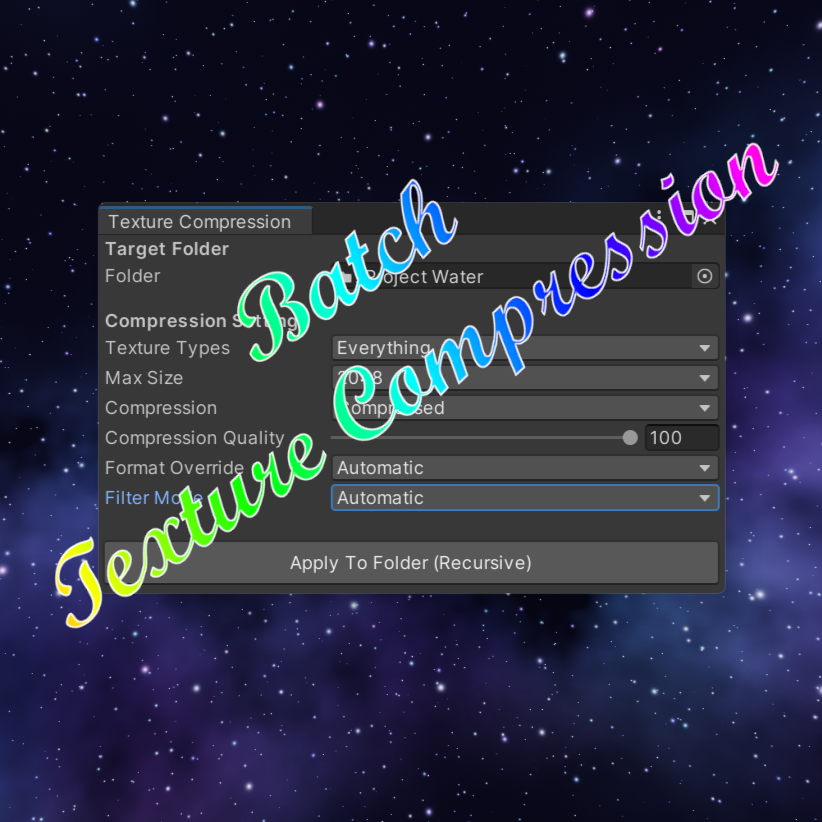

📁 Batch Texture Compression Tool
On Sale
€0.00
Pay what you want:
€
Optimize entire Unity texture folders in just a few clicks. ✨
This lightweight Editor tool applies consistent compression and import settings to every matching texture inside a selected folder including all subfolders.
🔧 Features
- 📁 Recursive folder processing
- 🖼️ Filter by texture type
- 📏 Set maximum texture size from 256–4096
- 🗜️ Adjust compression and quality
- 💾 Optional format override
- 🔍 Point, Bilinear, or Trilinear filtering
- ⚡ Automatic Crunch Compression
- 📐 Avoids assigning oversized limits to smaller textures
🚀 How to Use
- Open CyberLuna → Batch Texture Compression.
- Select a texture folder.
- Choose your settings.
- Click Apply To Folder (Recursive).
📁 Requirements
- Unity Editor
📋 License
- Personal use only
- Sharing in any form not allowed