
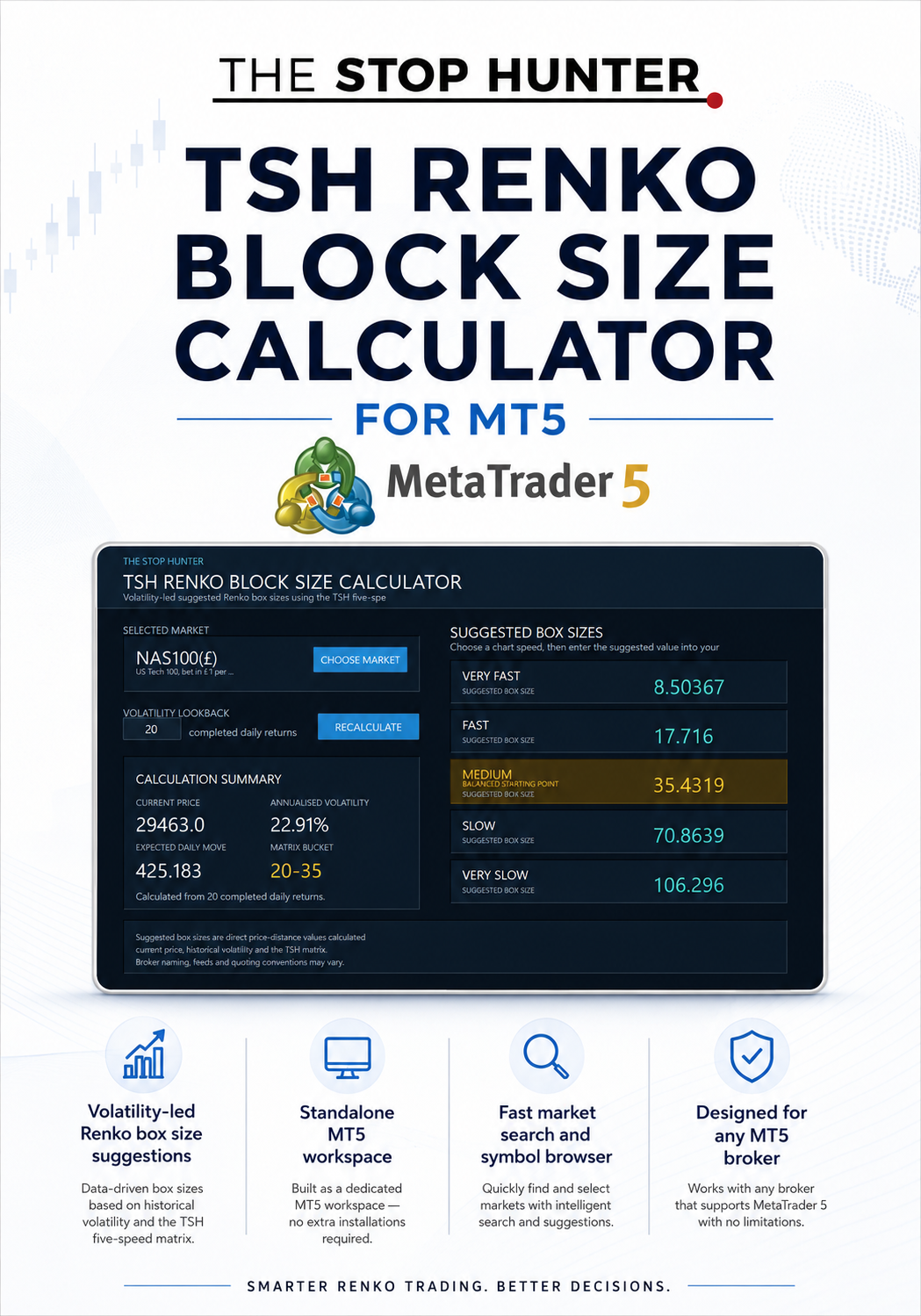
TSH RENKO BLOCK SIZE CALCULATOR FOR MT5
TSH Renko Block Size Calculator for MetaTrader 5
Stop Guessing Your Renko Box Size
Choosing the right Renko box size is one of the most important decisions a Renko trader makes.
Too small, and the chart becomes noisy and over-sensitive.
Too large, and important market movement can disappear.
The TSH Renko Block Size Calculator for MT5 removes that guesswork by calculating five suggested Renko box sizes from:
- the selected market’s current price;
- realised historical volatility;
- a 20-day volatility lookback by default;
- the proprietary TSH five-speed matrix.
The result is a clear set of suggested box sizes ranging from very fast to very slow, helping you choose a chart speed that matches the market and your trading style.
Built as a Standalone MT5 Workspace
The calculator runs inside its own dedicated MetaTrader 5 workspace.
It does not need to sit on top of your trading chart.
It does not interfere with indicators.
It does not compete for space with your Renko chart controls.
Open the calculator, select the market you want to analyse, review the suggested values, then manually enter your preferred box size into your Renko charting software.
Simple, clean and practical.
What the Calculator Does
For the selected market, the calculator displays:
- Current market price
- Volatility lookback
- Annualised historical volatility
- Expected daily price move
- TSH volatility-matrix bucket
- Five suggested Renko box sizes
The five chart speeds are:
- Very Fast
- Fast
- Medium
- Slow
- Very Slow
The Medium setting is highlighted as the balanced starting point.
You remain in control of the final choice.
Why Five Box Sizes?
Different traders want different chart behaviour.
A shorter-term trader may want a faster chart that reacts more quickly.
A swing trader may prefer a slower chart that filters more noise.
The five-speed approach gives you a structured choice instead of forcing one arbitrary box size on every market.
Very Fast
The most sensitive setting.
Designed for traders who want more blocks, faster reactions and greater detail.
Fast
Still responsive, but less sensitive than Very Fast.
Medium
The balanced starting point.
A practical middle ground between responsiveness and noise reduction.
Slow
Filters more short-term movement and produces fewer blocks.
Very Slow
The broadest and least sensitive setting.
Designed for traders who want a highly filtered view of market movement.
Volatility-Led Rather Than Guesswork
The calculator does not use a fixed box-size list. It adapts its suggestions to the selected market.
A quiet forex pair should not be treated in the same way as a volatile stock index, commodity or cryptocurrency.
The calculator measures the selected market’s historical volatility, estimates its expected daily price movement and then applies the TSH five-speed matrix.
This creates box-size suggestions that are specific to that market and its current volatility environment.
Works Across MT5 Brokers
The calculator is not restricted to one broker.
It is designed for use with compatible MetaTrader 5 platforms from different brokers.
The built-in symbol browser searches the broker’s available symbol catalogue, allowing you to find and select markets directly inside the calculator.
Broker naming, price feeds, decimal places, trading sessions and quoting conventions may vary.
For that reason, the calculator presents its results as direct suggested box-size values rather than trying to convert them into broker-specific pips, points or monetary values.
Full Symbol Search
The market browser allows you to:
- search by ticker;
- search by market name or description;
- select symbols from the broker’s full catalogue;
- add the chosen symbol to Market Watch where required;
- recalculate immediately for the selected market.
This makes it much easier to find broker-specific symbols without needing to know the exact ticker in advance.
Adjustable Volatility Lookback
The default calculation uses 20 completed daily returns.
You can change the lookback directly inside the workspace and press:
RECALCULATE
A shorter lookback may react more quickly to recent volatility changes.
A longer lookback may produce a more stable estimate.
Clear, Professional Workspace
The calculator provides a dedicated interface for:
- market selection;
- volatility settings;
- calculation summary;
- suggested Renko box sizes;
- recalculation.
The workspace is designed to remain separate from your trading chart so the chart itself stays clean and uncluttered.
How to Use It
- Open the calculator workspace in MetaTrader 5.
- Press Choose Market.
- Search for and select the required broker symbol.
- Review the current price, volatility and expected daily move.
- Compare the five suggested box sizes.
- Select the chart speed that suits your trading approach.
- Enter that suggested value into your Renko charting software.
The calculator does not place trades or alter your trading strategy.
It is a decision-support tool for choosing a Renko box size.
Designed to Work with TSH Pro Renko Charts
The calculator can be used with any compatible Renko charting product that accepts a direct price-distance box size.
It is also designed to complement:
TSH Pro Renko Charts for MT5
Use the calculator to determine the preferred box size, then enter that value into the Pro Renko Charts control panel and rebuild the chart.
The two products remain separate, so the calculator can also be used independently.
What You Receive
Your download includes:
- TSH Renko Block Size Calculator for MetaTrader 5
- Compiled MT5 .ex5 file
- Installation and user guide
- Clear installation instructions
- Full explanation of the workspace
- Guidance on market selection and box-size interpretation
No source code is included.
Installation
The calculator is installed as an Expert Advisor inside MetaTrader 5.
The supplied guide explains how to:
- Open the MT5 Data Folder.
- Copy the calculator into the correct MQL5/Experts/TSH folder.
- Restart or refresh MetaTrader 5.
- Open a normal broker chart.
- Attach the calculator from the Navigator.
- Enable Algo Trading if required.
- Open and use the standalone calculator workspace.
No programming knowledge is required.
Platform Requirements
You will need:
- MetaTrader 5 desktop
- A compatible broker-supplied MT5 platform
- Access to the market you want to analyse
- Sufficient completed daily price history
- Algo Trading enabled where requested by MT5
This product is for MetaTrader 5 only.
It is not compatible with MetaTrader 4, TradingView, NinjaTrader or browser-only trading platforms.
Suitable Markets
The calculator can be used with compatible broker symbols including:
- Forex
- Stock indices
- Metals
- Energy markets
- Commodities
- Cryptocurrencies
- Other supported CFD and broker markets
Available instruments and data quality will depend on the broker.
Who Is This For?
The TSH Renko Block Size Calculator is designed for traders who:
- use Renko charts;
- are unsure which box size to choose;
- want a more systematic starting point;
- trade several markets with different volatility levels;
- want to reduce subjective guesswork;
- prefer a standalone calculator rather than a chart overlay;
- use TSH Pro Renko Charts or another compatible Renko product.
Important Information
The calculator produces suggested box sizes based on price, historical volatility and the TSH five-speed matrix.
The results are not guaranteed to be optimal for every trader, market or strategy.
Different brokers may produce different results because of differences in:
- price feeds;
- symbol construction;
- market hours;
- available historical data;
- decimal conventions.
The calculator is an analysis tool only.
It does not provide financial advice, guarantee profitability or determine whether a trade should be taken.
Trading leveraged products involves substantial risk and may not be suitable for everyone.