

MotionPro
### 1. **Advanced Graph Editor**
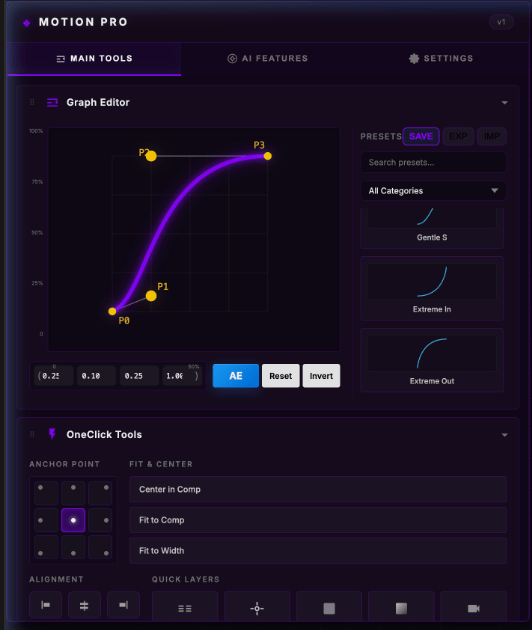
* **Visual Bezier Control:** Drag visual handles to create perfect easing curves.
* **Live Coordinates:** Manually enter `x1, y1, x2, y2` values for precision.
* **Invert Curve:** One-click to flip your animation direction (reversing the ease).
* **Preset Library:** Save your custom curves or use the 15+ built-in defaults (Impact, Logistic, Swift Pop, etc.).
* **Import/Export:** Support for importing and exporting `.flow` files to share your easing presets.
### 2. **OneClick Tools**
* **Anchor Point Grid:** Instantly move anchor points to any of 9 locations (Top-Left, Center, Bottom-Right, etc.) without moving the layer.
* **Alignment Suite:** Quick buttons for aligning layers to the Left, Right, Top, Bottom, or centering them horizontally/vertically.
* **Fit & Center:** Rapid "Fit to Comp," "Fit to Width," and "Center in Comp" actions.
* **Quick Layers:** One-click creation of Adjustment Layers, Nulls, Solids, Backgrounds (with auto-gradient), and Cameras.
### 3. **Instant Effects & Time Utilities**
* **One-Tap FX:** Quickly apply Shadow, Fill, Tint, Blur, Hue/Saturation, Lumetri, Curves, or Mirror effects.
* **Time Freeze:** Freeze the current, first, or last frame of a layer instantly.
* **Easy Remapping:** Enable time remapping with one click.
* **Precompose Pro:**
* **All → 1 Comp:** Group all selected layers into one new composition.
* **Each → Own Comp:** Put every selected layer into its own individual composition simultaneously.
### 4. **AI Smart Suite**
* **AI Expression Generator:** Type what you want in plain English (e.g., "Wiggle 5 at 100"), and the AI writes and applies the code for you.
* **AI Command Bot:** Automate complex tasks by describing them (e.g., "Create nulls for every selected layer and parent them").
* **Hybrid AI Connectivity:** Works with **locally hosted** models (LM Studio) for total privacy/speed, or connects to **Cloud APIs** (GPT-4o).
### 5. **Audio & Organization**
* **Auto Beat Marker:**
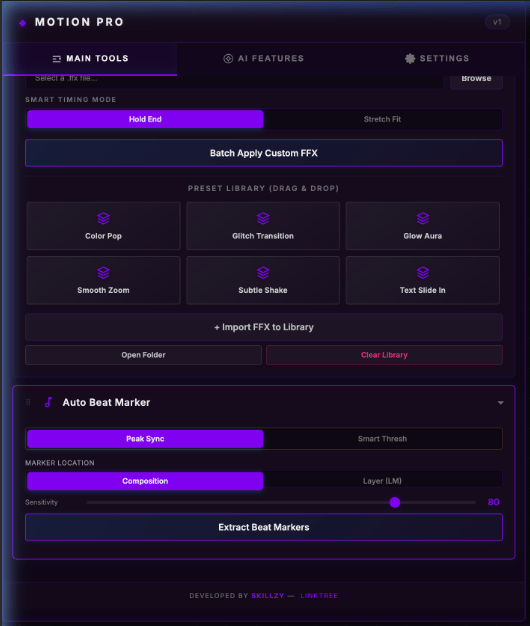
* **Peak Sync:** Detects audio peaks and places markers on the Comp or Layer.
* **Smart Threshold:** Advanced beat analysis (powered by Smart Threshold 1.0).
* **Smart Project Sort:** One-button sorting to organize your project panel into folders (Compositions, Footage, Images, Audio, Solids).
### 6. **Customizable UI**
* **Draggable Sections:** Drag and drop any tool panel to reorder the extension layout exactly how you like it.
* **Theming Engine:** Choose between **Technical**, **Neon**, **Jungle**, **Solar**, or **Royal** color themes.
* **Scale & Brightness:** Sliders to adjust the UI scale and brightness for your specific screen setup.
### 7. **Preset Library (Quick FX)**
* **Drag-and-Drop FFX:** A dedicated folder (`UserPresets`) where you can drop your favorite `.ffx` files to have them appear in the extension.
* **Smart Timing Modes:**
* **Hold End:** Keeps the last keyframe of an effect held until the end of the layer.
* **Stretch Fit:** Automatically stretches effect keyframes to perfectly fit the duration of your layer.