



Architectural Linework Cleanup Pro
Architectural Linework Cleanup Pro helps you clean messy AutoCAD drawings, repair common linework problems, and prepare clearer residential construction documents in less time.
Instead of manually searching for duplicate lines, tiny stray objects, elevation problems, and small endpoint gaps, you can select your cleanup settings and process the drawing from one easy-to-use dialog.
KEY FEATURES
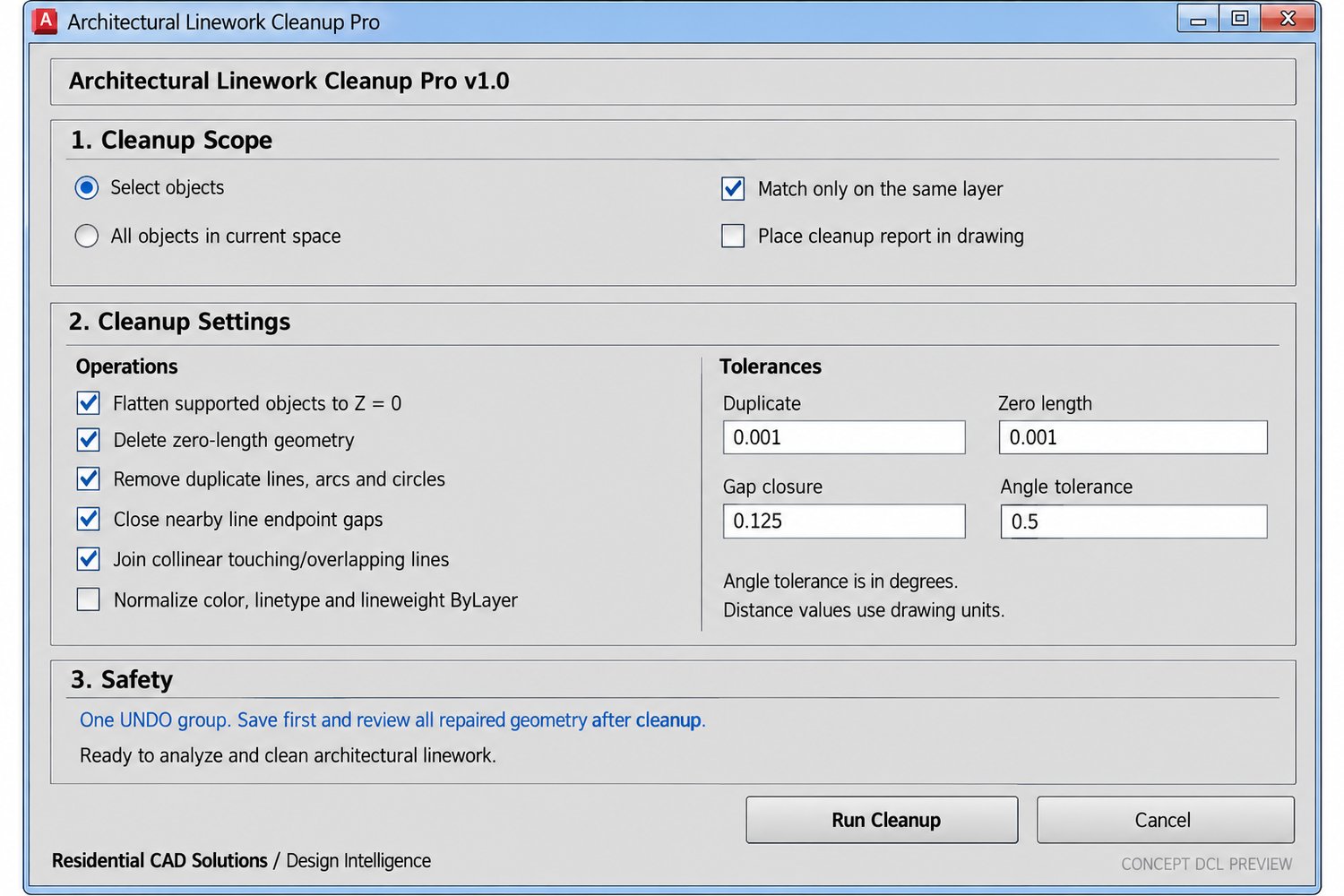
• Flatten supported drawing objects to Z=0
• Remove zero-length geometry
• Find and remove duplicate lines, arcs, and circles
• Close small gaps between line endpoints
• Join compatible collinear lines
• Standardize colors, linetypes, and lineweights to ByLayer
• Clean selected objects or the entire current drawing space
• Restrict duplicate matching and joining to the same layer
• Generate an optional cleanup report inside the drawing
• Reverse the entire cleanup with one AutoCAD UNDO command
Architectural Linework Cleanup Pro gives you control over duplicate, zero-length, gap, and angle tolerances. This allows you to use conservative settings for detailed drawings or adjust the program for larger cleanup operations.
INCLUDED FILES
• LineworkCleanup.lsp
• LineworkCleanup.dcl
• Installation and setup guide
• Complete command reference
• Compatibility information
• Single-user commercial license
• Disclaimer and changelog
INSTALLATION
Extract the ZIP file, keep the LISP and DCL files together, load LineworkCleanup.lsp through APPLOAD, and enter LINECLEANPRO or LCP to begin.
COMPATIBILITY
Developed from an AutoCAD 2002-compatible AutoLISP and DCL foundation. Requires a full desktop AutoCAD version that supports AutoLISP, Visual LISP/ActiveX, and DCL dialogs. AutoCAD LT versions without AutoLISP support are not compatible.
COMMANDS
LINECLEANPRO — Opens the complete cleanup program
LCP — Short command alias
LCPABOUT — Displays product and version information
IMPORTANT
This program intentionally modifies drawing geometry when gap closure, joining, flattening, duplicate removal, or ByLayer normalization is selected. Always save a backup and review the completed drawing before plotting, issuing, or relying on the results.
Clean your drawings. Repair troublesome linework. Produce more professional residential plans with Architectural Linework Cleanup Pro.