Your stick figure. In VRChat.
Create a 3D stylized stick figure avatar for PC VRChat with the Tara Stick Figure avatar base and visual Unity Creator. Choose compatible parts, personalize colors and materials, then bake, test and upload through the VRChat SDK.
One-time SDK Access purchase · Windows Unity 2022.3.22f1 · PC VRChat
MSage Account required for the Creator and baking tools. Create and verify an account using your purchase email, then link this purchase in My Products or redeem your individual emailed code. Your SDK Access is assigned to one authorized computer.
Avatars made with the SDK do not require MSage login to use in VRChat.
Create your MSage Account · Full SDK product page on MSage.co
What you can do
3D avatar preview
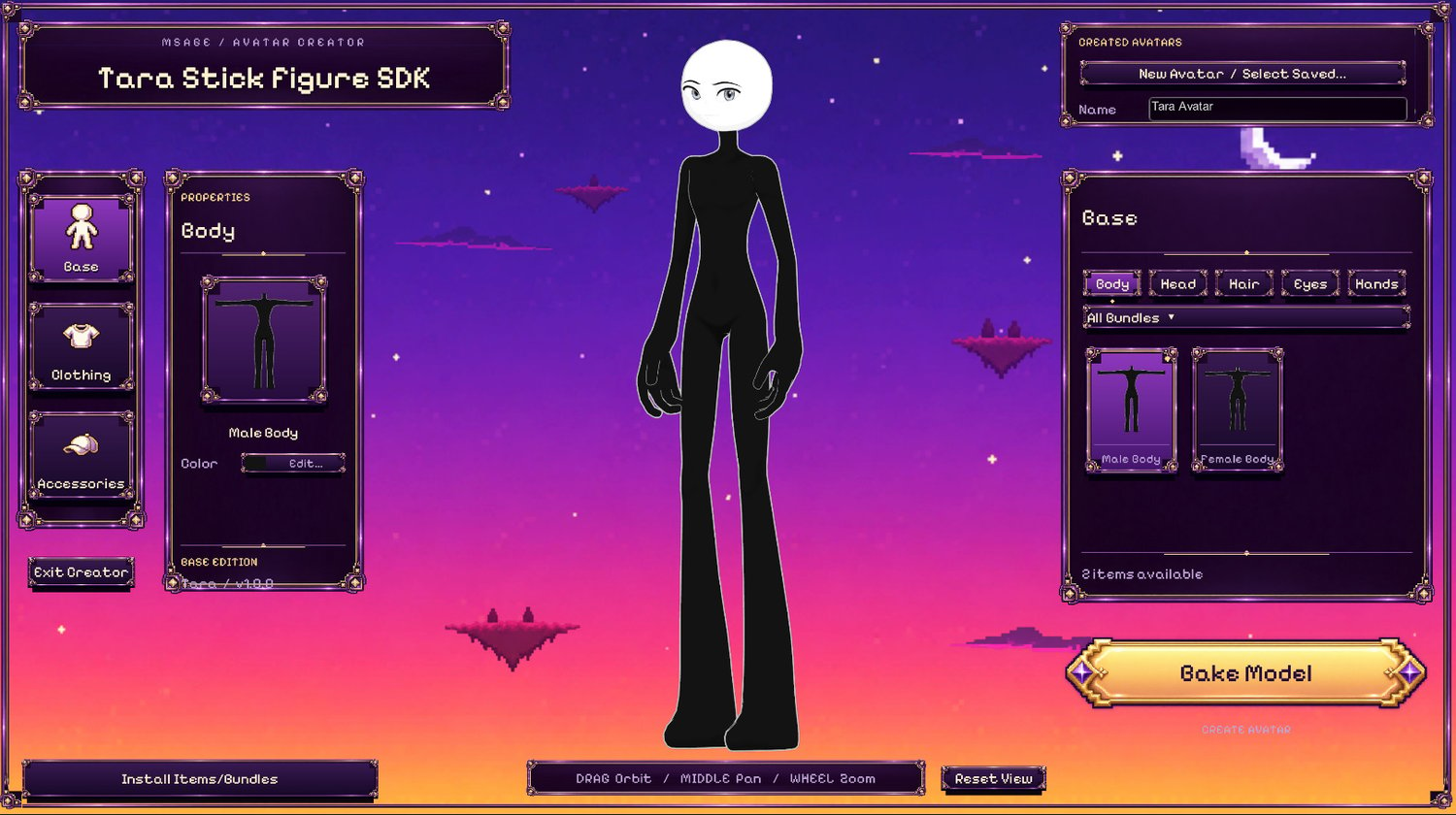
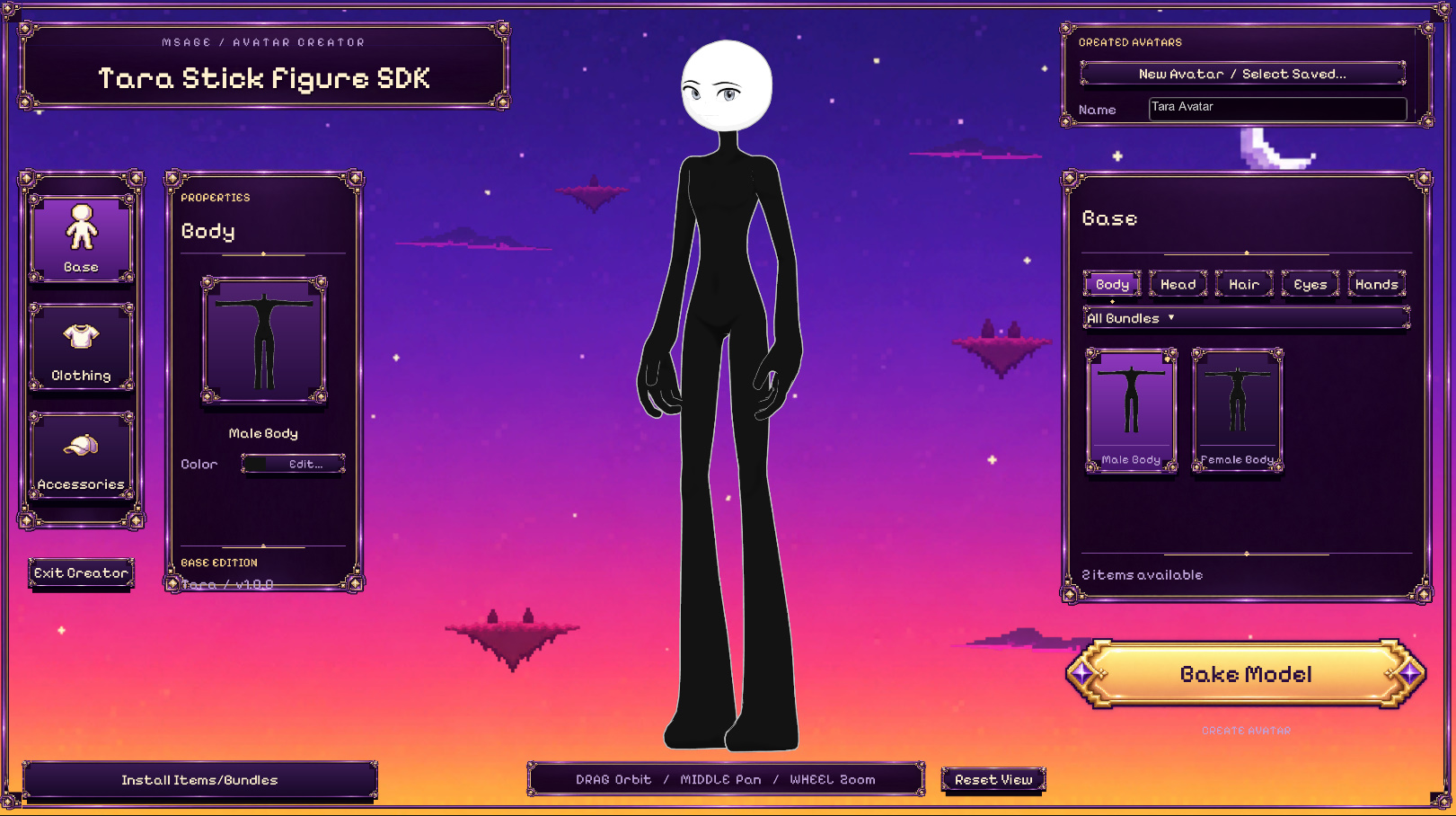
Rotate, pan and zoom around your stick figure in the Tara Stick Figure Creator’s purple-and-gold workspace. Preview idle motion, blinking and gaze while you assemble your look.
Base bodies & parts
Choose a male or female Tara Stick Figure body and the built-in default head, eyes and hands. The base browser also supports compatible installed body, head, hair, eye and hand items.
Clothing & accessories
Browse compatible tops, bottoms, overalls and shoes, then finish the look with multiple accessories. Eleven accessory categories organize everything from headwear and jewelry to back pieces and animated effects. Optional items are separate.
Colors & materials
Give your stick figure a signature palette. Style the built-in body and head with color controls; default hands and feet follow the body color. Compatible optional items can expose their own colors, and masked Color Shift controls what gets tinted.
Item & bundle installer
Search and filter installed bundles, with each tab remembering its filter. Install compatible .TaraItem and .TaraBundle files while the Creator stays open; required dependencies must already be in the project.
Shader Master Basic
Shape the look with the included Basic material tools: main textures and Color Shift, emissions, MatCaps, shading, outlines and render settings. The full Shader Master effects suite is a separate offering.
Combined base mesh
When your look is ready, Bake combines active compatible base parts into a skinned Body mesh and remaps them to the shared rig. Additional authored bones are retained; clothing and accessory renderers stay separate for control.
VRChat expression controls
Chosen clothing and accessory toggles generate VRChat expression menus, parameters and FX animations. Compatible item setup and VRChat’s expression-parameter budget still apply.
Bake your avatar in Unity
Generate a Humanoid FBX, prefab, materials, textures and expression assets for your VRChat setup. The included Unity FBX export tools handle the export; Blender is not needed to use the Creator or bake an avatar.
Prepare lip sync and expressions
The baker sets up a viewpoint, 15 visemes for lip sync and 102 Unified Expressions mappings with the supported VRChat SDK. Mapping coverage is not a claim that every expression has a distinct sculpted deformation.
GoGoLoco integration
The bake workflow copies and merges GoGoLoco 1.8.3 All into the avatar’s setup, alongside the generated controls. You still review, test and upload the result through the VRChat SDK.
Saved avatar editing
Reopen a saved avatar in the same project, try another color or compatible outfit, and bake it again with overwrite confirmation. Update checks notify you about SDK releases without forcing installation.
Included files
- Tara Stick Figure base v1.0.0 with male and female bodies and associated default parts
- Visual Avatar Creator, its interface, preview resources and compatible-item installer
- Base body, head and eye materials, color masks and textures
- Ten eye-color texture PNGs as resources—not ten separately registered eye items
- Shader Master Basic and its material inspector
- GoGoLoco integration assets and the bundled Unity bake/export tooling
Includes the tested v1.0.0 Unity package, the approved MSage personal-use license, Read Me and third-party notices. Optional hair, extra heads, clothing, accessories and authenticated eye packs are separate. Development screenshots may show optional content; they do not make it part of the core purchase.
Requirements
- Windows Unity Editor 2022.3.22f1 · Built-in rendering pipeline
- A VRChat Avatars project with SDK 3.10.6 or newer; the verified development version is 3.10.6
- Internet, a verified MSage Account and active SDK Access for the login-enabled release
- Correctly authored items compatible with Tara Stick Figures and their required dependencies for optional content
The current workflow is for PC VRChat. Mac/Linux Creator login, Unity 6, URP/HDRP and standalone Quest/Android support are not established. The VRChat SDK is installed separately through Creator Companion. Bundled bake tools include FBX Exporter 4.2.1, Autodesk FBX SDK 4.2.1 and Timeline 1.7.6.
Install and create
- Prepare Unity: use a supported Windows VRChat Avatars project, import the Unity package and let compilation and the included bake-tool setup finish.
- Link your purchase: create a verified MSage Account with the same purchase email and open My Products. Use Find purchases or your redeem code. For missing purchase access, contact info@msage.co.
- Open the Creator: sign in through your browser when prompted. The Creator then opens in Unity Play mode. Choose your base, compatible installed parts and colors.
- Bake, test and upload: enter an avatar name, choose Bake Model, review the generated prefab with the VRChat SDK and upload using VRChat’s tools. The Creator does not automatically upload your avatar.
Account and license
Verified account access and an internet connection are required to use the Creator and bake. Sign-in happens in your browser; Unity does not request your website password. One computer is assigned per SDK account. Contact info@msage.co for a computer change. SDK update notifications do not force an update.
The approved MSage license permits personal avatar creation, public VRChat avatars and monetized images, videos and streams. Sharing/reselling SDK or source files is prohibited. Selling avatar files or offering commercial commissions with this SDK requires separate written permission from MSage. Read the complete LICENSE.txt included in the download. Third-party components retain their own terms.
Credits
GoGoLoco 1.8.3 by Franada provides the included avatar locomotion integration. The original GoGoLoco logo is retained in the avatar pie menu; keep it there.
GoGoLoco by Franada · GoGoLoco license
Bundled Unity/Autodesk tools and fonts retain their original licenses and notices. See THIRD-PARTY-NOTICES.txt and the included dependency notices.
Support
info@msage.co · MSage Discord — Sage 3D Dojo · My Products & purchase linking
The Tara Stick Figure SDK is an avatar-base Creator. It is a separate product from The Plane of Tara game and MSage Follower Pets.