




Advanced YouTube Video Fact Checker – Unlimited AI-Powered Verification
On Sale
$21.95
$21.95
Description
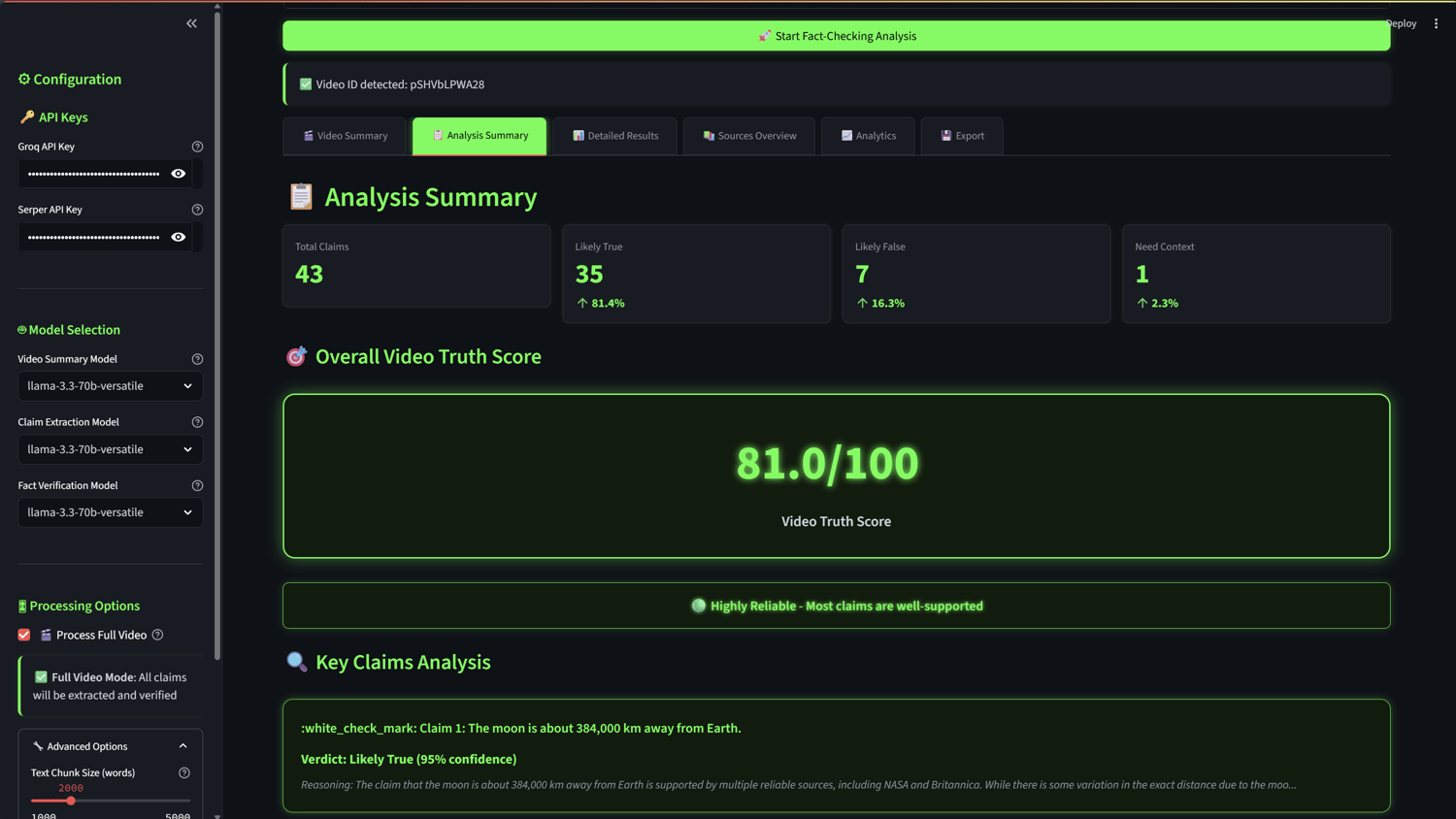
Fact-check any YouTube video with a single click! This AI-powered desktop application uses the latest Groq API models and advanced web search to extract, analyze, and verify factual claims in YouTube videos. Instantly receive a comprehensive report with verdicts, confidence scores, and source links—all in a sleek, modern interface.
Key Features
- AI Video Summary: Get an instant summary before analysis begins
- Automatic Transcript Extraction: Multiple methods for robust transcript retrieval
- Unlimited AI Claim Extraction: Uses all available LLMs for deep analysis
- Comprehensive Web Search: Unlimited results from reliable sources
- Multi-Model Verification: Employs all Groq models for accuracy
- Advanced Scoring: Calculates a 0-100 truth score for each video
- Interactive Analytics: Visual charts and detailed breakdowns
- Export Options: Download results as CSV or JSON
- Modern UI: Black & green theme for a professional look
- No Processing Limits: Analyze full videos, unlimited claims, and results
How to Install & Use
Quick Start (Recommended)
- Download & Unzip:
- Download the ZIP file from Gumroad and extract it.
- Run the App:
- Double-click run.bat to automatically set up everything (creates a virtual environment, installs dependencies, and launches the app).
- Enter API Keys:
- Get your Groq API key (console.groq.com) and Serper API key (serper.dev).
- Enter both keys in the app sidebar when prompted.
- Start Fact-Checking:
- Paste any YouTube video URL and click "Start Fact-Checking Analysis".
- Review the detailed, interactive report.
Manual Setup (Alternative)
- Create a Python virtual environment and install dependencies from requirements.txt.
- Run streamlit run app.py in your terminal.
Audience
- Content Creators: Ensure your videos are accurate and credible
- Journalists & Researchers: Quickly verify sources and claims
- Educators: Teach media literacy and critical thinking
- Fact-Checkers: Automate and streamline your workflow
- General Viewers: Become a more informed consumer of online content
What’s Included
- Windows application (run.bat, Python scripts)
- Step-by-step user guide (README.md)
- Free updates for 1 year
- Email support
System Requirements
- Windows 10 or later (64-bit)
- Internet connection
- Groq and Serper API keys (free to obtain)
License
- MIT License:
- Open source for personal and professional use.
- Not for resale or redistribution as a paid product.
- See included LICENSE file for details.
Support & Contact
- Email support for installation and troubleshooting
- Feature requests and feedback welcome
NB : For customers who have purchased the product and wish to connect it to a different LLM API—such as a local model via Ollama, LLM Studio, OpenAI, Claude, Perplexity ..etc—I’ll gladly adjust the application accordingly and send the updated version free of charge within 48 hours.