

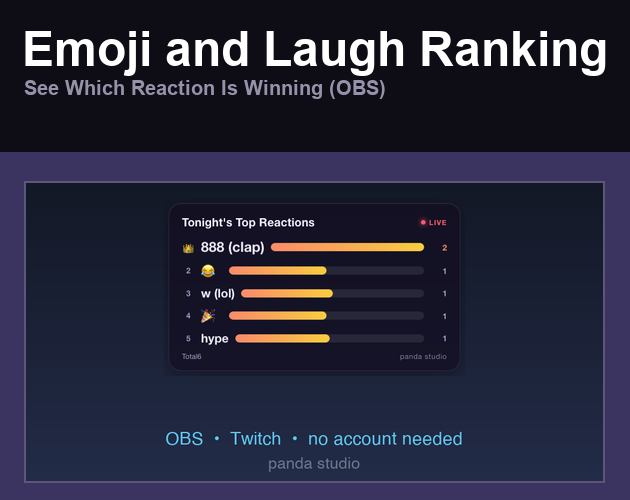
Emoji and Laugh Ranking — See Which Reaction Is Winning (OBS)
Please read first: what this does NOT do
- Comments come only from OneComme (a free app) or, when you add ?twitch=yourchannel to the end of the view.html address, from Twitch chat. There is no direct YouTube connection (YouTube works through OneComme).
- Counts are not saved: restarting OBS or refreshing the source starts again from 0 (panel settings are kept). Comments from the streamer and from bots are counted too.
- By default counts fade over time, to show what is hot right now. For a whole-stream total, untick "Fade older counts over time" in the panel.
- The panel must be added to OBS as its own Browser Source and used with Interact. If you open it in Chrome or another browser it keeps separate settings, and changes there never reach OBS.
Twitch channel names must be 4–25 characters: letters, numbers and _. Anything else after ?twitch= is ignored and nothing connects.
A live ranking of the emotes and reactions your chat is using.
It counts as messages arrive and shows the leaders on screen, so viewers can see which reaction is winning and pile on. Good for polls-by-vibes, reaction streams and anything where chat energy is the point.
- In one folder: view.html (the ranking), panel.html (the settings panel) and lib/. No server.
- Reads Twitch chat directly: in the OBS Browser Source, untick "Local file" and paste view.html's file:/// address into the URL box with ?twitch=yourchannel at the end (drag view.html into Chrome to copy the address). No account linking, no API key, read-only.
- Also works with OneComme: tick "Local file", choose view.html and start OneComme. - Settings are in panel.html. Add panel.html as a second Browser Source the same way as view.html (both as a URL, or both with "Local file" ticked), about 700 x 1000. Drag it outside the black canvas in the OBS preview so it is not streamed, then right-click it > Interact. Do not open panel.html in Chrome: Chrome and OBS keep their settings separately, so changes made there never reach OBS.
Commercial use is fine. Reselling the files is not.