
Animated Chat Themes for OneComme — 4 Chat Box Skins (YouTube / Twitch)
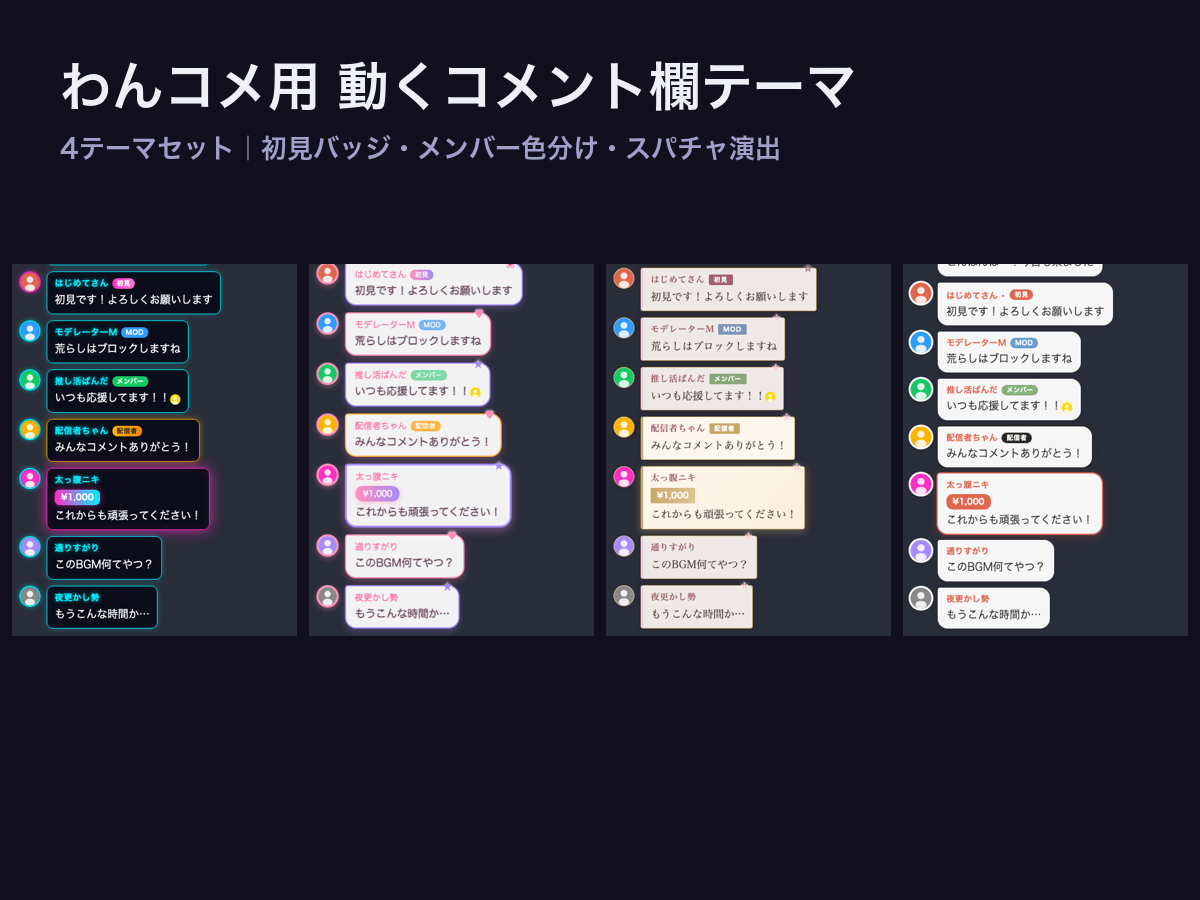
4 animated chat box themes for OneComme (わんコメ) — the popular multi-platform comment app for streamers that works with YouTube, Twitch and more. Turn your plain chat into a living part of your stream: messages pop in with animations, first-time viewers get a special badge, Super Chats get celebration effects, and members are color-coded automatically.
REQUIREMENT: This pack contains templates for the OneComme app (free version works). If you don't use OneComme, check our Animated Stream Overlays pack instead.
WHAT'S INSIDE
- NEON — cyberpunk cyan × pink chat bubbles with glow effects
- SAKURA — Japanese modern, sakura petals drift across new messages
- MINIMAL — clean & readable, fits any layout
- KAWAII — pastel bubbles with hearts (VTuber-friendly)
FEATURES (all 4 themes)
- Animated message entrance (pop / slide / fade per theme)
- First-time viewer badge — instantly spot and welcome newcomers
- Super Chat / paid message celebration effects
- Automatic member color-coding
- Transparent background, works as an OBS Browser Source
SETUP
1. Install OneComme (free) and connect your YouTube / Twitch
2. Select the theme folder as your template in OneComme
3. Add the generated URL as a Browser Source in OBS — done
Each theme has a CONFIG block at the top of the file for accent color and font tweaks. No coding knowledge needed.
LICENSE
Commercial use OK (monetized streams are fine). No redistribution or resale. See LICENSE.txt.
Made by Panda Studio — matching Animated Stream Overlays (same 4 themes) are also available, so your whole stream can share one look.