
Childcare Staffing Ratio & Coverage Planner Spreadsheet — Daycare Teacher Schedule, Call Out Coverage and Labor Cost Calculator
You already know the ratio. What you do not know is which half hour it breaks in.
It is 9:40 on a Wednesday. One teacher called out at six. The sub is coming, but not until ten. You have a floater who leaves at nine thirty and an aide who does not count. Somewhere in the next twenty minutes one of your rooms is going to be one adult short, and you will find out about it when you walk past the door.
This workbook finds out first.
WHAT IT ACTUALLY DOES
★ It cuts your day into blocks - thirty minutes by default, fifteen if you want it sharper - and walks every room through every block.
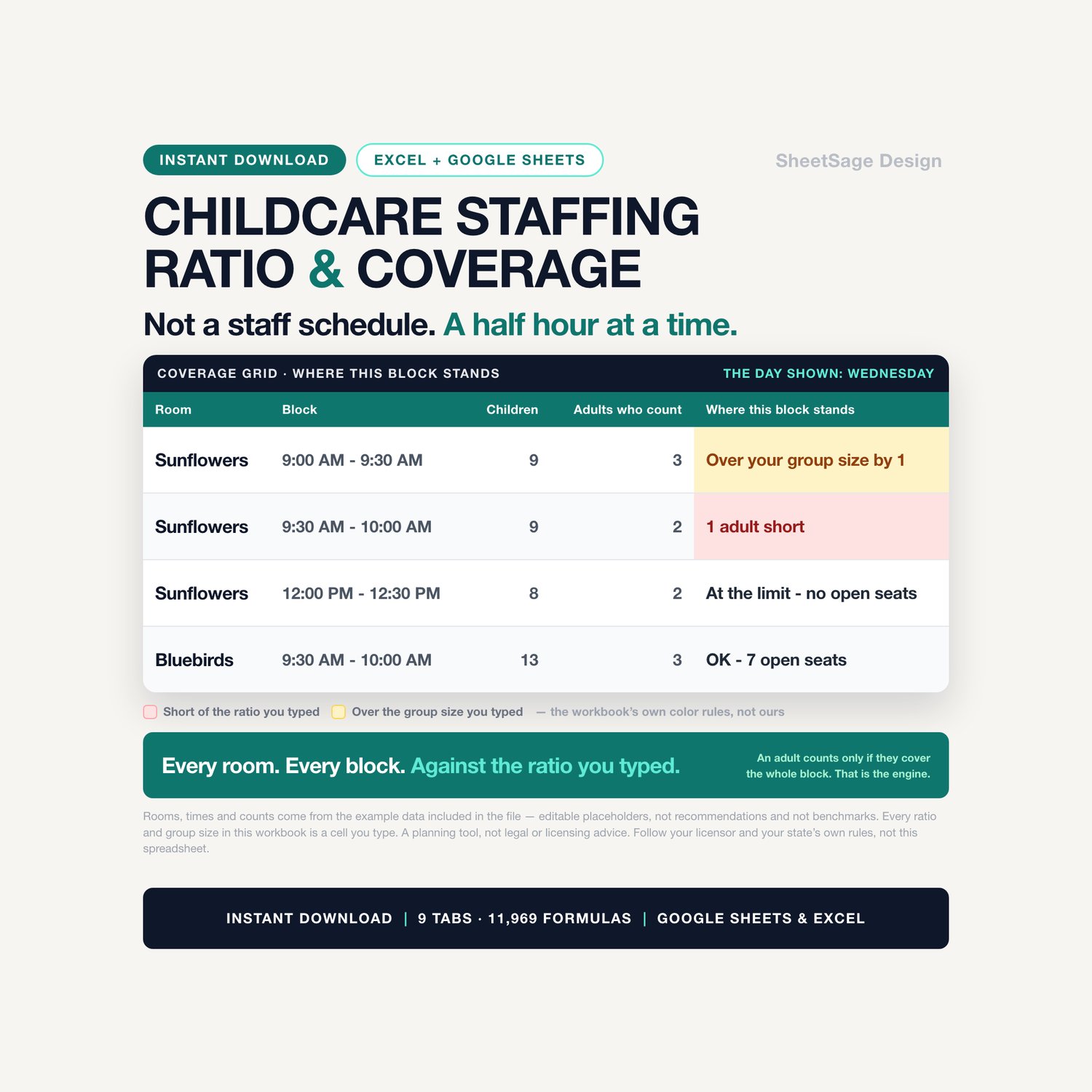
★ For each block it counts the children scheduled in that room, counts the adults who are standing in that room for the whole block, and compares the two against the ratio you typed.
★ Then it writes a sentence: 1 adult short · Over your group size by 1 · At the limit - no open seats · 1 open seat left · OK - 5 open seats.
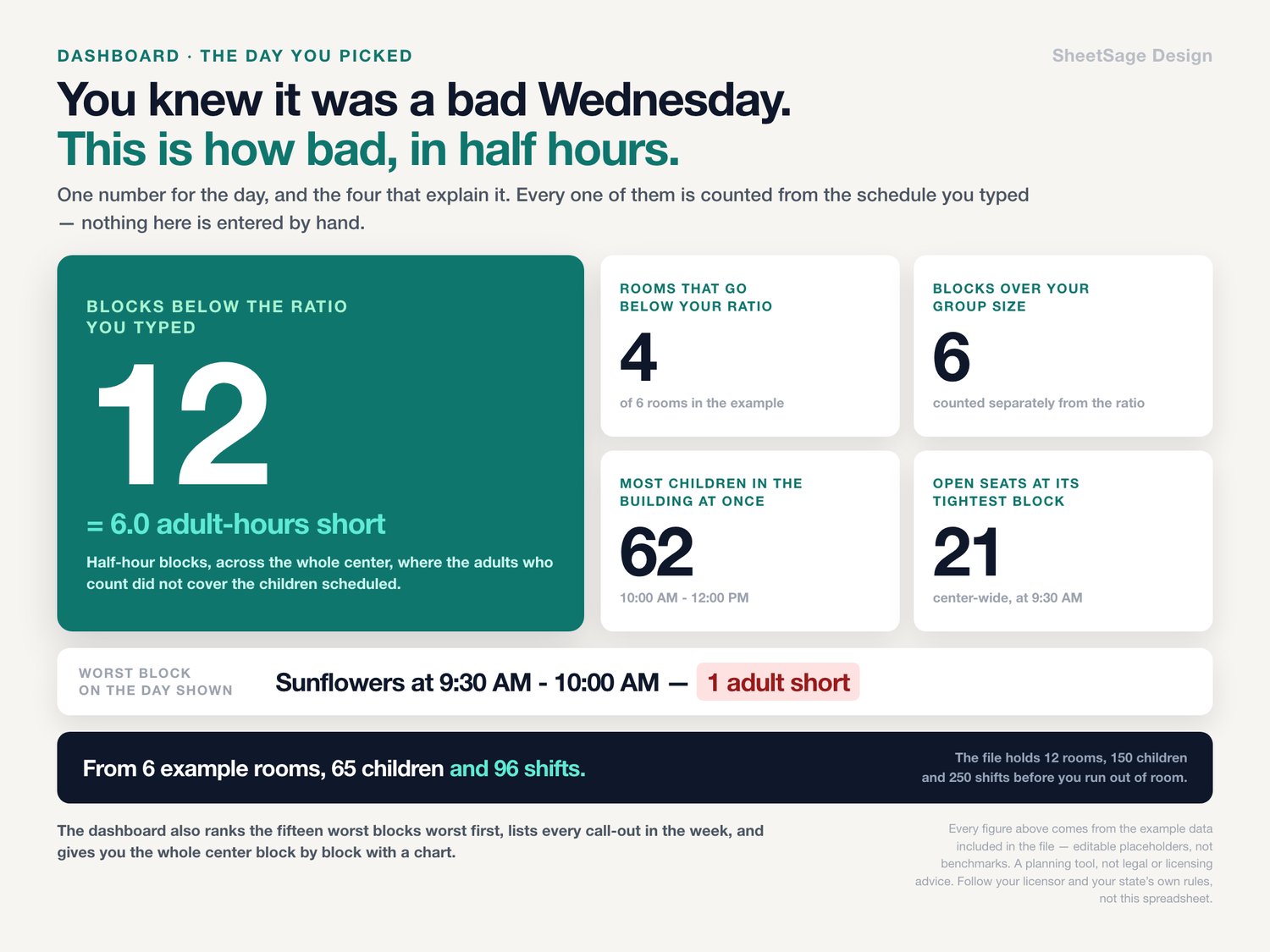
★ And it ranks the bad half hours worst first, so the first thing you read is the worst thing in your day.
THE TWO COUNTING RULES, AND WHY THEY ARE NOT THE OBVIOUS ONES
★ A child counts toward a block if any part of their day touches it. A child who leaves at 12:00 is not in the block that starts at 12:00.
★ An adult counts toward a block only if they cover the whole block. Somebody who walks out at 9:15 does not count for the half hour that runs from 9:00 to 9:30.
★ That second rule is deliberate and it is the conservative one. It is also the rule that makes the file worth having: in the example week, one room goes short at 9:30 for exactly one reason - the floater's shift ended at 9:30, and a floater who leaves at the start of a block was never really in it.
THE PART NOTHING ELSE DOES: THE CALL-OUT DOES NOT DISAPPEAR
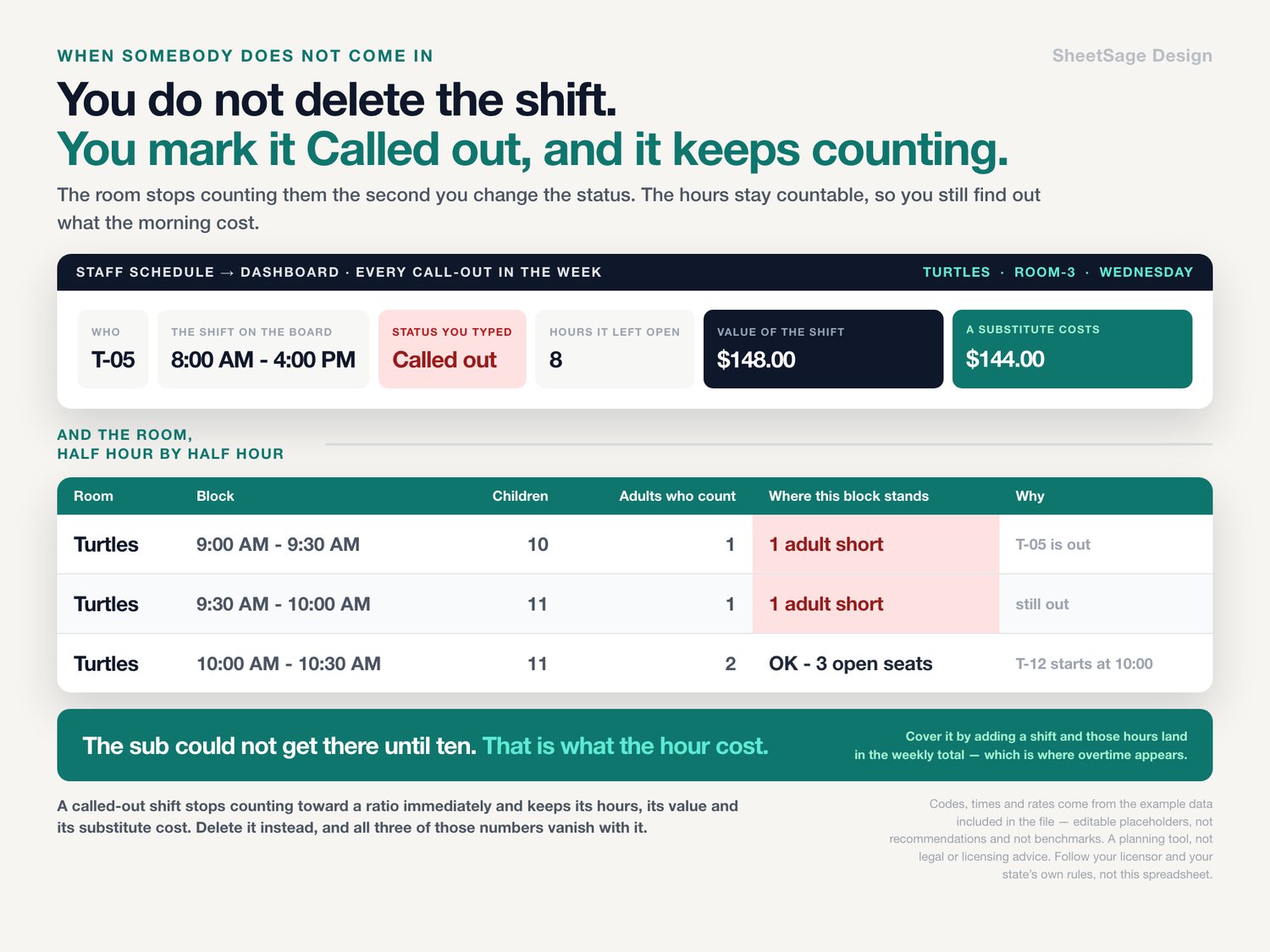
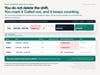
★ When somebody calls out, you do not delete their shift. You change its status to Called out, and it stays on the schedule.
★ The grid stops counting them immediately - that room's blocks go red where the ratio breaks.
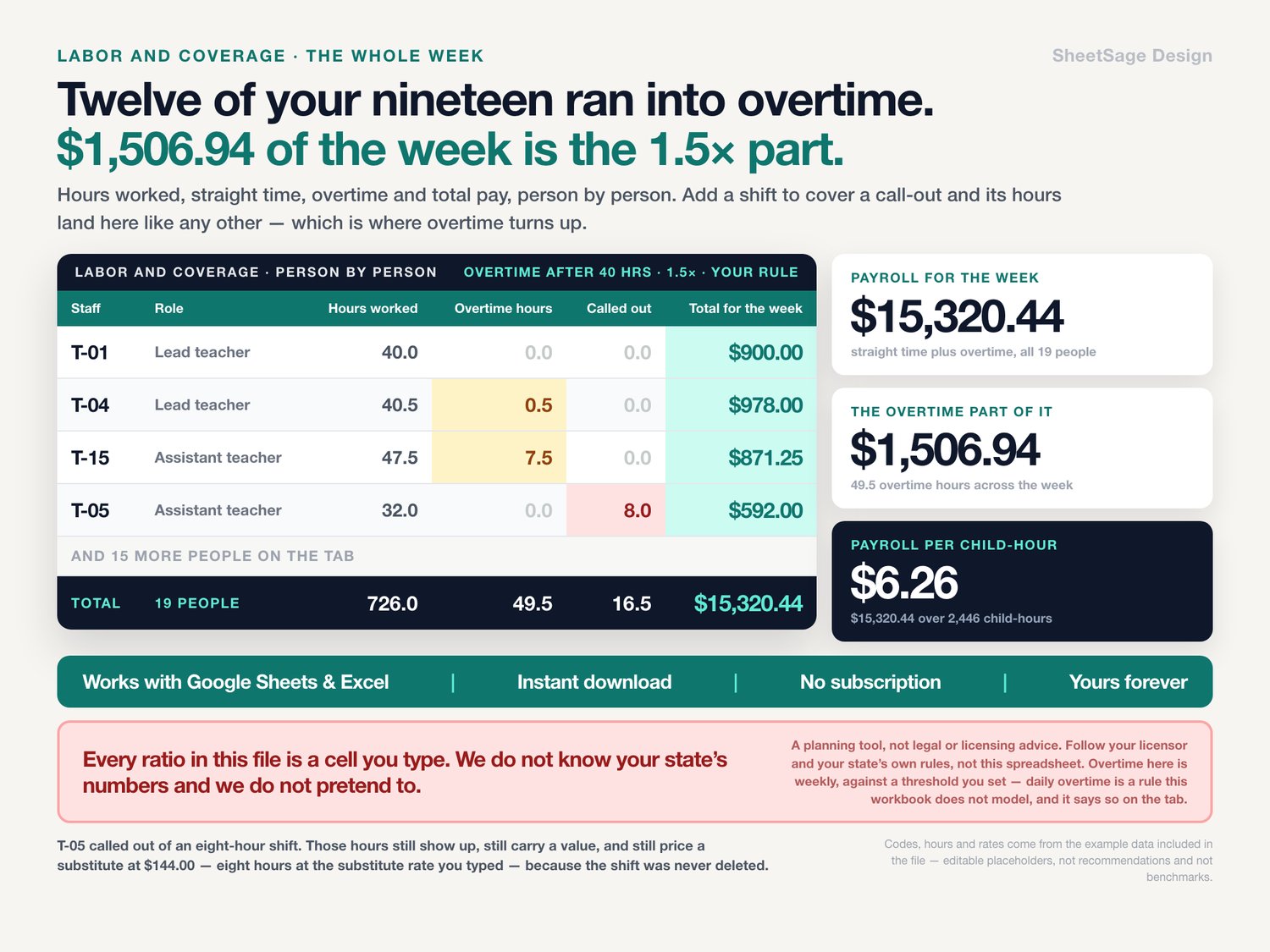
★ The hours stay countable. The workbook tells you how many hours the call-out left open, what those hours were worth at that person's rate, and what a substitute would cost to cover them at yours.
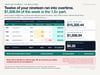
★ If you cover it by adding a shift for somebody else, that shift lands in the weekly hours like any other - which is where you find out whether covering the call-out just pushed somebody into overtime. That is the number nobody adds up, and it is on the dashboard.
IT CATCHES THE ONE TYPO THAT WOULD MAKE THE WHOLE THING LIE TO YOU
★ Type the same floater into two rooms at overlapping times and, in any ordinary schedule, they quietly count toward both ratios. Both rooms read covered. Neither one is.
★ This workbook flags both halves of the overlap in plain English: This person is on two shifts at once that day.
★ Neither row is wrong on its own, which is exactly why nobody catches it by reading the schedule.
★ The example week ships with one, on purpose: a floater on Wednesday afternoon is booked from 12:30 to 1:30 and again from 1:00 to 3:00, and both rows are already flagged when you open the file. The shift that ends at 3:00 and the one that starts at 3:00 are left alone - touching is not overlapping, and the check knows the difference.
AND IT KNOWS WHICH ADULTS COUNT
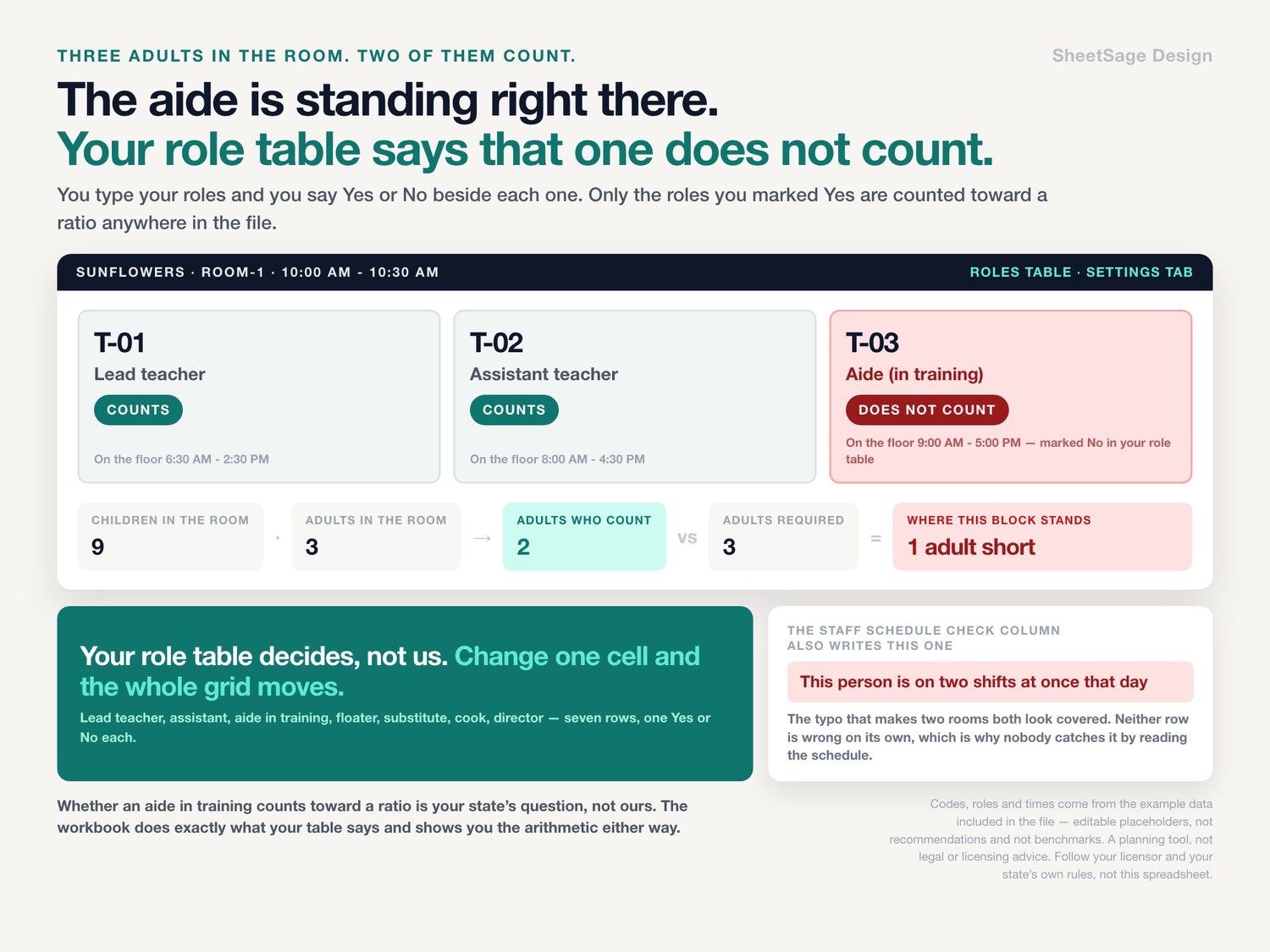
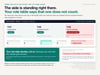
★ There is a role table. You type your roles - lead teacher, assistant, aide in training, floater, substitute, cook, director - and you say Yes or No next to each one.
★ Only the roles you marked Yes are counted toward a ratio anywhere in the file.
★ In the example week there is a room with three adults standing in it that reads as one adult short, because one of the three is an aide the buyer marked No. Whether that is right for you is your call and your state's; the workbook just does what your table says.
MIXED-AGE ROOMS GET THEIR OWN NUMBER
★ Each room takes its ratio and its group size from the age-group table.
★ Any room can override both with a number you type. A mixed-age room, a room with one infant in it, a room your rules read differently - type the number, and the whole grid follows it.
★ In the example the mixed room is set by hand to one adult per four instead of the table's one per six, and you can watch its open seats drop from five to one.
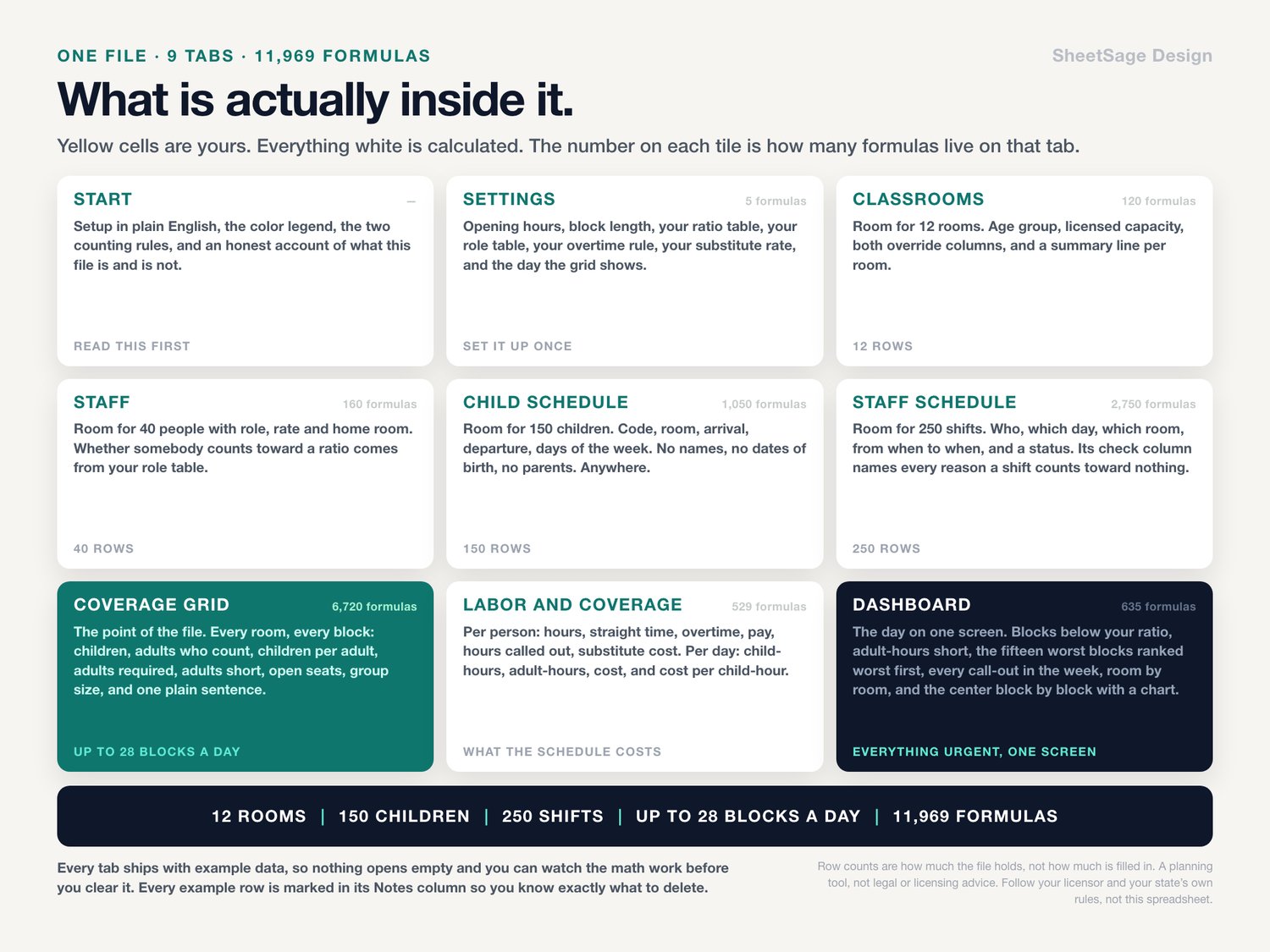
WHAT'S INSIDE (one file, 9 tabs)
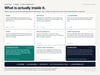
★ COVERAGE GRID - the point of the file. Every room, every block of the day you picked: children in the room, adults who count, children per adult, adults required, adults short, open seats, group size limit, how far over it you are, and one plain sentence.
★ DASHBOARD - the day on one screen. Blocks below your ratio, adult-hours short, rooms affected, blocks over your group size, most children in the building at once, open seats at your tightest moment, the fifteen worst blocks ranked, every call-out in the week, room by room, and the whole center block by block with a chart.
★ CHILD SCHEDULE - 150 children. Code, room, arrival, departure, and which days of the week. No names. A check column catches a room that is not on your list, a departure before an arrival, an arrival before you open, and a child with no days marked.
★ STAFF SCHEDULE - 250 shifts. Who, which day, which room, from when to when, and a status. Its own check column tells you when a shift counts toward no ratio and exactly why - including the one nobody catches by eye, the same person typed into two rooms at once.
★ STAFF - 40 people with role, rate and home room. Whether they count toward a ratio comes from your role table.
★ CLASSROOMS - 12 rooms. Age group, licensed capacity, both override columns, and a summary per room: peak children, adults at its thinnest block, blocks short, blocks over group size, open seats at its tightest moment.
★ LABOR AND COVERAGE - what the schedule costs. Per person: hours worked, straight-time hours, overtime hours, straight pay, overtime pay, total, hours called out, and what a substitute for them would cost. Per day: children, child-hours, adult-hours, labor cost and cost per child-hour.
★ SETTINGS - opening hours, block length, your ratio table, your role table, your overtime rule, your substitute rate, and the day the grid shows.
★ START - setup in plain English, a color legend, the two counting rules, and an honest account of what this file is and is not.
THE RATIOS IN IT ARE NOT OURS
Every ratio and every group size in this workbook is a cell you type. The numbers that ship with the file are example numbers and nothing more. They are not your state's numbers. They are not anybody's minimum. Open your own licensing rules, read them, and type what they say. This is a planning tool that does arithmetic on numbers you give it - deciding what those numbers should be, and what to do when a room does not have enough adults in it, belongs to you and to the people who license you.
NO CHILD NAMES ANYWHERE
No name field, no date of birth field, no parent field, no medical field. Anywhere. You identify children with your own code - C-001, C-002 - and the code-to-name key stays wherever you already keep enrollment records. That is a design choice on our side, not a certification of anything: where you store this file and who you share it with is your decision and your responsibility.
WORKS WITH
Google Sheets (free) and Microsoft Excel. Every formula was chosen so it behaves identically in both - nothing that breaks on the way across. Instant digital download, one .xlsx file, import instructions inside. No subscription, no login, no add-on to install. Yours forever.
PLEASE NOTE
• Digital download - no physical item will be shipped.
• For your own use; please do not resell or share the file.
• A planning tool, not legal or licensing advice. Follow your licensor and your state's own rules, not this spreadsheet. It does not know your state's rules, your county's rules, the conditions on your license, your union contract or your wage and hour law.
• Every ratio, every group size, every hour and every rate in this workbook is a number you type. Those numbers differ by state and they change. The workbook counts what you give it; it does not check it and it cannot tell you that you have it right.
• Overtime here is weekly, calculated against a threshold you set. If your state pays daily overtime, that is a rule this workbook does not model. The per-day cost column is straight time only, and says so on the tab.
• It is built to be used with codes rather than names, but how and where you store and share the file is your decision.
• No outcome is promised.
• The file ships with example data in every tab, so nothing opens empty and you can see the math working before you clear it. Every number, code and time quoted above comes from that example data, and the example week is deliberately messy: rooms go short, one room runs over its group size, two people call out, one person is booked onto two shifts at the same time, and several run into overtime - so every one of those warnings is already on screen when you open the file. It illustrates how the workbook calculates; it is not a recommendation, a benchmark, or advice about any ratio of your own.
• Microsoft Excel and Google Sheets are trademarks of their respective owners. This is an independent product from SheetSage Design, with no affiliation to, sponsorship by, or connection with Microsoft or Google.
• Designed by us and built with the assistance of AI tools, then manually reviewed and verified - every formula was checked against an independent calculation before release.
Questions before you buy? Message us - we answer fast, and we are happy to help you set it up.