
Dynamic Accordion plugin - 5 sites
The Dynamic Accordion block plugin you always wanted!
The Dynamic Accordion plugin is very versatile, lightning fast and at the same time easy to use.
All you need as a designer without worries about the end-user
It is sometimes difficult to find the ideal middle ground: an accordion plugin that does what it is supposed to do, handles custom fields well, is truly usable in a custom template, and is still usable by a regular or even inexperienced end user. The Dynamic Accordion block plugin is based on the real needs of a designer/developer and the capabilities of a regular end user.
The missing block in multiple Gutenberg builder plugins
There are several good block builder plugins available. What they often lack is that they are not really aimed at the professional developer, meaning dynamic functionality, such as in Dynamic Accordion, is missing.
Complete the WordPress Gutenberg core blocks
The standard Gutenberg core blocks can easily be made dynamic with a plugin such as ModernFields. However, what is missing is a good Dynamic Accordion block. That’s why we created it.
Limiting non-admin capabilities
Yes, you read that correctly. The settings offer the option to limit access to certain settings of both the main accordion block and the accordion-items settings. This is ideal to make sure the client or editor can only edit the dynamic field content, not all the settings.
- Administrators (manage_options) — always see everything.
- Editors and other roles — restricted sidebar when the option is on.
- The settings page clearly shows what is and what’s not available in the ‘Restrict block sidebar’ mode.
Structure
- The accordion block consists of a main block containing separate accordion-items.
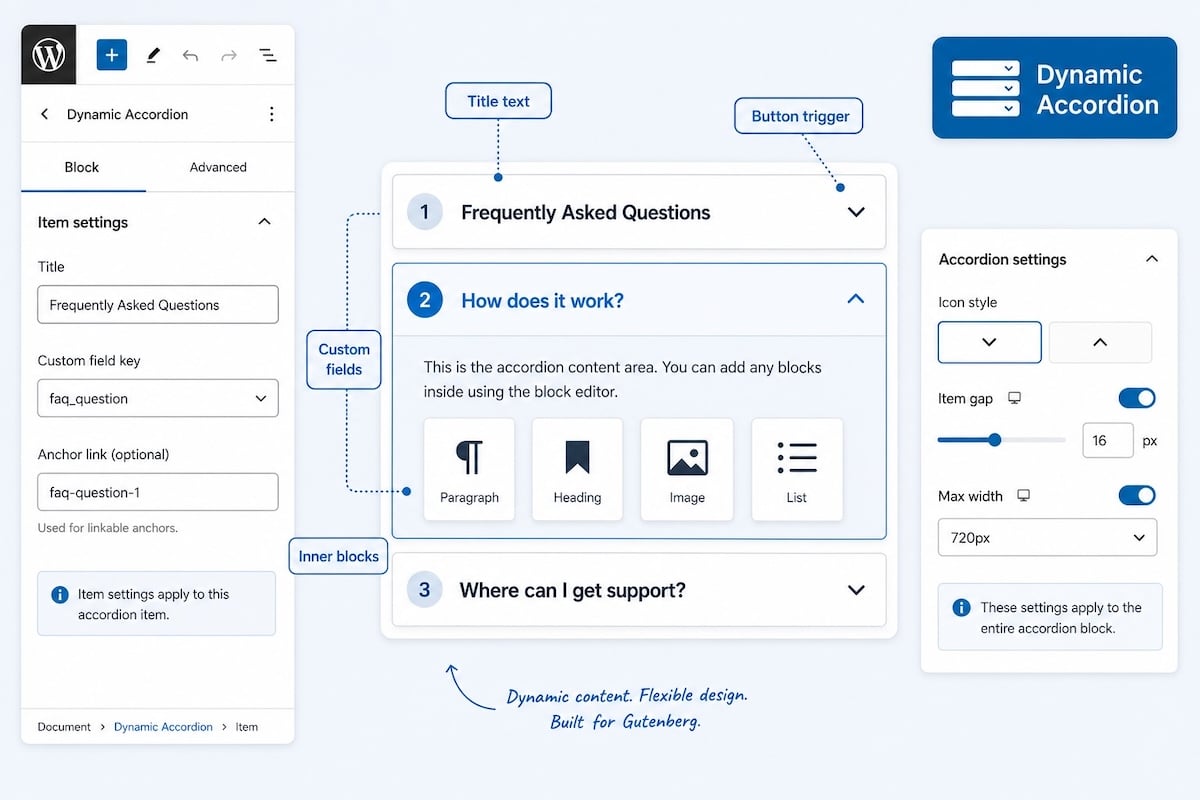
- Each accordion-item has an accordion title and an accordion content area.
Title of the accordion
The title field works in two ways
- You can enter a title directly as plain text. This is also used to indicate the name of the accordion item in the Listview.
- You can link the field to a custom field.
If you enter both text and a custom field, the entered text is used to indicate the name of the accordion item in the List view, and the item displays the custom field value on the frontend.
The content section
The content section field works in two ways
- You can link the field to a custom field (text, area, rich text, wysiwyg or editor field).
- You can add Gutenberg core blocks such as heading, text, list, and image.
- The content section is also compatible with blocks from other Gutenberg blocks, like Greenshift, Stackable, Kadence, GenerateBlocks, Twentig and others
- Most blocks will work. Not all, because some blocks are poorly coded or require a separate script to be displayed.
- Most form blocks will also work. If the form script is not activated, place the form block in the first accordion item and set it to ‘open’.
- Map blocks have been intentionally excluded, just like placing an accordion block inside the accordion block.
Dynamic with custom fields, without a builder
- Even without a builder that allows you to use custom fields, you can deploy our dynamic accordion with custom fields. In short, even on a standard WordPress installation, with a (free) custom fields plugin like ACF, SCF, or Modern Fields, you can dynamically configure this plugin.
- The content section works with text, text-area, rich text and WYSIWYG (editor) fields, including headings, lists, images, etc.
- If there is a value in the title field or the content field, it is overridden by the custom field value. Therefore, an accidental value in those fields does not disrupt it.
Integrated custom fields
- Often that’s all you need. A custom textfield for the title and a rich-text area field for the content. In settings you can set the number of custom fields you require. The rich text fields for the content have a simple editor for normal text, bold, italic, color, h3, h4, URLs, and shortcode are also allowed. And we thought of you; it also works with custom post types. Direct media integration is excluded to keep everything fast and light. If you require that, just switch to a standard custom field plugin; it’s fully supported as well.
Compatible with several kinds of custom fields
- Integrated custom fields
- Custom fields from several custom fields plugins
- Post dynamic fields like title, post title, author, excerpt, date and main post content.
- WooCommerce values: price, regular price, sale price, SKU, short description and long description.
Only used accordion-items are shown on the frontend
- If an accordion item contains no text, the frontend is not displayed. If the title or content section is linked to a custom field but it contains no values, the frontend is not displayed. This is ideal for websites designed with a preset number of accordion items that the end user fills in themselves; not used is not shown.
Settings
- Dynamic Accordion has settings for heading, body text, border color normal and active, spacing, rounded corners, and more.
- Each accordion item can be provided with an #anchor link; a reference in text or a button then ensures that the page scrolls to that accordion item, opens it, and makes the content visible to the visitor.
- Another example: set anchor prices on an item, then link to yoursite.com/page#prices — that item opens and scrolls into view.
- You can create five preset styles.
- In every accordion block, you can select one of the 5 styles or choose for custom and design everything yourself.
- Your website got messy with all kinds of different accordion styles? There is a button to make them all the same again, with just 1 click.
Width (max)
- The accordion block takes the space you allow, usually the page width, a group block or column; whichever is smaller.
- It also has a max. width field to allow for a manual maximum width setting.
- If you need the accordions to all the space there is, just set a max. width like 2000 px.
Class targets and CSS effects
- There are multiple ways to target tabs, frames, and backgrounds in normal state, hover, and active.
- There are also multiple visual effects available to make the accordions open.
- Both the classes (which save you a lot of time) and the CSS for the effects are all located on the plugin’s Settings page.
Using the accordion block in a query
- Because Dynamic Accordion works with custom fields, you can also use it in a query with a custom post type. Simply place a Dynamic Accordion block with one item in the query card, and link the title and content to a custom field. Every time the end user creates a new custom post, an accordion item is automatically added.
Accessibility
- Accessibility is fully implemented.
- Each item uses <button type=”button” class=”…__trigger”> (not a <div> or plain text) and both aria-expanded and the aria-controls + panel id are included in the schema.
- Talking about accessibility; the plugin provides a migrate.md file for AI agents for an automatic migration; from any site (HTML) to our accordion blocks.
FAQ schema
- FAQ schema is not used anymore for rich results, but search engines like Google, Bing and AI still read it as a source of information.
- The Dynamic Accordion block has a button in the main section to switch the FAQ schema on.
- This advanced function offers a title field for the whole set of accordion-items, like ‘Frequently Asked Questions’ or ‘Questions about our lifetime plans’. If left empty, it uses the page title automatically.
- Only items that would actually show on the frontend are included, and each item needs both a question (title) and a text answer (HTML is converted to plain text). Empty items and image-only answers are skipped.
More information
- Examples of the default styles
- Full Dynamic Accordion documentation
- Dynamic Accordion plugin page
Get your Dynamic Accordion license
- You are allowed to use the plugin on a maximum of websites, according to the purchased license.
- Always deactivate a license on an unused website; otherwise the key slot remains occupied.
- It’s a one-time payment; no yearly costs.
- You can check your available slots at: https://server.wpinsight.eu/validate-key/
