

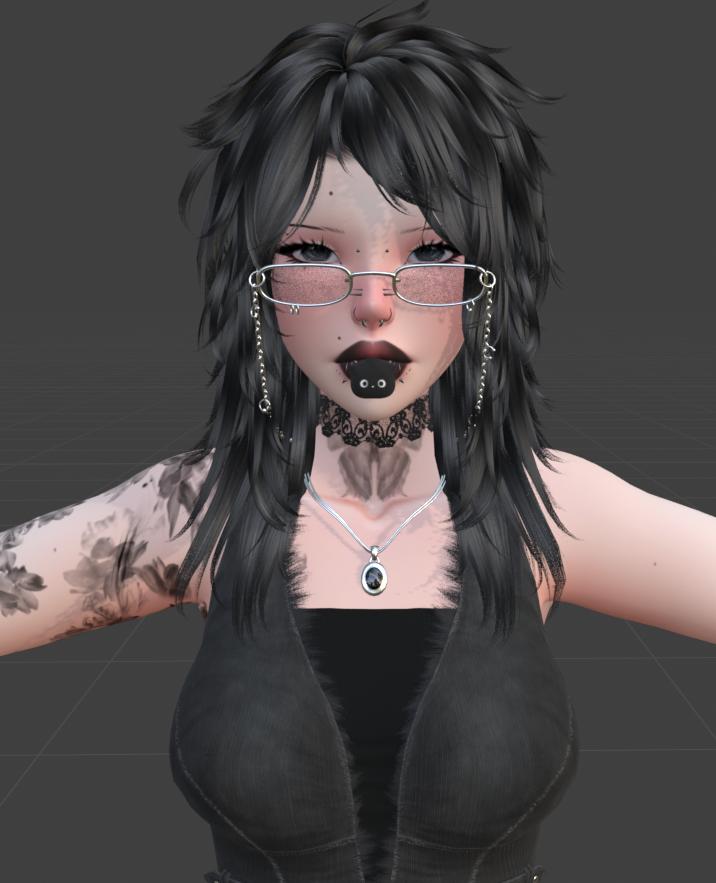
COMING SOON ♱🦇☆Iris SFW☆🦇♱[PC / QUEST / GOGO / WORLD DROP]
Make sure to read my Terms and Conditions before purchasing
Features
Avatar limb scaling
Pen
Hair emmisions
White and black versions of all clothes
Gogo Loco
Lightening sliders
Breathing animation
Skin sliders
Metal swap
Physbones: hair, chest, fans, tummy, lobster, thighs
World drop
Toggles
Dress set: Leg bow, Leg strap, Corset, Socks
Shirt, Longsleeve, Denim top, Face piercings, Belly ring, Rings, Choker, Necklace, Glasses
Messy, Long hair, 2 bangs
Tattoos, Breathe anim, Lashes white
Pen, Fans, Mouth cat, Chair, Lobster
Not on quest
Disclaimer for quest: this is my first quest convert Quest version mainly works for platform support
due to vrchat limits customization very limited.
-Floy toy
-Physbones only in hair
-White swaps
Toggles:
-Leg bow
-Bangs
Very Poor performance
My model is completely SFW
-clothing toggles will not fully remove clothes
-100% sfw mesh
-100% sfw textures
-no systems for adult use
Required:
-poi_Toon_7.3.50_UpTo_9.3.64
-vrcfury
-avatar sdk 3.10 and above
Upploading
PC (upload first if you want to sync)
1.make a 2022 avatar unity project through the vrchat avatar companion and create and open.
2.import vrcfury and poiyomi.
3.once shaders are imported import the model package pc.
4.once the model is imported locate the OPEN ME scene in the project files.
5.drag and drop OPEN ME to the Hierarchy.
6.navigate to the vrchat sdk at the top and open the control panel.
7.in the control panel popup navigate to Builder.
8.fill out the info in the builder and press Build and publish at the bottom
Quest
1.make a 2022 avatar unity project through the vrchat avatar companion and create and open.
2.navigate to files at top left corner and click build settings.
3.click the Android option and click switch platform at bottom right corner.
4.import the model package quest.
5.once the model is imported locate the OPEN ME scene in the project files.
6.drag and drop OPEN ME to the Hierarchy.
7.navigate to the vrchat sdk at the top and open the control panel.
8.in the control panel popup navigate to Content Manager- find the models pc side
9.under that model click copy ID.
10.navigate to the avatar in the hierarchy and click.
11.on the right under the inspector locate the pipeline manager.
12.paste the ID you copied under the pipeline manager and click attach.
13.follow steps 6-8 from pc side.
Credits
Body: Luxa base
Head: Mina head, Mina's Hairline
Hair: Coll Hair , Minas hair
Hair textures - Hair Texture Pack
Clothes: Tube top, Pantsuit, Fit set, Fishnets, Safety Shorts, Longsleeve, Tee
Acessories: Silver set, Lace choker, Chain Glasses , Mouth cat, Piercings, Rings, belly piercing, Leg band
Fun stuff: Lobster plush, Fan flow toy, Egg chair, Pen
Extra: Menu icons, Avatar limb scaling, Puff Particle ,
Quest matcaps, Gestures, Av3Creator , Lighting Sliders, Finger Trails, Matcap pack,Quest Matcaps
If I missed anything please feel free to contact me at etherealvengeance on discord or EtherealVen@outlook.com