
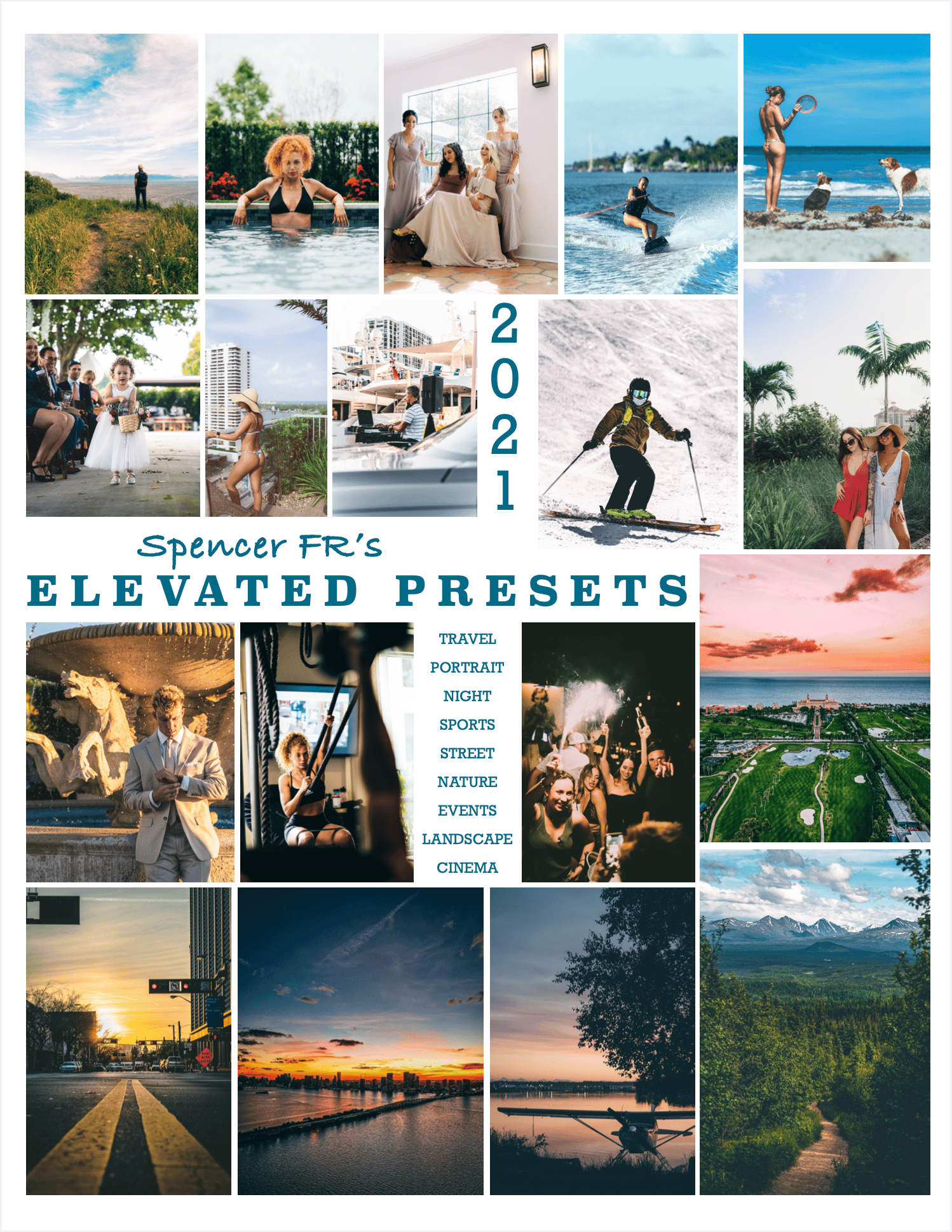
ELEVATED PRESETS 2021
On Sale
$25.00
Pay what you want:
(minimum $25.00)
$
CREATE A PROFESSIONAL AND CINEMATIC LOOK IN YOUR PHOTOS WITH 1 CLICK
Including 18 Lightroom Presets
Works on IOS, Android, Windows, & Mac (DNG and .xmp files included)
Instructions for install on both platforms included!
I have been working on & testing these Presets for months, both in my creative and commercial photography! They work best on RAW photos but will work great on JPG too!
*Your iPhone can shoot RAW - use it!
These presets just WORK. I struggled to find a pack of presets that would give me non-destructive, pro looking results with little to no effort. So, over the past few months of commercial projects - I made my own! I hope you enjoy using them as much as I enjoyed creating them.
***These Presets do NOT affect Exposure or White Balance! These are the only 2 sliders you should tweak once applying the presets. Brighter or Darker / Cooler or Warmer. Thats it! Enjoy :)
- INSTRUCTIONS FOR PHONE -
(Highly recommended to download on computer, its so much easier and you will still be able to access the presets on your phone once you are done!) But, if you must do it on your phone, follow these steps:
>Go to Settings, Safari, Downloads, make sure "STORE DOWNLOADED FILES ON:" is set to On My Iphone
>Now open your download link in Safari, and download the folder
>It will appear in the top right of your Safari Window, once you click it should bring you to Files app
>In Files app, click the ELEVATED PRESETS.zip and it will give you the new blue folder ELEVATED PRESETS
>Open the folder, open the MOBILE DNGs folder
>From here, click on a preset you'd like to load into lightroom - lets use Aspen as an example
>Click Aspen, a blank screen with "ASPEN Adobe raw image" text will appear
>Click the "share" button in the bottom left, swipe right to the Lightroom icon, "Launch Lightroom Now"
>Once in Lightroom, scroll up to "Recently Added" Folder
>Inside, scroll to the top. The most recent picture should be a DNG of my friends posing by some plants
>Open the pic, hit the 3 dots (⋅⋅⋅) in the top right, select "Create Preset"
>At this point, name your Preset whatever you want, or rename it Aspen.
>IMPORTANT: before you save, do 2 things: go into Light, make sure Exposure is unchecked, leave the rest checked. Now go into Color, make sure White Balance is unchecked, leave the rest checked.
>And you're done! Unfortunately on the phone, you will have to repeat this process with every Preset you want to load
-On a computer the process is SO much simpler-
>Open the download link from your email or airdrop from your phone
>Download the folder somewhere easy to find like desktop
>Open Lightroom
>Open Presets tab, hit 3 dots (⋅⋅⋅) or (+) and "Add Preset / Import Preset"
>Navigate to the ELEVATED PRESETS folder you just downloaded
>Select the PRESETS folder within it
>boom, you are done! All the presets are loaded into lightroom and automatically organized for you
>The best part! All of the presets are now on your phone's lightroom app too!
Again, any questions feel free to reach out to me and I will guide you through it!
Including 18 Lightroom Presets
Works on IOS, Android, Windows, & Mac (DNG and .xmp files included)
Instructions for install on both platforms included!
I have been working on & testing these Presets for months, both in my creative and commercial photography! They work best on RAW photos but will work great on JPG too!
*Your iPhone can shoot RAW - use it!
These presets just WORK. I struggled to find a pack of presets that would give me non-destructive, pro looking results with little to no effort. So, over the past few months of commercial projects - I made my own! I hope you enjoy using them as much as I enjoyed creating them.
***These Presets do NOT affect Exposure or White Balance! These are the only 2 sliders you should tweak once applying the presets. Brighter or Darker / Cooler or Warmer. Thats it! Enjoy :)
- INSTRUCTIONS FOR PHONE -
(Highly recommended to download on computer, its so much easier and you will still be able to access the presets on your phone once you are done!) But, if you must do it on your phone, follow these steps:
>Go to Settings, Safari, Downloads, make sure "STORE DOWNLOADED FILES ON:" is set to On My Iphone
>Now open your download link in Safari, and download the folder
>It will appear in the top right of your Safari Window, once you click it should bring you to Files app
>In Files app, click the ELEVATED PRESETS.zip and it will give you the new blue folder ELEVATED PRESETS
>Open the folder, open the MOBILE DNGs folder
>From here, click on a preset you'd like to load into lightroom - lets use Aspen as an example
>Click Aspen, a blank screen with "ASPEN Adobe raw image" text will appear
>Click the "share" button in the bottom left, swipe right to the Lightroom icon, "Launch Lightroom Now"
>Once in Lightroom, scroll up to "Recently Added" Folder
>Inside, scroll to the top. The most recent picture should be a DNG of my friends posing by some plants
>Open the pic, hit the 3 dots (⋅⋅⋅) in the top right, select "Create Preset"
>At this point, name your Preset whatever you want, or rename it Aspen.
>IMPORTANT: before you save, do 2 things: go into Light, make sure Exposure is unchecked, leave the rest checked. Now go into Color, make sure White Balance is unchecked, leave the rest checked.
>And you're done! Unfortunately on the phone, you will have to repeat this process with every Preset you want to load
-On a computer the process is SO much simpler-
>Open the download link from your email or airdrop from your phone
>Download the folder somewhere easy to find like desktop
>Open Lightroom
>Open Presets tab, hit 3 dots (⋅⋅⋅) or (+) and "Add Preset / Import Preset"
>Navigate to the ELEVATED PRESETS folder you just downloaded
>Select the PRESETS folder within it
>boom, you are done! All the presets are loaded into lightroom and automatically organized for you
>The best part! All of the presets are now on your phone's lightroom app too!
Again, any questions feel free to reach out to me and I will guide you through it!