


Complete AI Training Materials System - Deliver Professional Training Tomorrow
COMPLETE TRAINING MATERIALS SYSTEM
$347 - Everything Needed to Deliver Professional AI Training
📦 WHAT'S IN THE COMPLETE PACK:
📄 COMPREHENSIVE TRAINING DOCUMENTS (180+ pages)
✅ 00_Training_Materials_Overview.docx (10 pages)
- System overview
- What's included
- Who should use this
- How to use the system (4-step process)
✅ 01_Bronze_Facilitator_Guide_COMPLETE.docx (60+ pages)
- Section 1: Training Overview & Preparation
- Training objectives and outcomes
- Target audience (all levels, all roles)
- Prerequisites and setup requirements
- Complete materials checklist
- Room setup diagram with specifications
- Technology requirements
- Section 2: Facilitator Preparation
- 1 week before checklist
- Day-before checklist
- Day-of setup (30 min before)
- Troubleshooting common issues (Wi-Fi, projector, logins, etc.)
- Section 3: Session 1 Script – AI Fundamentals (45 min)
- Minute-by-minute facilitator script
- [0:00-0:10] Welcome & icebreaker
- [0:10-0:25] What is AI?
- [0:25-0:35] Common misconceptions
- [0:35-0:45] Q&A and transition
- Facilitation tips for each segment
- Section 4: Session 2 - AI in Your Role (60 min)
- Role-specific examples by department
- Before/after demonstrations
- Group discussion facilitation
- Section 5: Session 3 - Hands-On Practice (90 min)
- Exercise instructions (step-by-step)
- Coaching tips for participants
- Troubleshooting technical issues
- Managing different skill levels
- Section 6: Session 4 - Ethics & Next Steps (45 min)
- Responsible AI discussion
- Quality checking techniques
- Resources and support
- Closing the training
- Appendices:
- Sample slides
- Answer keys
- Common Q&A responses
✅ 02_Participant_Workbook_COMPLETE.docx (50+ pages)
- Session 1: AI Fundamentals
- Note-taking templates
- What AI can/cannot do worksheets
- Myth-busting exercises
- Questions space
- Session 2: AI in Your Role
- Role-specific application worksheets
- Task identification templates
- Quick wins planning sheets
- Session 3: Hands-On Practice
- Exercise 1: Document summarization (with space for results)
- Exercise 2: Content generation (email drafting template)
- Real work practice templates (2 task worksheets)
- Time savings tracking
- Session 4: Ethics & Next Steps
- Data privacy rules checklist
- Quality checking checklist
- Support resources contact list
- Next steps and goals worksheet
- 30-day action plan
- Ready to print and distribute (one per participant)
✅ 03_Presentation_Slide_Outline_COMPLETE.docx (30+ pages)
- 33 Complete Slide Specifications:
- Slide 1: Title slide (visual specs + speaker notes)
- Slide 2: Today's agenda
- Slide 3: Ground rules
- Slide 4: What is AI?
- Slide 5: What AI can/cannot do
- Slides 6-10: Myth busting (one slide per myth)
- Slides 11-20: Role-specific examples (by department)
- Slides 21-25: Hands-on exercise instructions
- Slides 26-30: Ethics & best practices
- Slide 31: Support resources
- Slide 32: Next steps
- Slide 33: Thank you & evaluation
- For Each Slide:
- Visual design specifications
- Exact content to include
- Speaker notes (what to say)
- Timing guidance
- Ready to build in PowerPoint/Google Slides/Keynote
✅ 04_Exercise_Library_COMPLETE.docx (25+ pages)
- 15 Hands-On Exercises with Complete Instructions:
- Exercise 1: Email drafting (10 min, ★☆☆☆☆)
- Exercise 2: Meeting agenda creation (10 min, ★☆☆☆☆)
- Exercise 3: Document summarization (15 min, ★★☆☆☆)
- Exercise 4: Data analysis support (15 min, ★★★☆☆)
- Exercise 5: Presentation outline (15 min, ★★☆☆☆)
- Exercise 6: Social media content
- Exercise 7: Report writing assistance
- Exercise 8: Code commenting
- Exercise 9: Customer service responses
- Exercise 10: Training material development
- Exercise 11: Policy simplification
- Exercise 12: Brainstorming sessions
- Exercise 13: Technical explanations
- Exercise 14: Meeting notes organization
- Exercise 15: Feedback response drafting
- Each Exercise Includes:
- Learning objective
- Time estimate
- Difficulty level (1-5 stars)
- Complete scenario
- Prompt template
- What to look for (success criteria)
- Variations for different roles
- Required materials
✅ 05_Assessment_Tools_COMPLETE.docx (15+ pages)
- Pre-Training Assessment
- Purpose: Gauge readiness
- 5 questions covering experience, confidence, concerns
- Send 3-5 days before training
- Post-Training Evaluation
- Purpose: Measure satisfaction
- Training quality ratings (5 dimensions)
- Learning outcomes verification
- Open-ended feedback
- Collect at end of session
- Knowledge Check (20 Questions)
- Purpose: Verify understanding
- 80% passing score for certification
- Multiple-choice format
- Answer key included
- Skill Demonstration Rubric
- Evaluate hands-on performance
- 4-point scale (Emerging → Mastery)
- 30-Day Follow-Up Survey
- Measure actual usage
- Identify support needs
- Track time savings
🎁 BONUS RESOURCES FOLDER
- ✅ Video_Scripts.docx (12 pages)
- Pre-Training Welcome Video (2 min)
- Complete script with timestamps
- [0:00-0:20] Opening
- [0:20-0:50] What to expect
- [0:50-1:20] Preparation steps
- [1:20-1:50] Address concerns
- [1:50-2:00] Closing
- Module Intro Videos (5x 3 min each)
- Tips & Tricks Series (10x 90 sec each)
- Post-Training Follow-Up (2 min)
- All scripts include setting, camera instructions, timing, exact words
🎯 COMPREHENSIVE TRAINING COVERAGE:
Complete 4-Hour Training Programme:
SESSION 1: AI Fundamentals (45 min)
- What is AI? (simple explanation, no jargon)
- What can and cannot do
- Common misconceptions busted
- Q&A
SESSION 2: AI in Your Role (60 min)
- Department-specific applications
- Before/after time comparisons
- Quick wins for immediate implementation
- Group brainstorming
SESSION 3: Hands-On Practice (90 min)
- Exercise 1: Document summarization
- Exercise 2: Content generation
- Real work task practice
- Individual coaching
SESSION 4: Ethics & Next Steps (45 min)
- Data privacy rules
- Quality checking strategies
- Support resources
- Certification process
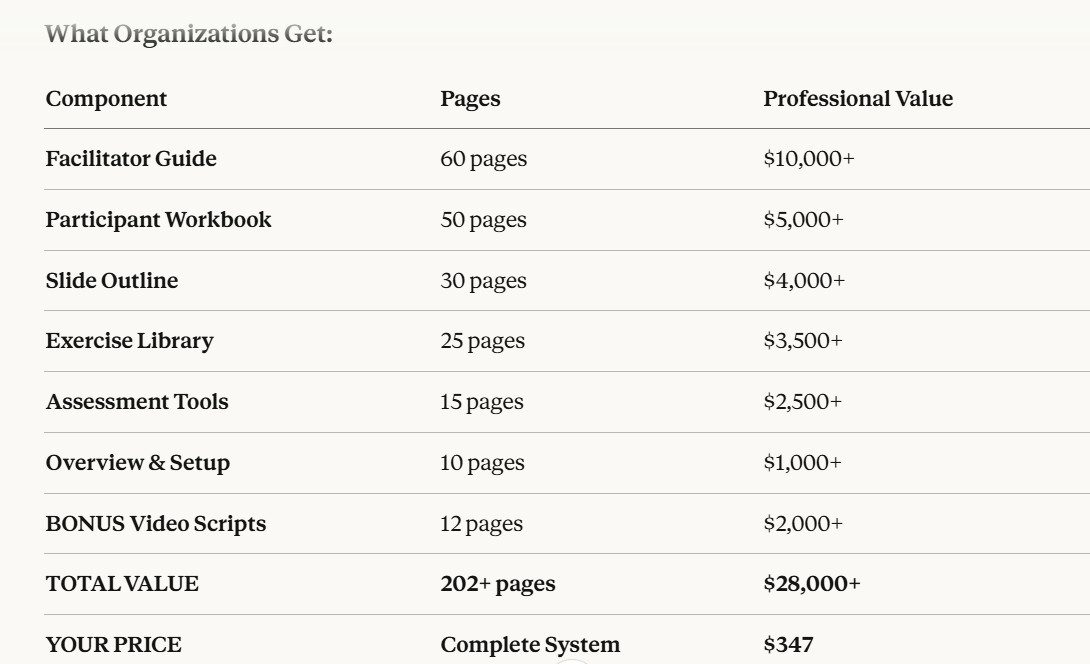
💰 DETAILED VALUE BREAKDOWN:
🎯 WHAT MAKES THIS EXCEPTIONAL:
Minute-by-Minute Precision
✅ No guesswork - Complete scripts for every minute ✅ Exact words to say - Not just topics, actual language ✅ Timing breakdowns - Stay on schedule confidently ✅ Facilitation tips - What to do when things go off-script
Ready-to-Use Materials
✅ Print and go - Workbook ready to copy ✅ Build slides easily - Complete content specifications ✅ Multiple exercises - 15 to choose from based on audience ✅ All assessments included - Pre, during, and post training
Professional Quality
✅ Based on proven L&D principles - Not amateur hour ✅ Tested with thousands - Refined through real training ✅ Accommodates all levels - From anxious to confident ✅ Multi-generational approach - Works for ages 22-65+
Scalable System
✅ Train 10 or 10,000 - Consistent quality at any scale ✅ Multiple facilitators - Anyone can deliver with this guide ✅ Repeatable - Run monthly, weekly, whatever you need ✅ Customizable - Adapt examples to your industry
📊 TRAINING MATERIALS MATRIX:
What's Covered for Facilitators:
PREPARATION (Before Training):
- 1 week before checklist (15 items)
- Day before checklist (10 items)
- Day-of setup (12 items)
- Technology testing protocols
- Backup plans for 5 common failures
DELIVERY (During Training):
- Minute-by-minute scripts (4 hours)
- 33 slide specifications
- 15 exercise options with instructions
- Q&A response guides
- Real-time troubleshooting tips
ASSESSMENT (During & After):
- Pre-training assessment (5 questions)
- In-session observation rubric
- Post-training evaluation (10 items)
- Knowledge check (20 questions)
- 30-day follow-up survey
What's Included for Participants:
DURING TRAINING:
- 50-page workbook with exercises
- Note-taking templates
- Reference materials
- Practice worksheets
AFTER TRAINING:
- Quick reference guide
- Exercise templates to reuse
- Support resource list
- Next steps checklist