
Alberta Loaded-Labour Estimating Workbook 2026: Construction Estimate Template for Canada (Excel)
Know what your crew really costs, then build a bid that covers it.
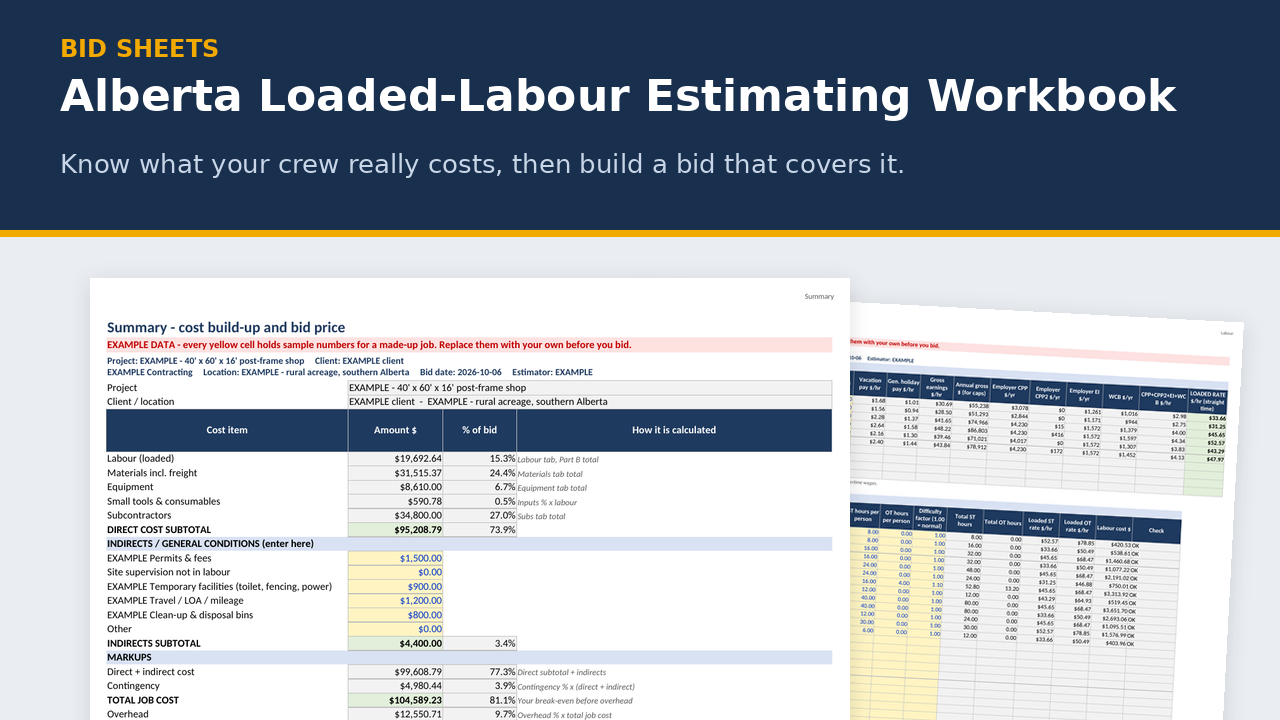
Most estimates go wrong before the first line item, because the labour rate is wrong. In this workbook's example, a $38/hr carpenter actually costs about $45.65 an hour once you add 6% vacation pay, 3.6% general holiday pay, employer CPP and CPP2, EI and WCB. And that's before overhead and profit.
This workbook works out your Alberta loaded labour rate for 2026 using the real rules: the Alberta construction vacation and holiday pay minimums, and the CRA and WCB yearly earnings caps, so the numbers don't drift on higher earners. Then it carries that rate into a full estimate: labour, materials, equipment, subs, small tools, contingency, overhead, profit, an optional bond, and a bid price rounded up to the next $100. It finishes with a clean one-page quote for your customer.
It's a construction estimate template made for Canada, not a US sheet with the payroll taxes missing. Put in your own WCB industry rate and it works as a WCB Alberta rate calculator for every worker on your crew.
What's in the zip
- EXAMPLE workbook (.xlsx), filled in for a made-up 40' x 60' post-frame shop with slab, so you can see how every tab works
- BLANK workbook (.xlsx), example inputs cleared and ready for your job
- Print preview PDF showing sample printed pages
- README quick start
- 9 tabs: Instructions · Inputs · Labour · Materials · Equipment · Subs · Summary · Client Quote · Print - Labour
Key features
- Loaded rate for each trade classification: base wage + 6% vacation + 3.6% general holiday pay, then employer CPP (5.95%, with the annual basic exemption), CPP2 (4%), EI (2.282% employer) and WCB, each capped at its 2026 yearly maximum. Benefits and allowances can be added on top. An overtime rate is worked out too.
- Labour takeoff: crew size × hours × a difficulty factor, straight time and overtime, priced at the loaded rates.
- Materials with waste % and freight, Equipment (rate × units × duration, plus mob/demob and fuel), and Subs with a scope-gap adjustment.
- Summary: small tools and consumables, contingency, overhead, profit and an optional bond, then the bid price rounded up to the nearest $100. It shows markup on cost, gross margin and net profit margin, plus a markup-vs-margin table so you stop mixing the two up.
- Checks box: flags labour lines that need fixing, a missing WCB rate, overhead set below what your numbers say you need to recover, and a price below cost.
- GST is shown on the price for information. Costs go in without GST.
- Client Quote: one clean page with no header or footer. Your costs and markups don't show. There are white boxes for scope, exclusions and terms, and room at the top right for your logo.
- Prints clean (v0.2): every tab prints on letter paper with the project, client and bid date at the top, and the print date and page X of Y at the bottom. The green Print - Labour tab gives a one-page labour sheet.
- Works with the takeoffs: the "To Estimate" and "Labour Drivers" tabs in the Bid Sheets takeoffs use the same columns as the Materials and Labour tabs, so you paste values straight in.
Who it's for
Small Alberta general contractors, framers, post-frame and shop builders, renovators and site-work outfits with 1 to 20 people. Anyone pricing jobs with their own crew who wants the labour number right.
FAQ
Does it do payroll? No. It estimates employer costs for bidding. Use your payroll software or accountant for actual pay.
What WCB rate should I use? Your own. It depends on your industry code and claims history. The workbook ships with an example rate and tells you where to look yours up on wcb.ab.ca.
Does it work outside Alberta? The payroll part follows Alberta rules (vacation and holiday pay, WCB Alberta). CPP and EI are federal. You can edit every rate, but it's set up for Alberta.
Does it read my PDF drawings? No. You measure or take off the quantities and the workbook prices them. The Bid Sheets takeoffs can feed it quantities by copy and paste.
Do I need to be good at Excel? No. Type in the yellow cells and leave the grey ones alone. Grey cells are locked so you can't break a formula by accident.
What about GST? Enter costs without GST. The workbook shows GST on the price for information. Only charge it if you're registered.
Can I put my logo on the quote? Yes. Insert it over the empty space at the top right of the Client Quote.
What happens in January? Rates change every year. You get the 2027 update free by email.
Can I get a refund? It's a digital download, so there are no refunds once it's delivered. Try the free Bid Go/No-Go Scorer first to make sure the files work on your computer, and email me if you have any trouble.
Disclaimer
An estimating aid, not payroll, accounting, tax, engineering or legal advice. Example numbers are made up for illustration. Check every rate and price before you rely on it.
About the maker
Built by a tradesperson with 35 years in fabrication and construction across Western Canada.
Compatibility (spreadsheets)
- Made for Microsoft Excel 2016 or newer, Windows or Mac. Plain .xlsx with no macros.
- LibreOffice Calc (free): every workbook recalculates with no formula errors.
- Does it work in Google Sheets? You can upload the .xlsx and open it in Google Sheets, but Sheets drops the sheet protection (so grey formula cells can be typed over) and ignores the print layouts. For printing, Excel is recommended.
- Not tested in Apple Numbers.
- Type in the yellow cells. Grey formula cells are locked (no password), so you can't break a formula by accident.
- Grab the free Bid Go/No-Go Scorer first. It's built the same way, so if it opens and works on your computer, the paid sheets will too.
Licence
One-business licence: use it across your business (all its sites and crews) on as many jobs as you like. Please don't resell, share or publish the blank templates outside your business. Completed job files and filled-in forms can go to your clients, prime contractors, auditors and regulators.
Refund policy
Because these are digital downloads, I don't offer refunds once a file has been delivered. Please check the compatibility list above before you buy, and grab the free Bid Go/No-Go Scorer to test on your computer first. If a file won't open or something isn't working, email me at support@bidsheets.ca and I'll help you sort it out.
Updates
Buyers get the 2027 update free. I'll email you the new version when it's ready. Each January I refresh the payroll rates (CPP, EI, WCB) in the estimating workbook and fab calculator, re-check the Alberta OHS and prompt-payment references in the safety and billing products, and re-check the standards references in the takeoffs.
Support
Questions? Email support@bidsheets.ca. I usually answer within 2 business days.
Founding price for the newsletter list: use code BIDFOUNDER at checkout, valid until November 20, 2026.