

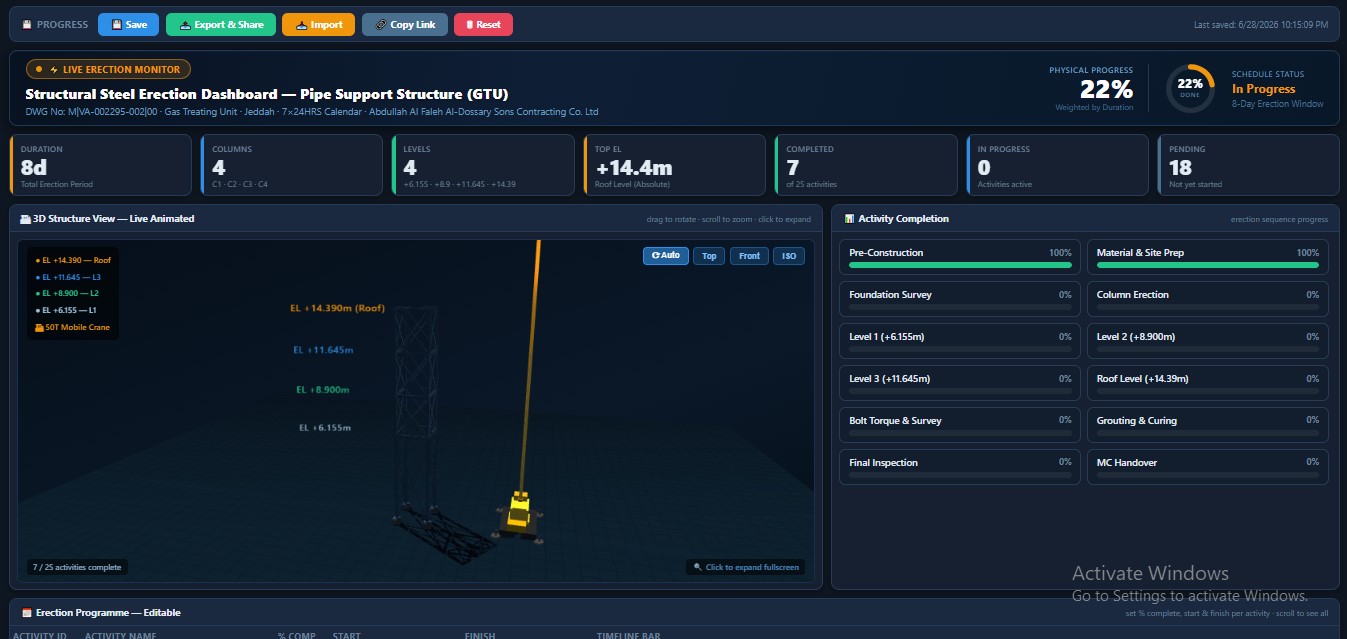
Structural Steel Erection Dashboard — Live 3D Animated Progress Tracker (HTML)
Stop presenting erection progress with a flat Gantt chart nobody trusts.
The Structural Steel Erection Dashboard is a single self-contained HTML
file that turns your erection programme into a live, watchable 3D model —
open it in any browser, no install, no internet required after download.
(Prompt Will be given once after purchase completed.)
WHAT'S INSIDE
→ Editable Erection Programme
Set % complete, start date and finish date per activity. The Gantt
timeline bar, KPIs, and 3D structure all update instantly.
→ Live 3D Structure Model
Columns, beams, and X-bracing are color-coded by progress — grey when
pending, amber when in progress, green when complete — built level by
level exactly as your structure goes up (foundation → columns → L1 →
L2 → L3 → roof).
→ Animated 50T Mobile Crane
The crane appears automatically the moment your "Mobilize Crane"
activity starts. Its boom angle and hoist cable length update in real
time as the structure rises — low boom angle at foundation level,
full extension at roof level.
→ 12-Person Animated Site Crew
Site engineer, QC inspector, HSE officer, structural supervisor,
3 steel erectors, 2 riggers, a pipe fitter, a foreman and a helper —
each with distinct hard hat colors, tools, and walking/working
animations around the structure.
→ Auto-Calculated KPIs
Physical progress % (duration-weighted), schedule status, activities
complete/in-progress/pending — calculated the same way a project
controls engineer would build it manually.
→ Save / Export / Share
Progress auto-saves in your browser. Export a shareable HTML snapshot
to send to your PM or client — they open it and see your live progress,
no software needed on their end.
WHO IT'S FOR
Planning engineers, project controls teams, and site supervisors running
structural steel, pipe rack, pipe support, or vessel skirt erection
packages who want a progress tool that's actually engaging to present in
a weekly progress meeting.
HOW TO USE IT
The activity list, durations, and elevations are fully editable in the
file's data section — swap in your own erection programme and the 3D
model adapts automatically. Comes pre-loaded with a sample 4-column,
4-level pipe support structure so you can see it working immediately.
No add-ins. No macros. No server. Just open the HTML file in Chrome,
Edge, or Firefox.
Q: Do I need to install anything?
A: No. It's a single HTML file — double-click and it opens in your browser.
Q: Can I use it for structures other than pipe supports?
A: Yes. Edit the activity list and elevation values in the data section
and the 3D model rebuilds automatically to match.
Q: Does my progress data get uploaded anywhere?
A: No. Everything runs locally in your browser — your data stays on your
machine unless you choose to export and share the file yourself.
Q: Can I share this with my client or PM?
A: Yes — use the built-in Export button to generate a snapshot HTML file
with your current progress baked in. They open it, no software needed.
Q: Does it work offline?
A: Yes, after the first load (it uses a CDN-hosted 3D library on first
open — after that, works fully offline).